> ## Documentation Index
> Fetch the complete documentation index at: https://docs.kwebby.com/llms.txt
> Use this file to discover all available pages before exploring further.
# Local delivery and local SEO
> Delivery areas and zones, the postcode check, use my location, area landing pages and the delivery map.
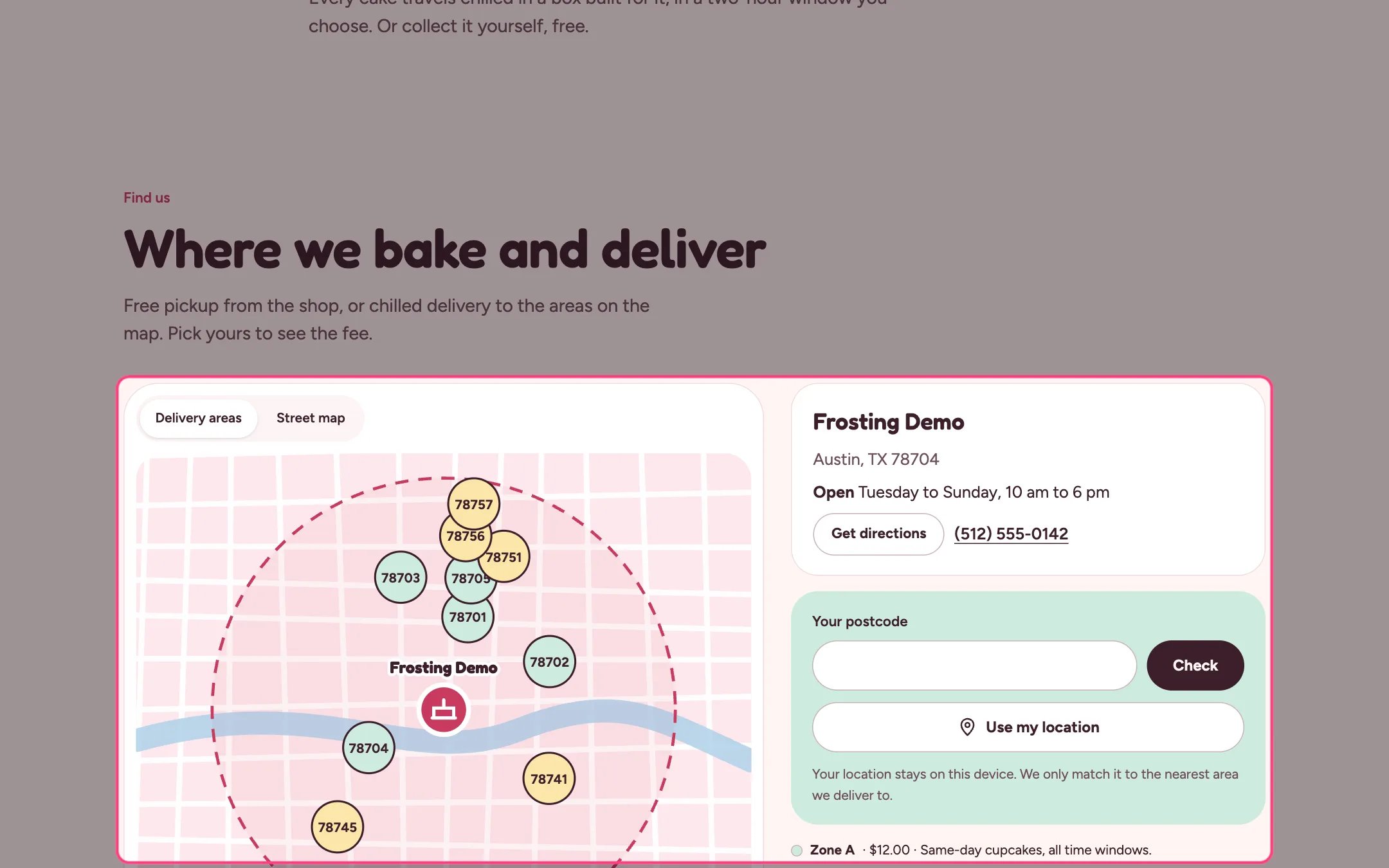
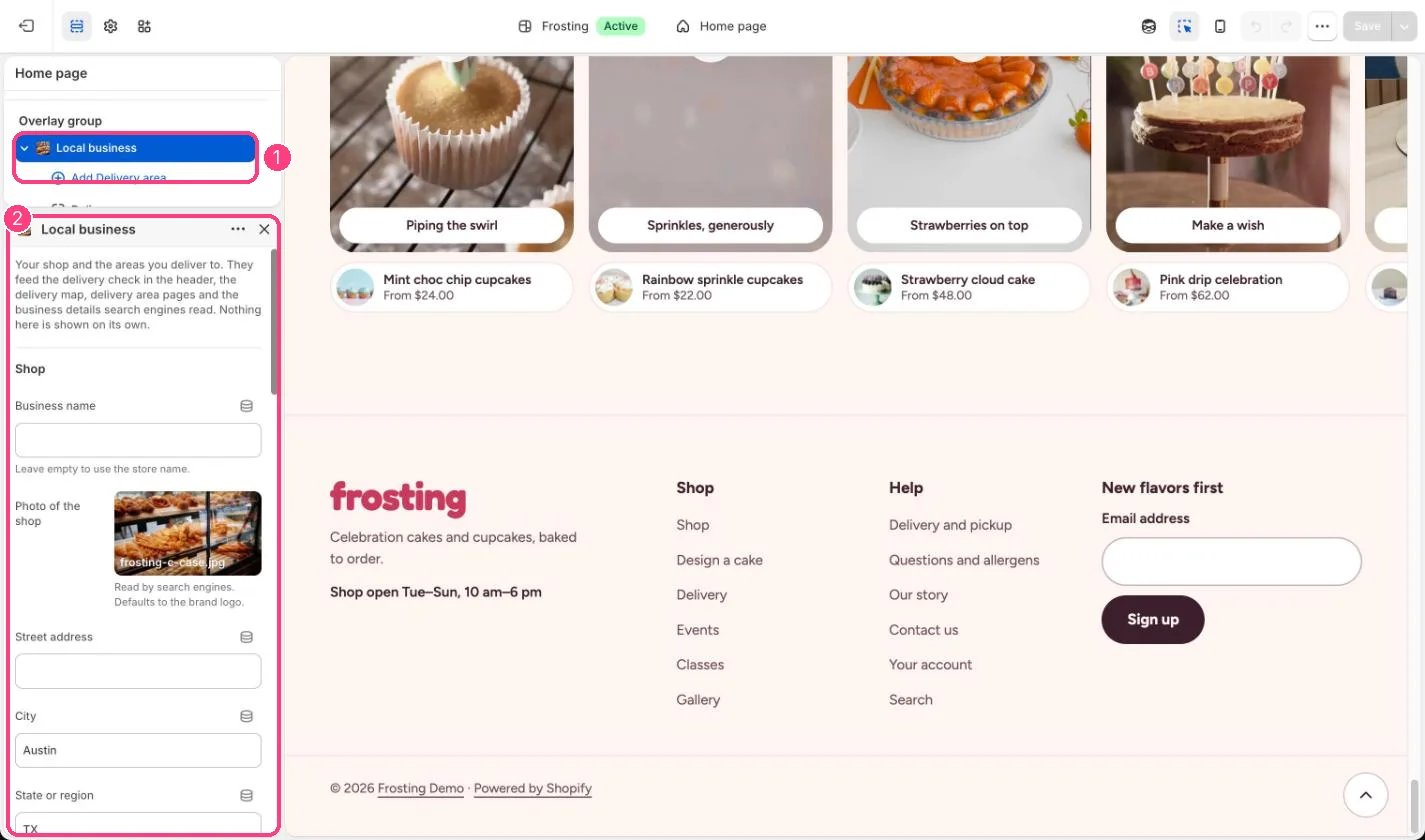 Frosting keeps everything about where you bake and deliver in one section, Local business, in the Overlay group. Fill it in once and it drives the header delivery check, the Delivery map, the Delivery zones table, area landing pages, the postcode check in the cake builder and the business details search engines read.
**1. Your shop.** In the theme editor, select Local business under Overlay group. Fill in the business name, street, city, state, postcode, country code, phone, email, opening hours and price range. Paste your shop's latitude and longitude from an online map. A photo of the shop helps search engines; without one your brand logo is used.
**2. Zones.** Name Zone A and Zone B and set their fee, whether they get same-day delivery and a short note. Zone A shows in mint and Zone B in butter on the map.
**3. Delivery areas.** Add a Delivery area block per postcode with a name (a neighborhood), its zone and the latitude and longitude of its middle. Use a prefix with \* to cover many postcodes at once, for example 787\*.
**4. The postcode check.** Shoppers type a postcode in the header, the map or the builder and see the zone, fee, free delivery threshold, same-day option and first cake delivery date. Unknown postcodes are told about free pickup. The postcode is remembered on their device. Use my location finds the nearest area on the shopper's own device, with nothing sent to an outside service, and only matches when the shopper is inside your delivery radius and close to one of your areas.
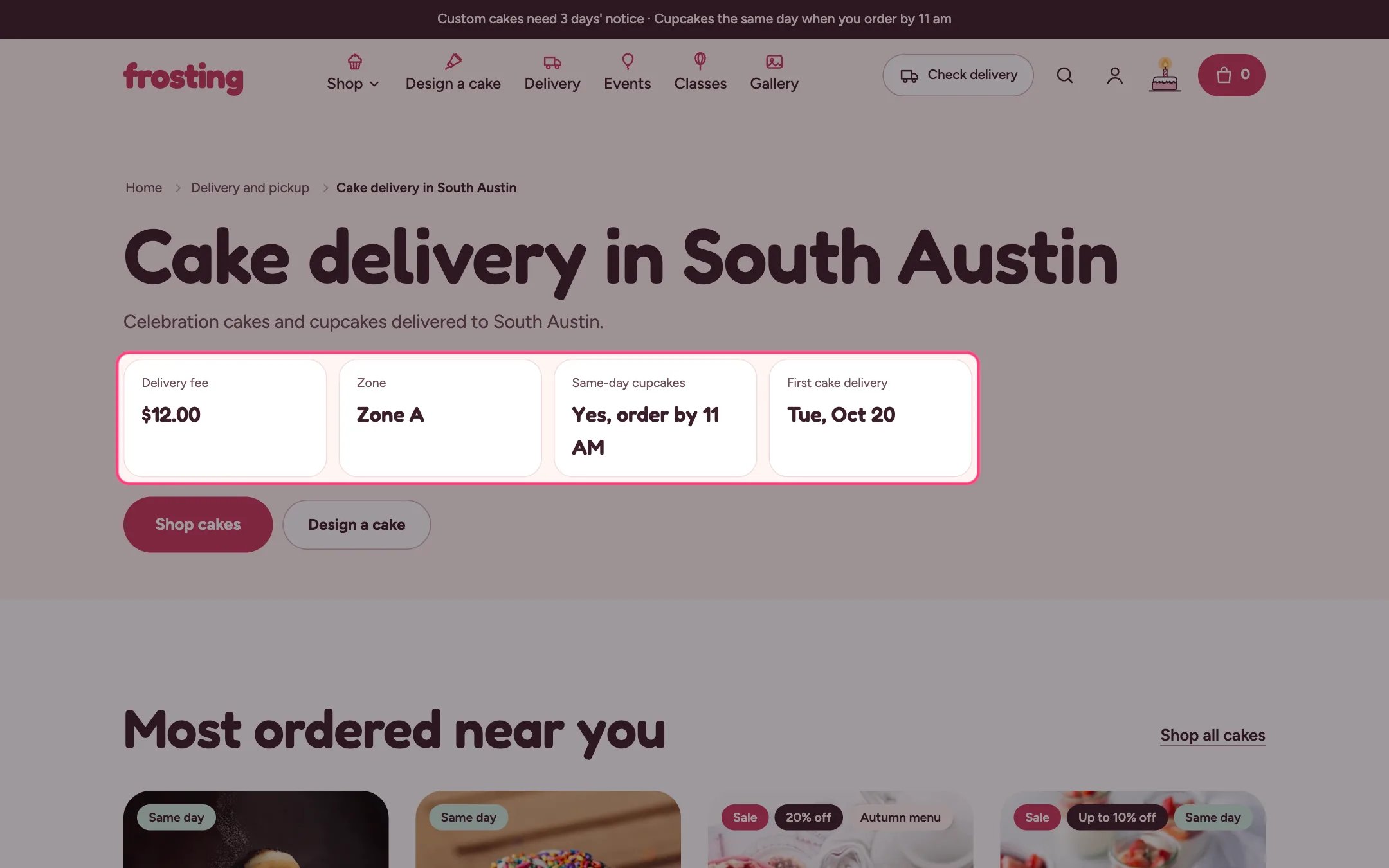
**5. Area landing pages.** Create a page per area, for example Cake delivery in South Austin, and choose the delivery-area template. Add a Pages metafield definition custom.area\_code (Single line text) and fill in the area's postcode, or link the page from its Delivery area block. Write a unique introduction for each page. The page shows the area's fee, zone, same-day option and first delivery date, the map with the area highlighted, and breadcrumbs that search engines can read.
**6. The delivery page.** Use the delivery page template for a page that shows the Delivery map, Delivery zones, Bake calendar and Steps.
**7. Search engines.** Every page includes your business details as a bakery: name, address, phone, opening hours, map position, price range and the areas you serve. Write the search engine opening hours as Tu-Su 10:00-18:00.
**Charge the right fees.** The fees in Local business are shown to shoppers only. Set your real local delivery zones and rates in Settings, Shipping and delivery, so checkout charges what the store promises.
**The street map.** The Delivery map's Street map tab loads Google Maps only when a shopper asks, because Google may set cookies.
This documentation is built and hosted on [Mintlify](https://mintlify.com), a developer documentation platform.
Frosting keeps everything about where you bake and deliver in one section, Local business, in the Overlay group. Fill it in once and it drives the header delivery check, the Delivery map, the Delivery zones table, area landing pages, the postcode check in the cake builder and the business details search engines read.
**1. Your shop.** In the theme editor, select Local business under Overlay group. Fill in the business name, street, city, state, postcode, country code, phone, email, opening hours and price range. Paste your shop's latitude and longitude from an online map. A photo of the shop helps search engines; without one your brand logo is used.
**2. Zones.** Name Zone A and Zone B and set their fee, whether they get same-day delivery and a short note. Zone A shows in mint and Zone B in butter on the map.
**3. Delivery areas.** Add a Delivery area block per postcode with a name (a neighborhood), its zone and the latitude and longitude of its middle. Use a prefix with \* to cover many postcodes at once, for example 787\*.
**4. The postcode check.** Shoppers type a postcode in the header, the map or the builder and see the zone, fee, free delivery threshold, same-day option and first cake delivery date. Unknown postcodes are told about free pickup. The postcode is remembered on their device. Use my location finds the nearest area on the shopper's own device, with nothing sent to an outside service, and only matches when the shopper is inside your delivery radius and close to one of your areas.
**5. Area landing pages.** Create a page per area, for example Cake delivery in South Austin, and choose the delivery-area template. Add a Pages metafield definition custom.area\_code (Single line text) and fill in the area's postcode, or link the page from its Delivery area block. Write a unique introduction for each page. The page shows the area's fee, zone, same-day option and first delivery date, the map with the area highlighted, and breadcrumbs that search engines can read.
**6. The delivery page.** Use the delivery page template for a page that shows the Delivery map, Delivery zones, Bake calendar and Steps.
**7. Search engines.** Every page includes your business details as a bakery: name, address, phone, opening hours, map position, price range and the areas you serve. Write the search engine opening hours as Tu-Su 10:00-18:00.
**Charge the right fees.** The fees in Local business are shown to shoppers only. Set your real local delivery zones and rates in Settings, Shipping and delivery, so checkout charges what the store promises.
**The street map.** The Delivery map's Street map tab loads Google Maps only when a shopper asks, because Google may set cookies.
This documentation is built and hosted on [Mintlify](https://mintlify.com), a developer documentation platform.