> ## Documentation Index
> Fetch the complete documentation index at: https://docs.kwebby.com/llms.txt
> Use this file to discover all available pages before exploring further.
# Account hub
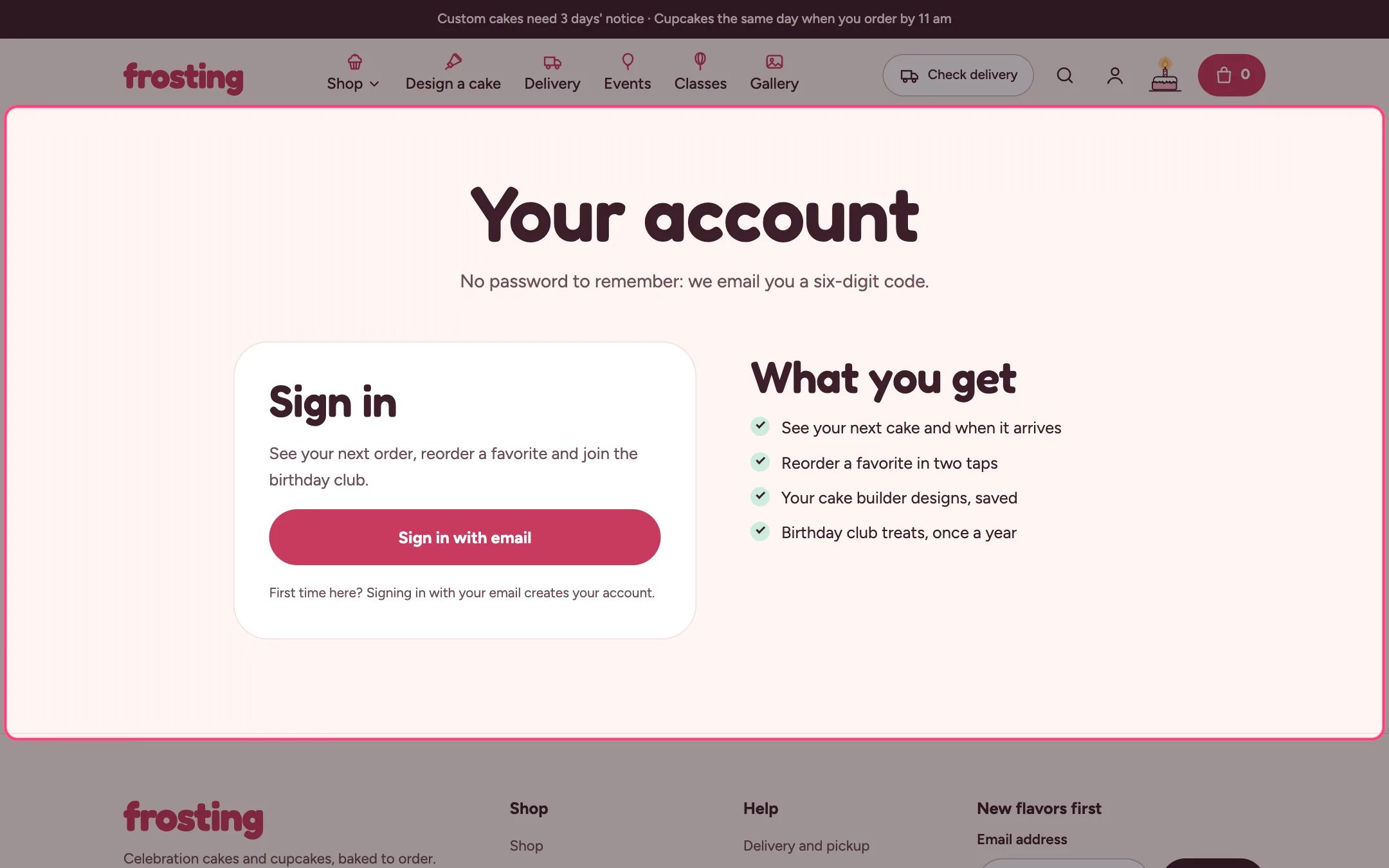
> A friendly account page that greets signed-in customers with their next cake, recent orders with reorder, saved designs and the birthday club, and links to Shopify's secure account pages.
 ## Where to find it
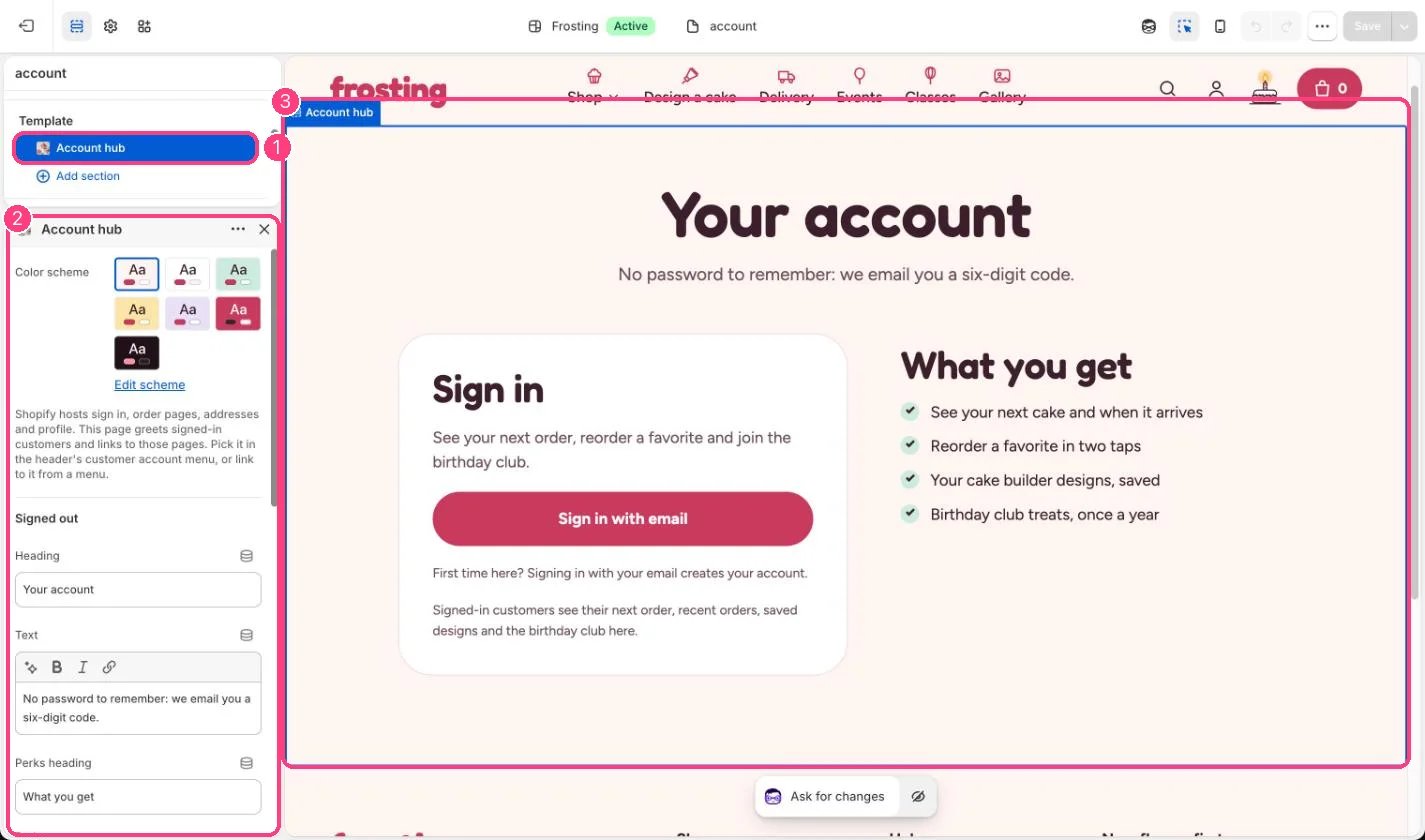
The page that uses the account template. In the theme editor choose Pages, then account, and select Account hub. Preview it signed out; the signed-in view needs a real customer.
## How it works
* Signed out, it shows your heading, a sign-in button to Shopify's account sign-in and a list of perks.
* Signed in, it shows Coming up: the next order with its delivery or pickup date, time window and a four-step tracker that follows the order's payment and fulfillment status.
* Recent orders (1 to 10) each have View and Reorder; reorder adds the available items back to the cart.
* Saved designs from the cake builder on this device open in the builder with the design loaded.
* The birthday club form saves the month as a customer tag.
* Addresses and profile are summarized here and edited on Shopify's account pages.
## Where to find it
The page that uses the account template. In the theme editor choose Pages, then account, and select Account hub. Preview it signed out; the signed-in view needs a real customer.
## How it works
* Signed out, it shows your heading, a sign-in button to Shopify's account sign-in and a list of perks.
* Signed in, it shows Coming up: the next order with its delivery or pickup date, time window and a four-step tracker that follows the order's payment and fulfillment status.
* Recent orders (1 to 10) each have View and Reorder; reorder adds the available items back to the cart.
* Saved designs from the cake builder on this device open in the builder with the design loaded.
* The birthday club form saves the month as a customer tag.
* Addresses and profile are summarized here and edited on Shopify's account pages.
 ## Edit it
* Create a page such as Your account and choose the account template.
* Set Cake builder product so saved designs open in the builder.
* Set Link for order changes, for example your contact page.
* Write the perks one per line.
* Link the page from the header's Customer account menu and the Account hub page setting.
## Settings
| Setting | What it does |
| - | - |
| **Color scheme** | Color scheme for this area (edit the schemes in Theme settings → Colors). Default: Scheme 1. |
Shopify hosts sign in, order pages, addresses and profile. This page greets signed-in customers and links to those pages. Pick it in the header's customer account menu, or link to it from a menu.
**Signed out**
| Setting | What it does |
| - | - |
| **Heading** | Text. Default: Your account. |
| **Text** | Formatted text (one line). |
| **Perks heading** | Text. Default: What you get. |
| **Perks** | Text (several lines). One per line. Default: See your next cake and when it arrives Reorder a favorite in two taps Your cake builder designs, saved Birthday club treats, once a year. |
**Signed in**
| Setting | What it does |
| - | - |
| **Cake builder product** | Choose a product. Saved designs open this product with the design loaded. |
| **Recent orders to show** | Slider from 1 to 10. Default: 5. |
| **Link for order changes** | Link: a page, product, collection or web address. Shown on upcoming orders, for example your contact page. |
| **Show birthday club** | On or off. Adds the tags birthday-club and birthday-month, for example birthday-march, to the customer. Default: on. |
| **Birthday club text** | Formatted text (one line). |
This documentation is built and hosted on [Mintlify](https://mintlify.com), a developer documentation platform.
## Edit it
* Create a page such as Your account and choose the account template.
* Set Cake builder product so saved designs open in the builder.
* Set Link for order changes, for example your contact page.
* Write the perks one per line.
* Link the page from the header's Customer account menu and the Account hub page setting.
## Settings
| Setting | What it does |
| - | - |
| **Color scheme** | Color scheme for this area (edit the schemes in Theme settings → Colors). Default: Scheme 1. |
Shopify hosts sign in, order pages, addresses and profile. This page greets signed-in customers and links to those pages. Pick it in the header's customer account menu, or link to it from a menu.
**Signed out**
| Setting | What it does |
| - | - |
| **Heading** | Text. Default: Your account. |
| **Text** | Formatted text (one line). |
| **Perks heading** | Text. Default: What you get. |
| **Perks** | Text (several lines). One per line. Default: See your next cake and when it arrives Reorder a favorite in two taps Your cake builder designs, saved Birthday club treats, once a year. |
**Signed in**
| Setting | What it does |
| - | - |
| **Cake builder product** | Choose a product. Saved designs open this product with the design loaded. |
| **Recent orders to show** | Slider from 1 to 10. Default: 5. |
| **Link for order changes** | Link: a page, product, collection or web address. Shown on upcoming orders, for example your contact page. |
| **Show birthday club** | On or off. Adds the tags birthday-club and birthday-month, for example birthday-march, to the customer. Default: on. |
| **Birthday club text** | Formatted text (one line). |
This documentation is built and hosted on [Mintlify](https://mintlify.com), a developer documentation platform.