> ## Documentation Index
> Fetch the complete documentation index at: https://docs.kwebby.com/llms.txt
> Use this file to discover all available pages before exploring further.
# Collection
> The collection page: banner, filters and sorting, a ready-by date filter, product cards and up to three promo tiles in the grid.
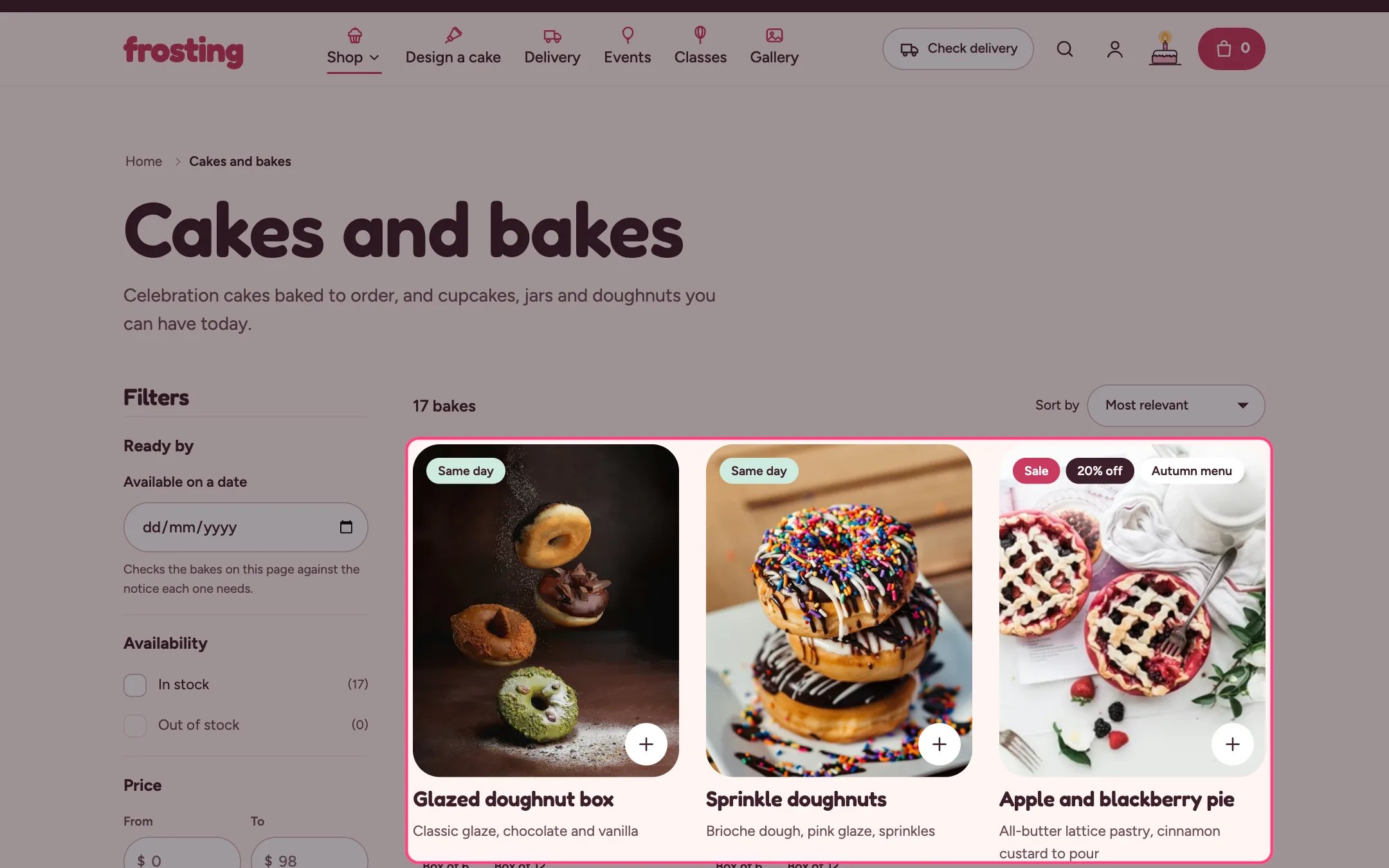 ## Where to find it
Every collection page. In the theme editor choose Collections, then Default collection, and select Collection.
## How it works
* Filters and sorting update the grid in place and keep the address in sync. On phones the filters open in a slide-in panel.
* The ready-by date filter hides products on the current page whose notice cannot make the chosen date. Links from the hero's date check apply it automatically.
* Promo tiles sit at a chosen position in the grid on the first page only, and show in your store only once they have a link.
* Empty results offer a way out: clear the filters, or a button to the cake builder.
## Where to find it
Every collection page. In the theme editor choose Collections, then Default collection, and select Collection.
## How it works
* Filters and sorting update the grid in place and keep the address in sync. On phones the filters open in a slide-in panel.
* The ready-by date filter hides products on the current page whose notice cannot make the chosen date. Links from the hero's date check apply it automatically.
* Promo tiles sit at a chosen position in the grid on the first page only, and show in your store only once they have a link.
* Empty results offer a way out: clear the filters, or a button to the cake builder.
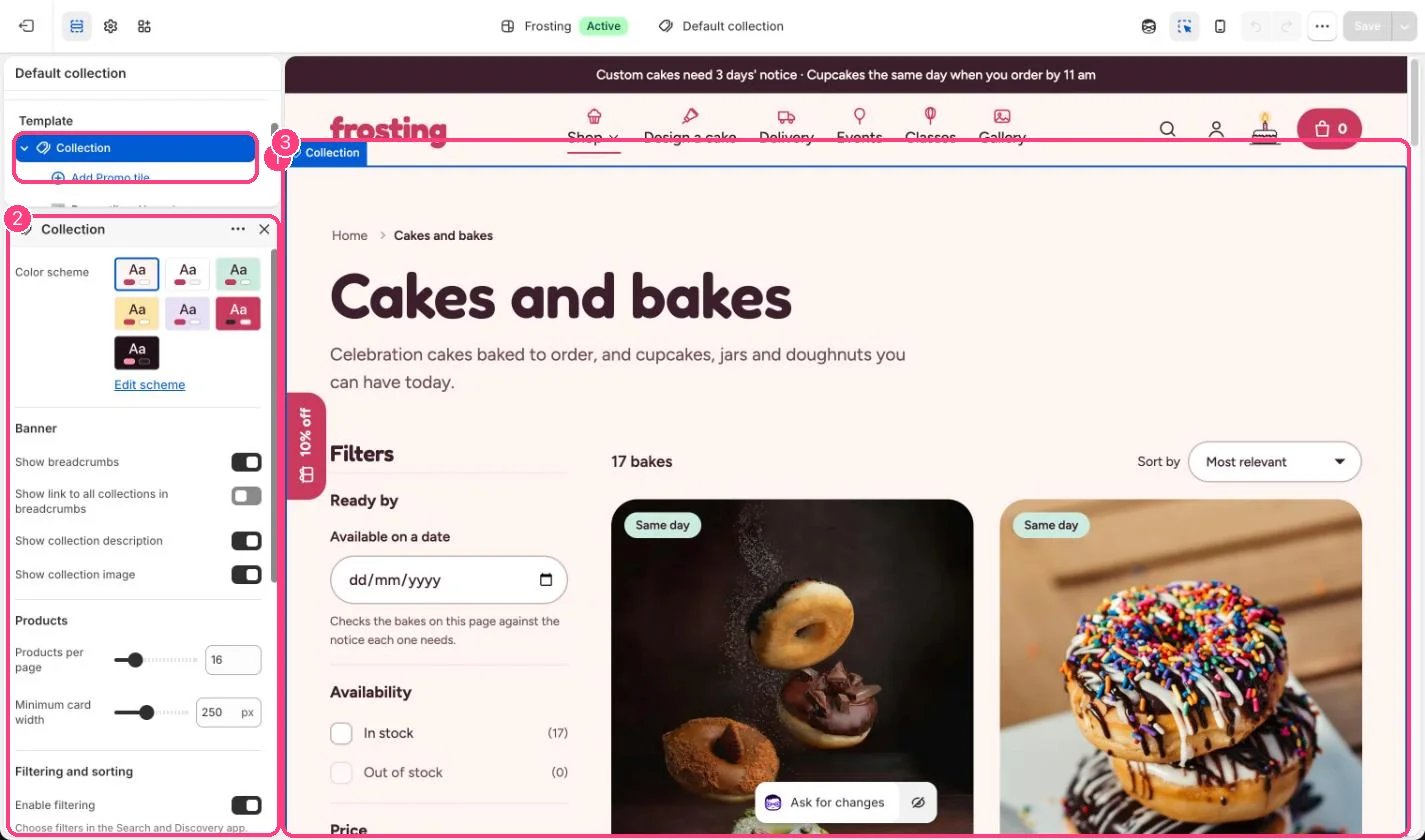 ## Edit it
* Choose which filters show in the Search and Discovery app.
* Set Products per page (8 to 48) and Minimum card width (200 to 320 px).
* Add up to 3 Promo tile blocks, set Position in the grid (1 to 24) and a link.
* Set the Cake builder link so shoppers who find nothing can design their own.
## Settings
| Setting | What it does |
| - | - |
| **Color scheme** | Color scheme for this area (edit the schemes in Theme settings → Colors). Default: Scheme 1. |
**Banner**
| Setting | What it does |
| - | - |
| **Show breadcrumbs** | On or off. Default: on. |
| **Show link to all collections in breadcrumbs** | On or off. Default: off. |
| **Show collection description** | On or off. Default: on. |
| **Show collection image** | On or off. Default: on. |
**Products**
| Setting | What it does |
| - | - |
| **Products per page** | Slider from 8 to 48, in steps of 4. Default: 16. |
| **Minimum card width** | Slider from 200 to 320 px, in steps of 10. Default: 250 px. |
**Filtering and sorting**
| Setting | What it does |
| - | - |
| **Enable filtering** | On or off. Choose filters in the Search and Discovery app. Default: on. |
| **Enable sorting** | On or off. Default: on. |
| **Show the ready by a date filter** | On or off. Hides products on the current page whose notice cannot make the chosen date. Uses each product's custom.lead\_days metafield or the delivery settings. Default: on. |
**No results**
| Setting | What it does |
| - | - |
| **Cake builder link** | Link: a page, product, collection or web address. |
| **Cake builder button label** | Text. Default: Design a cake. |
## Blocks
Add a block with **Add block** under the section in the sidebar; drag blocks to reorder them.
### Promo tile (up to 3)
| Setting | What it does |
| - | - |
| **Position in the grid** | Slider from 1 to 24. Shown on the first page only. Default: 5. |
| **Eyebrow** | Text. Default: Design a cake. |
| **Heading** | Text. Default: Your shape, your colors, your toppings. |
| **Text** | Text. |
| **Button label** | Text. Default: Start designing. |
| **Link** | Link: a page, product, collection or web address. The tile only shows in your store once it has a link. |
| **Image** | Image: upload one or choose from Content → Files. |
| **Color scheme** | Color scheme for this area (edit the schemes in Theme settings → Colors). Default: Scheme 4. |
The ready-by filter works on the products of the page being viewed, not on the whole collection at once.
This documentation is built and hosted on [Mintlify](https://mintlify.com), a developer documentation platform.
## Edit it
* Choose which filters show in the Search and Discovery app.
* Set Products per page (8 to 48) and Minimum card width (200 to 320 px).
* Add up to 3 Promo tile blocks, set Position in the grid (1 to 24) and a link.
* Set the Cake builder link so shoppers who find nothing can design their own.
## Settings
| Setting | What it does |
| - | - |
| **Color scheme** | Color scheme for this area (edit the schemes in Theme settings → Colors). Default: Scheme 1. |
**Banner**
| Setting | What it does |
| - | - |
| **Show breadcrumbs** | On or off. Default: on. |
| **Show link to all collections in breadcrumbs** | On or off. Default: off. |
| **Show collection description** | On or off. Default: on. |
| **Show collection image** | On or off. Default: on. |
**Products**
| Setting | What it does |
| - | - |
| **Products per page** | Slider from 8 to 48, in steps of 4. Default: 16. |
| **Minimum card width** | Slider from 200 to 320 px, in steps of 10. Default: 250 px. |
**Filtering and sorting**
| Setting | What it does |
| - | - |
| **Enable filtering** | On or off. Choose filters in the Search and Discovery app. Default: on. |
| **Enable sorting** | On or off. Default: on. |
| **Show the ready by a date filter** | On or off. Hides products on the current page whose notice cannot make the chosen date. Uses each product's custom.lead\_days metafield or the delivery settings. Default: on. |
**No results**
| Setting | What it does |
| - | - |
| **Cake builder link** | Link: a page, product, collection or web address. |
| **Cake builder button label** | Text. Default: Design a cake. |
## Blocks
Add a block with **Add block** under the section in the sidebar; drag blocks to reorder them.
### Promo tile (up to 3)
| Setting | What it does |
| - | - |
| **Position in the grid** | Slider from 1 to 24. Shown on the first page only. Default: 5. |
| **Eyebrow** | Text. Default: Design a cake. |
| **Heading** | Text. Default: Your shape, your colors, your toppings. |
| **Text** | Text. |
| **Button label** | Text. Default: Start designing. |
| **Link** | Link: a page, product, collection or web address. The tile only shows in your store once it has a link. |
| **Image** | Image: upload one or choose from Content → Files. |
| **Color scheme** | Color scheme for this area (edit the schemes in Theme settings → Colors). Default: Scheme 4. |
The ready-by filter works on the products of the page being viewed, not on the whole collection at once.
This documentation is built and hosted on [Mintlify](https://mintlify.com), a developer documentation platform.