> ## Documentation Index
> Fetch the complete documentation index at: https://docs.kwebby.com/llms.txt
> Use this file to discover all available pages before exploring further.
# Contact form
> A contact or quote form whose fields you build yourself, with checks next to each field and a thank-you message.
 ## Where to find it
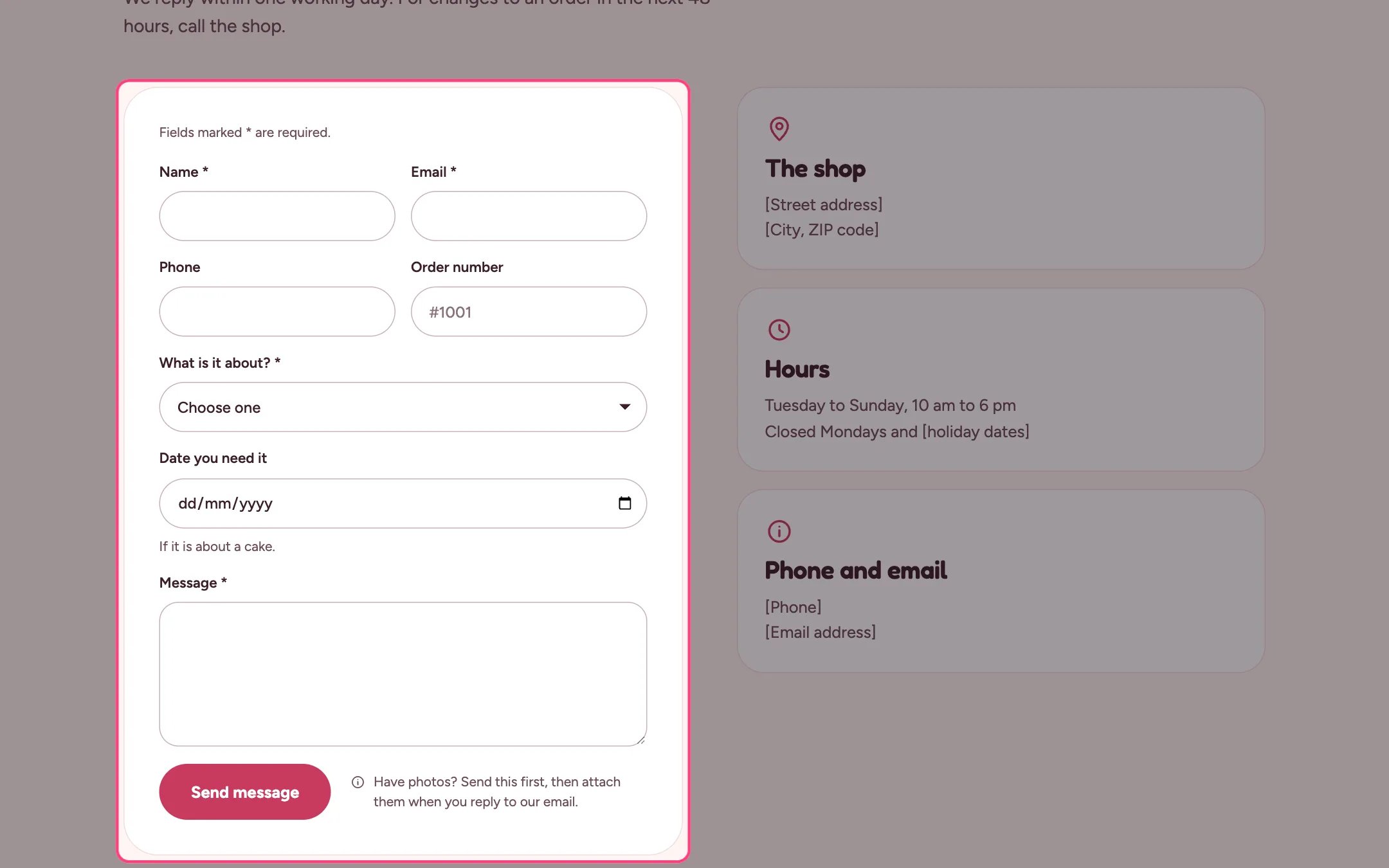
The contact page and the events page (as a quote form). In the theme editor choose Pages, then contact, and select Contact form. Can be added to any page.
## How it works
* Field types: text, email, phone, number, date, paragraph, dropdown and checkbox. Up to 30 blocks in all.
* Fields are checked in the browser before sending; errors show next to the field.
* Date fields can refuse past dates with Only allow today or later.
* Text blocks add notes inside the form or in the side column, with an optional icon.
* Messages go to the sender email in Settings, Notifications. If no Email field exists, the form adds one.
## Where to find it
The contact page and the events page (as a quote form). In the theme editor choose Pages, then contact, and select Contact form. Can be added to any page.
## How it works
* Field types: text, email, phone, number, date, paragraph, dropdown and checkbox. Up to 30 blocks in all.
* Fields are checked in the browser before sending; errors show next to the field.
* Date fields can refuse past dates with Only allow today or later.
* Text blocks add notes inside the form or in the side column, with an optional icon.
* Messages go to the sender email in Settings, Notifications. If no Email field exists, the form adds one.
 ## Edit it
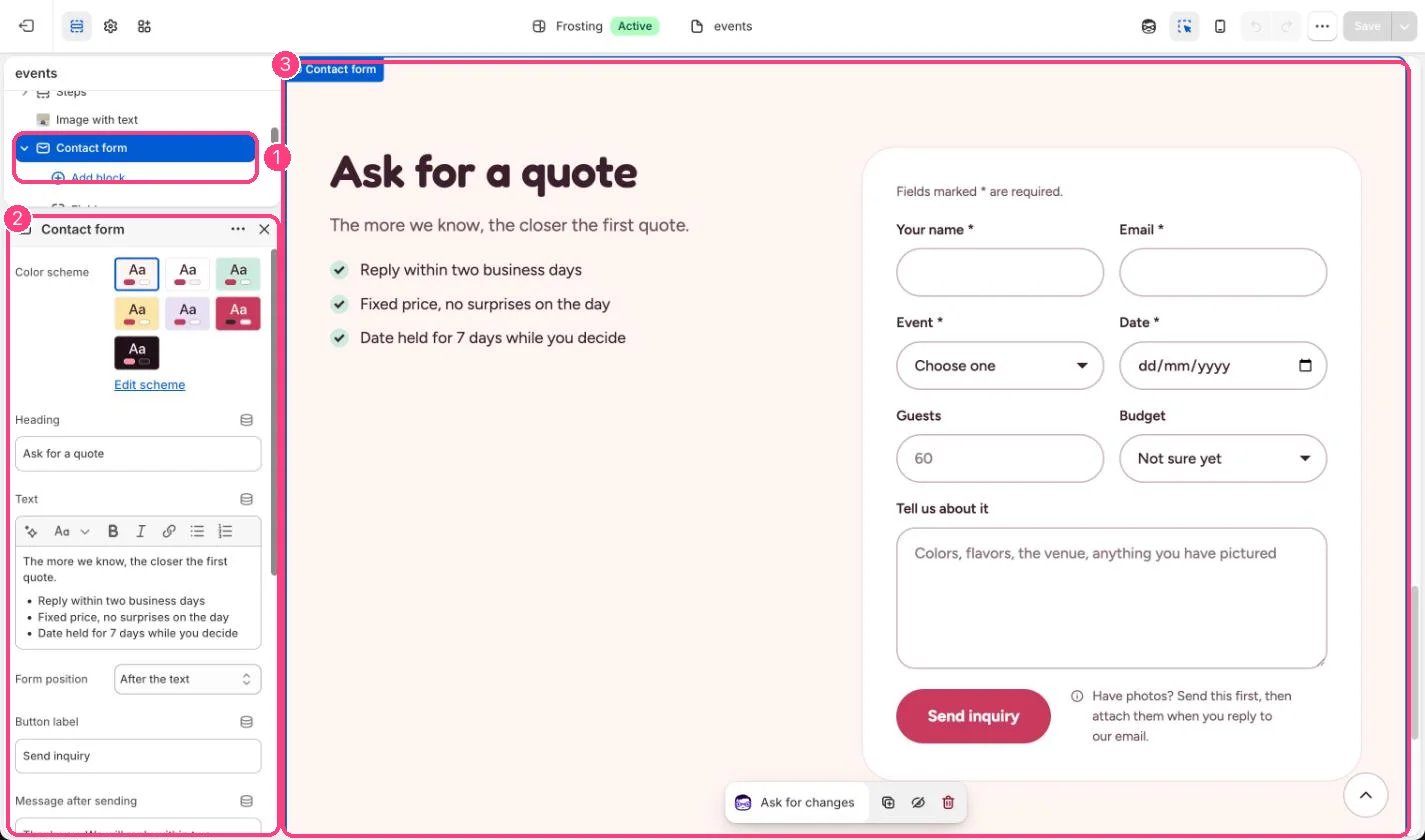
* Add Field blocks and set the Label; the label also names the answer in the email you receive.
* For a dropdown, type one option per line.
* Set an Anchor such as quote, then link a button to #quote.
* Choose Form position to put the form before or after the text.
* Keep Show photo note on so shoppers know to attach photos when they reply.
## Settings
| Setting | What it does |
| - | - |
| **Color scheme** | Color scheme for this area (edit the schemes in Theme settings → Colors). Default: Scheme 1. |
| **Heading** | Text. Default: Ask us anything. |
| **Text** | Formatted text. |
| **Form position** | Options: After the text, Before the text. Default: After the text. |
| **Button label** | Text. Default: Send message. |
| **Message after sending** | Text. Default: Thank you. We will reply within one business day. |
| **Show photo note** | On or off. Contact forms cannot take files, so the note asks shoppers to attach photos when they reply to your email. Default: on. |
| **Anchor** | Text. Lets a button link straight to this form. For example, enter quote and link a button to #quote. |
| **Remove top spacing** | On or off. Use when the form follows a page introduction. Default: off. |
Messages go to the sender email in Settings > Notifications. Add one Email field so you can reply. If there is none, the form adds one.
## Blocks
Up to 30 blocks. Add a block with **Add block** under the section in the sidebar; drag blocks to reorder them.
### Field
| Setting | What it does |
| - | - |
| **Label** | Text. Also names the answer in the email you receive. Default: Name. |
| **Type** | Options: Short text, Email, Phone, Number, Date, Paragraph, Dropdown, Checkbox. Default: Short text. |
| **Dropdown options** | Text (several lines). One option per line. |
| **Only allow today or later** | On or off. Default: on. |
| **Required** | On or off. Default: off. |
| **Help text** | Text. |
| **Placeholder** | Text. |
| **Full width** | On or off. Default: off. |
### Text
| Setting | What it does |
| - | - |
| **Placement** | Options: In the form, Beside the form, as a card. Default: In the form. |
| **Icon** | Options: None, Map pin, Clock, Calendar, Information, Delivery truck, Shop front, Gift, Cake. Default: None. |
| **Heading** | Text. Default: Good to know. |
| **Text** | Formatted text. |
Shopify contact forms cannot take file uploads.
This documentation is built and hosted on [Mintlify](https://mintlify.com), a developer documentation platform.
## Edit it
* Add Field blocks and set the Label; the label also names the answer in the email you receive.
* For a dropdown, type one option per line.
* Set an Anchor such as quote, then link a button to #quote.
* Choose Form position to put the form before or after the text.
* Keep Show photo note on so shoppers know to attach photos when they reply.
## Settings
| Setting | What it does |
| - | - |
| **Color scheme** | Color scheme for this area (edit the schemes in Theme settings → Colors). Default: Scheme 1. |
| **Heading** | Text. Default: Ask us anything. |
| **Text** | Formatted text. |
| **Form position** | Options: After the text, Before the text. Default: After the text. |
| **Button label** | Text. Default: Send message. |
| **Message after sending** | Text. Default: Thank you. We will reply within one business day. |
| **Show photo note** | On or off. Contact forms cannot take files, so the note asks shoppers to attach photos when they reply to your email. Default: on. |
| **Anchor** | Text. Lets a button link straight to this form. For example, enter quote and link a button to #quote. |
| **Remove top spacing** | On or off. Use when the form follows a page introduction. Default: off. |
Messages go to the sender email in Settings > Notifications. Add one Email field so you can reply. If there is none, the form adds one.
## Blocks
Up to 30 blocks. Add a block with **Add block** under the section in the sidebar; drag blocks to reorder them.
### Field
| Setting | What it does |
| - | - |
| **Label** | Text. Also names the answer in the email you receive. Default: Name. |
| **Type** | Options: Short text, Email, Phone, Number, Date, Paragraph, Dropdown, Checkbox. Default: Short text. |
| **Dropdown options** | Text (several lines). One option per line. |
| **Only allow today or later** | On or off. Default: on. |
| **Required** | On or off. Default: off. |
| **Help text** | Text. |
| **Placeholder** | Text. |
| **Full width** | On or off. Default: off. |
### Text
| Setting | What it does |
| - | - |
| **Placement** | Options: In the form, Beside the form, as a card. Default: In the form. |
| **Icon** | Options: None, Map pin, Clock, Calendar, Information, Delivery truck, Shop front, Gift, Cake. Default: None. |
| **Heading** | Text. Default: Good to know. |
| **Text** | Formatted text. |
Shopify contact forms cannot take file uploads.
This documentation is built and hosted on [Mintlify](https://mintlify.com), a developer documentation platform.