> ## Documentation Index
> Fetch the complete documentation index at: https://docs.kwebby.com/llms.txt
> Use this file to discover all available pages before exploring further.
# Delivery area
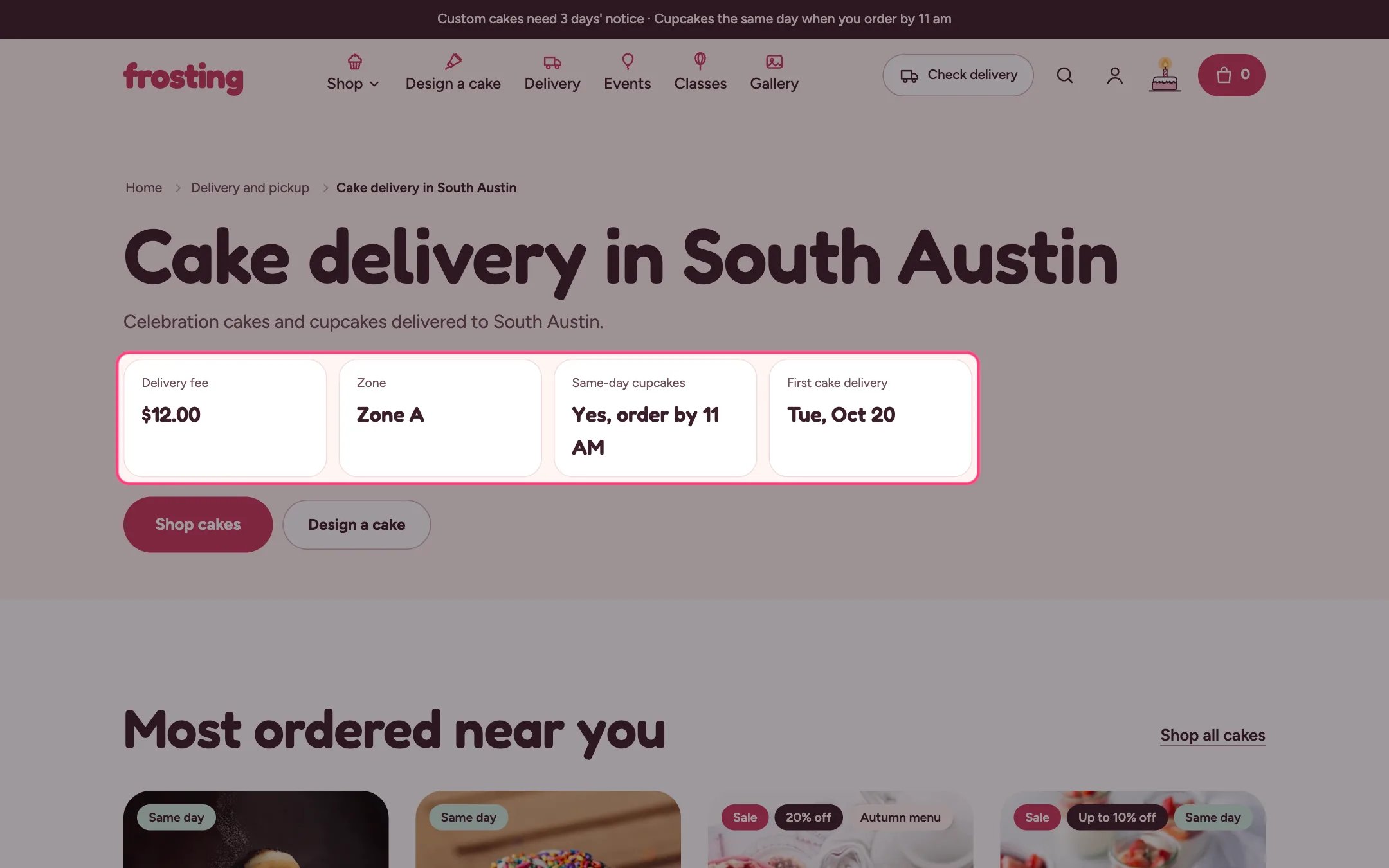
> A landing page for one neighborhood you deliver to, with its fee, zone, same-day option and first delivery date, built to help you show up in local search.
 ## Where to find it
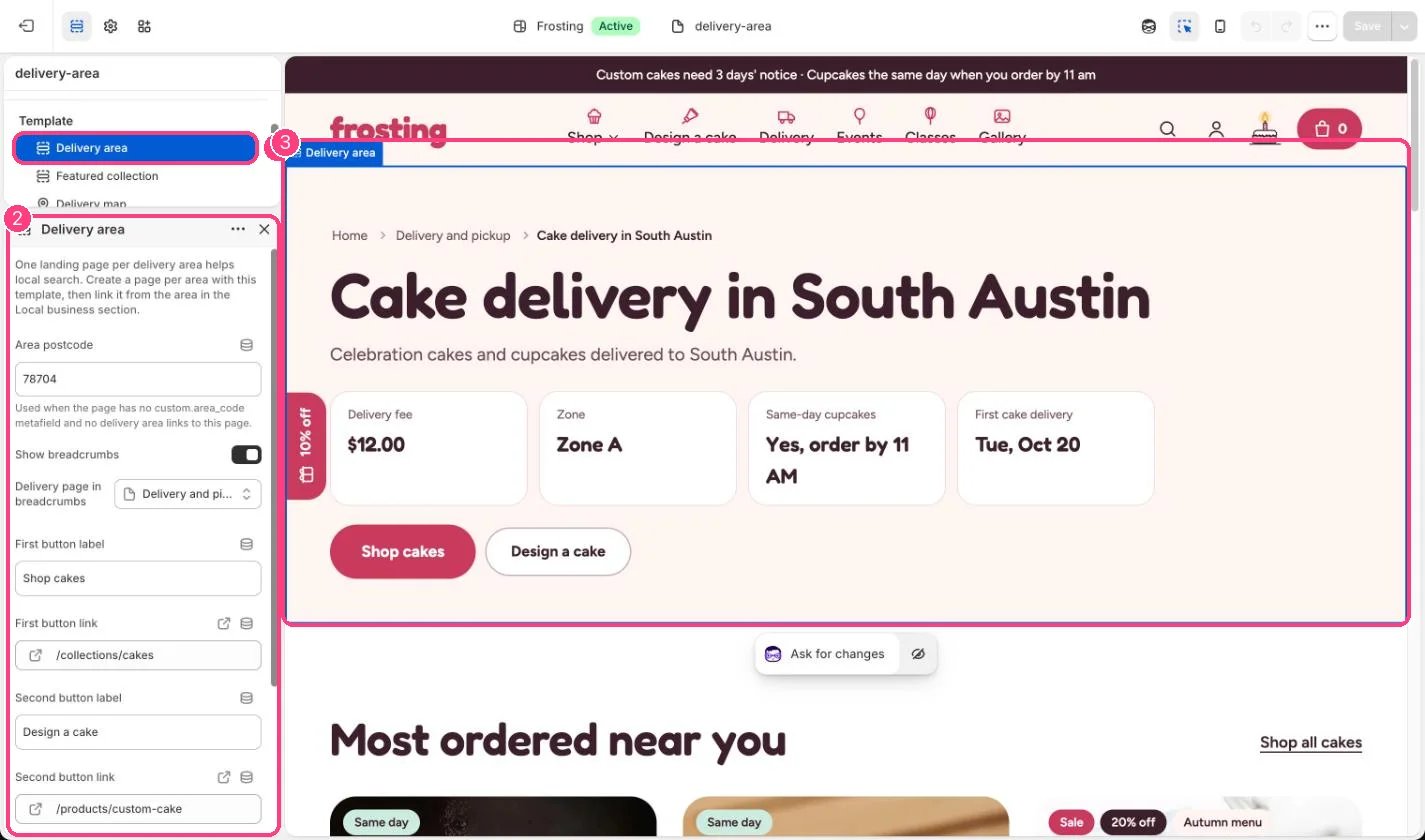
Pages that use the delivery-area template. In the theme editor choose Pages, then delivery-area, and select Delivery area.
## How it works
* The page title is the main heading and the page content is the introduction. With no content, a short line about delivery to that postcode and its distance from your kitchen is written for you.
* The area comes from the page metafield custom.area\_code, else the delivery area whose landing page is this page, else the Area postcode setting.
* Facts (delivery fee, zone, same-day cupcakes and first cake delivery) come from the Local business section.
* Breadcrumbs can include your delivery page, and the same trail is written for search engines.
* The default template also shows products, the delivery map with this area highlighted, and questions.
## Where to find it
Pages that use the delivery-area template. In the theme editor choose Pages, then delivery-area, and select Delivery area.
## How it works
* The page title is the main heading and the page content is the introduction. With no content, a short line about delivery to that postcode and its distance from your kitchen is written for you.
* The area comes from the page metafield custom.area\_code, else the delivery area whose landing page is this page, else the Area postcode setting.
* Facts (delivery fee, zone, same-day cupcakes and first cake delivery) come from the Local business section.
* Breadcrumbs can include your delivery page, and the same trail is written for search engines.
* The default template also shows products, the delivery map with this area highlighted, and questions.
 ## Edit it
* Create one page per area in Online Store, Pages, and choose the delivery-area template.
* Give each page a custom.area\_code metafield with its postcode, or link the page from its Delivery area block in Local business.
* Write a unique introduction for each page.
* Choose your delivery page under Delivery page in breadcrumbs.
## Settings
One landing page per delivery area helps local search. Create a page per area with this template, then link it from the area in the Local business section.
| Setting | What it does |
| - | - |
| **Area postcode** | Text. Used when the page has no custom.area\_code metafield and no delivery area links to this page. Default: 78704. |
| **Show breadcrumbs** | On or off. Default: on. |
| **Delivery page in breadcrumbs** | Choose a page. |
| **First button label** | Text. Default: Shop cakes. |
| **First button link** | Link: a page, product, collection or web address. Default: /collections/all. |
| **Second button label** | Text. Default: Design a cake. |
| **Second button link** | Link: a page, product, collection or web address. |
| **Color scheme** | Color scheme for this area (edit the schemes in Theme settings → Colors). Default: Scheme 1. |
All area pages share one template, so the Area postcode setting is the same for every page. Use the metafield or the landing page link to tell pages apart.
This documentation is built and hosted on [Mintlify](https://mintlify.com), a developer documentation platform.
## Edit it
* Create one page per area in Online Store, Pages, and choose the delivery-area template.
* Give each page a custom.area\_code metafield with its postcode, or link the page from its Delivery area block in Local business.
* Write a unique introduction for each page.
* Choose your delivery page under Delivery page in breadcrumbs.
## Settings
One landing page per delivery area helps local search. Create a page per area with this template, then link it from the area in the Local business section.
| Setting | What it does |
| - | - |
| **Area postcode** | Text. Used when the page has no custom.area\_code metafield and no delivery area links to this page. Default: 78704. |
| **Show breadcrumbs** | On or off. Default: on. |
| **Delivery page in breadcrumbs** | Choose a page. |
| **First button label** | Text. Default: Shop cakes. |
| **First button link** | Link: a page, product, collection or web address. Default: /collections/all. |
| **Second button label** | Text. Default: Design a cake. |
| **Second button link** | Link: a page, product, collection or web address. |
| **Color scheme** | Color scheme for this area (edit the schemes in Theme settings → Colors). Default: Scheme 1. |
All area pages share one template, so the Area postcode setting is the same for every page. Use the metafield or the landing page link to tell pages apart.
This documentation is built and hosted on [Mintlify](https://mintlify.com), a developer documentation platform.