> ## Documentation Index
> Fetch the complete documentation index at: https://docs.kwebby.com/llms.txt
> Use this file to discover all available pages before exploring further.
# Delivery zones
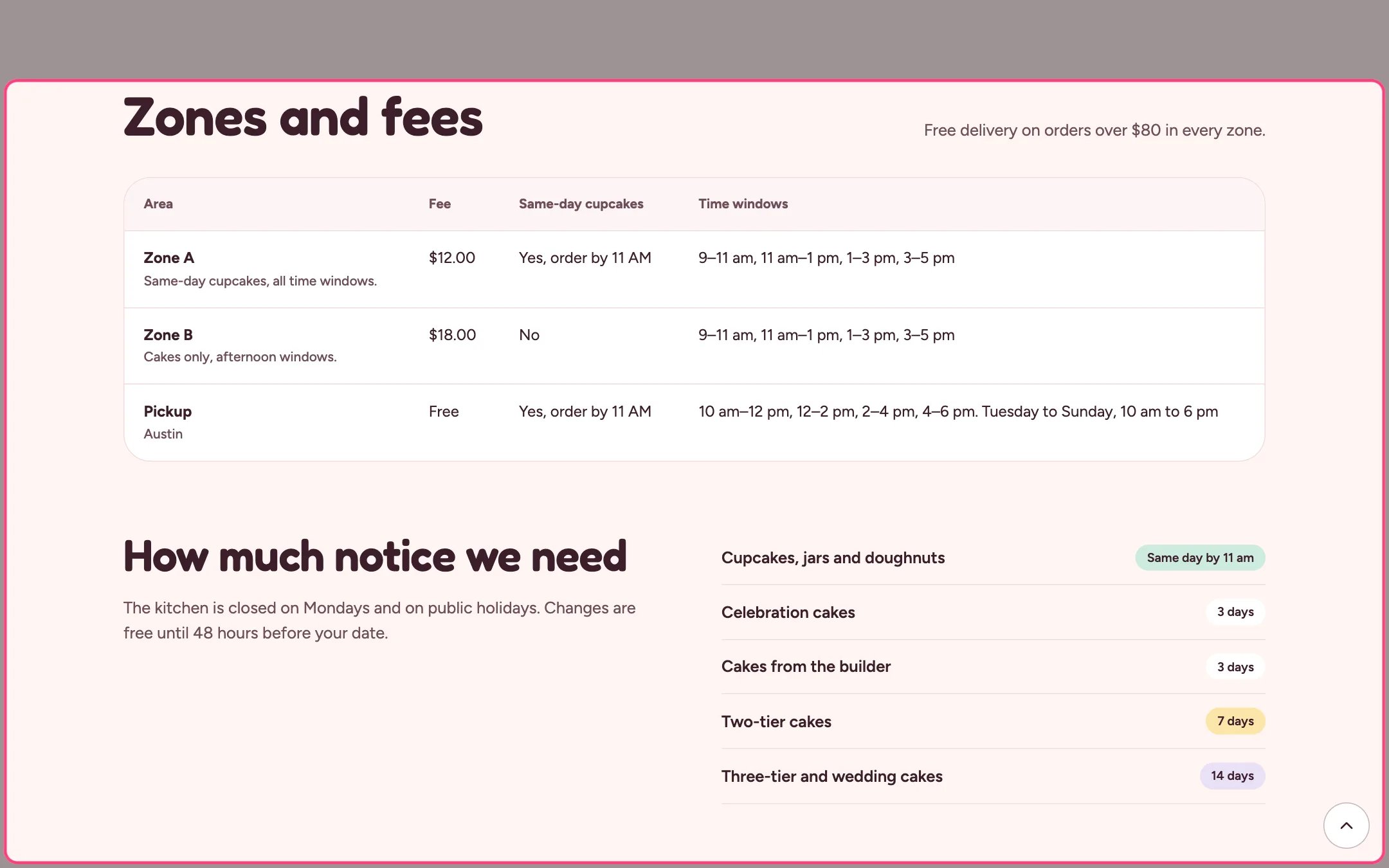
> A table of zones with fees, same-day delivery and time windows, plus a pickup row and a list of how much notice each kind of bake needs.
 ## Where to find it
The delivery page. In the theme editor choose Pages, then delivery, and select Delivery zones. Can be added to any page.
## How it works
* Rows are built from the zones in Local business; a zone with no areas is left out.
* Time windows come from Theme settings, Delivery and pickup.
* The pickup row shows the shop address, free pickup, the same-day cut-off and your pickup windows and opening hours.
* With the text left empty, the free delivery threshold from Theme settings shows instead.
* Notice blocks (up to 12) list a kind of bake with a colored badge, for example Cupcakes with a Same day badge.
## Where to find it
The delivery page. In the theme editor choose Pages, then delivery, and select Delivery zones. Can be added to any page.
## How it works
* Rows are built from the zones in Local business; a zone with no areas is left out.
* Time windows come from Theme settings, Delivery and pickup.
* The pickup row shows the shop address, free pickup, the same-day cut-off and your pickup windows and opening hours.
* With the text left empty, the free delivery threshold from Theme settings shows instead.
* Notice blocks (up to 12) list a kind of bake with a colored badge, for example Cupcakes with a Same day badge.
 ## Edit it
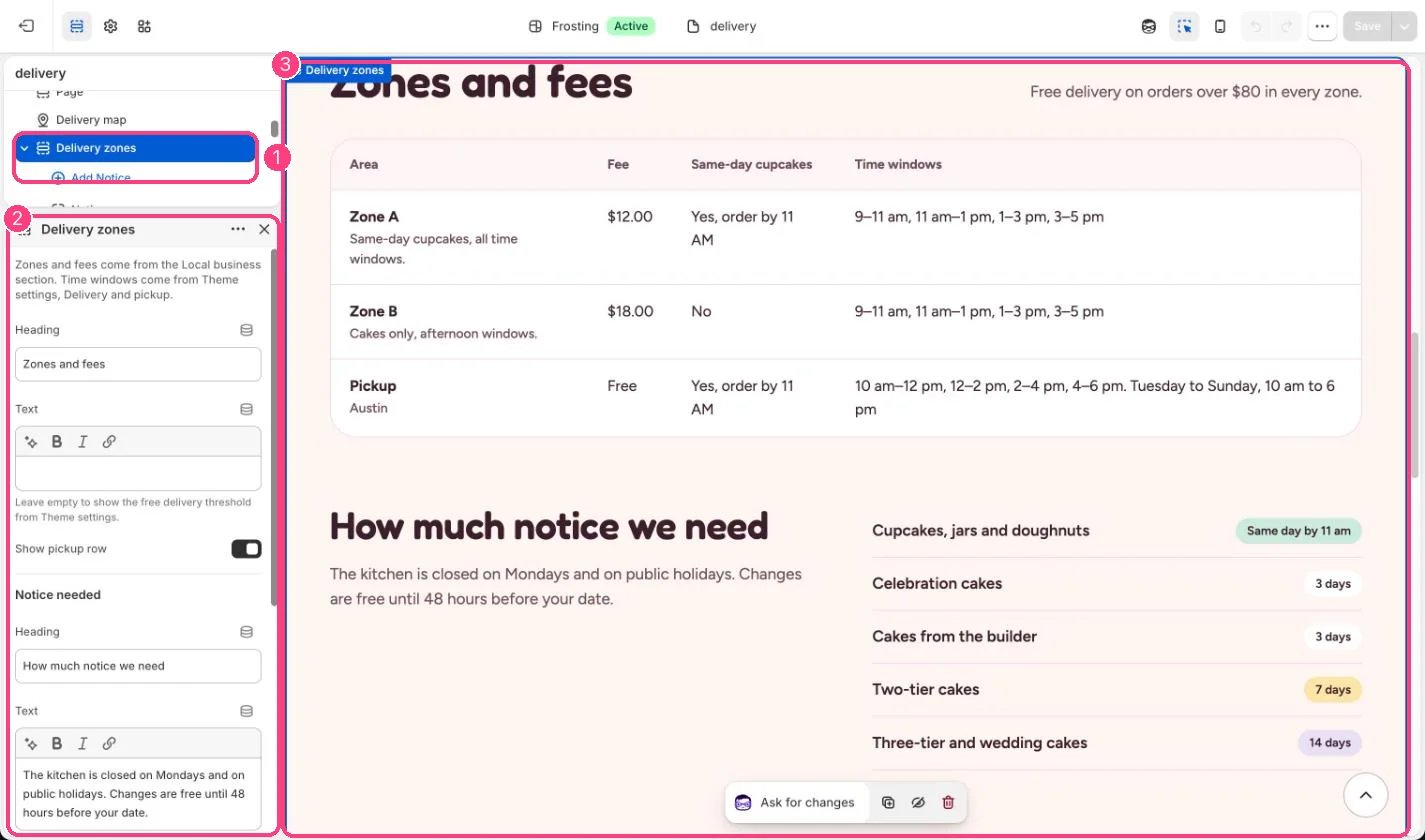
* Add Notice blocks with a label, badge text and badge color.
* Untick Show pickup row if you do not offer pickup.
* Edit the notice text, which mentions Monday closures by default.
* Tick Remove top spacing when it follows a section with the same color scheme.
## Settings
Zones and fees come from the Local business section. Time windows come from Theme settings, Delivery and pickup.
| Setting | What it does |
| - | - |
| **Heading** | Text. Default: Zones and fees. |
| **Text** | Formatted text (one line). Leave empty to show the free delivery threshold from Theme settings. |
| **Show pickup row** | On or off. Default: on. |
**Notice needed**
| Setting | What it does |
| - | - |
| **Heading** | Text. Default: How much notice we need. |
| **Text** | Formatted text (one line). |
| **Remove top spacing** | On or off. Use it right after a section with the same color scheme. Default: off. |
| **Color scheme** | Color scheme for this area (edit the schemes in Theme settings → Colors). Default: Scheme 1. |
## Blocks
Up to 12 blocks. Add a block with **Add block** under the section in the sidebar; drag blocks to reorder them.
### Notice
| Setting | What it does |
| - | - |
| **Label** | Text. Default: Celebration cakes. |
| **Badge text** | Text. Default: 3 days. |
| **Badge color** | Options: Plain, Mint, Butter, Lilac. Default: Plain. |
This documentation is built and hosted on [Mintlify](https://mintlify.com), a developer documentation platform.
## Edit it
* Add Notice blocks with a label, badge text and badge color.
* Untick Show pickup row if you do not offer pickup.
* Edit the notice text, which mentions Monday closures by default.
* Tick Remove top spacing when it follows a section with the same color scheme.
## Settings
Zones and fees come from the Local business section. Time windows come from Theme settings, Delivery and pickup.
| Setting | What it does |
| - | - |
| **Heading** | Text. Default: Zones and fees. |
| **Text** | Formatted text (one line). Leave empty to show the free delivery threshold from Theme settings. |
| **Show pickup row** | On or off. Default: on. |
**Notice needed**
| Setting | What it does |
| - | - |
| **Heading** | Text. Default: How much notice we need. |
| **Text** | Formatted text (one line). |
| **Remove top spacing** | On or off. Use it right after a section with the same color scheme. Default: off. |
| **Color scheme** | Color scheme for this area (edit the schemes in Theme settings → Colors). Default: Scheme 1. |
## Blocks
Up to 12 blocks. Add a block with **Add block** under the section in the sidebar; drag blocks to reorder them.
### Notice
| Setting | What it does |
| - | - |
| **Label** | Text. Default: Celebration cakes. |
| **Badge text** | Text. Default: 3 days. |
| **Badge color** | Options: Plain, Mint, Butter, Lilac. Default: Plain. |
This documentation is built and hosted on [Mintlify](https://mintlify.com), a developer documentation platform.