> ## Documentation Index
> Fetch the complete documentation index at: https://docs.kwebby.com/llms.txt
> Use this file to discover all available pages before exploring further.
# Featured product
> One product with its photos, price, ready-by date, size tiles and buy buttons, on any page.
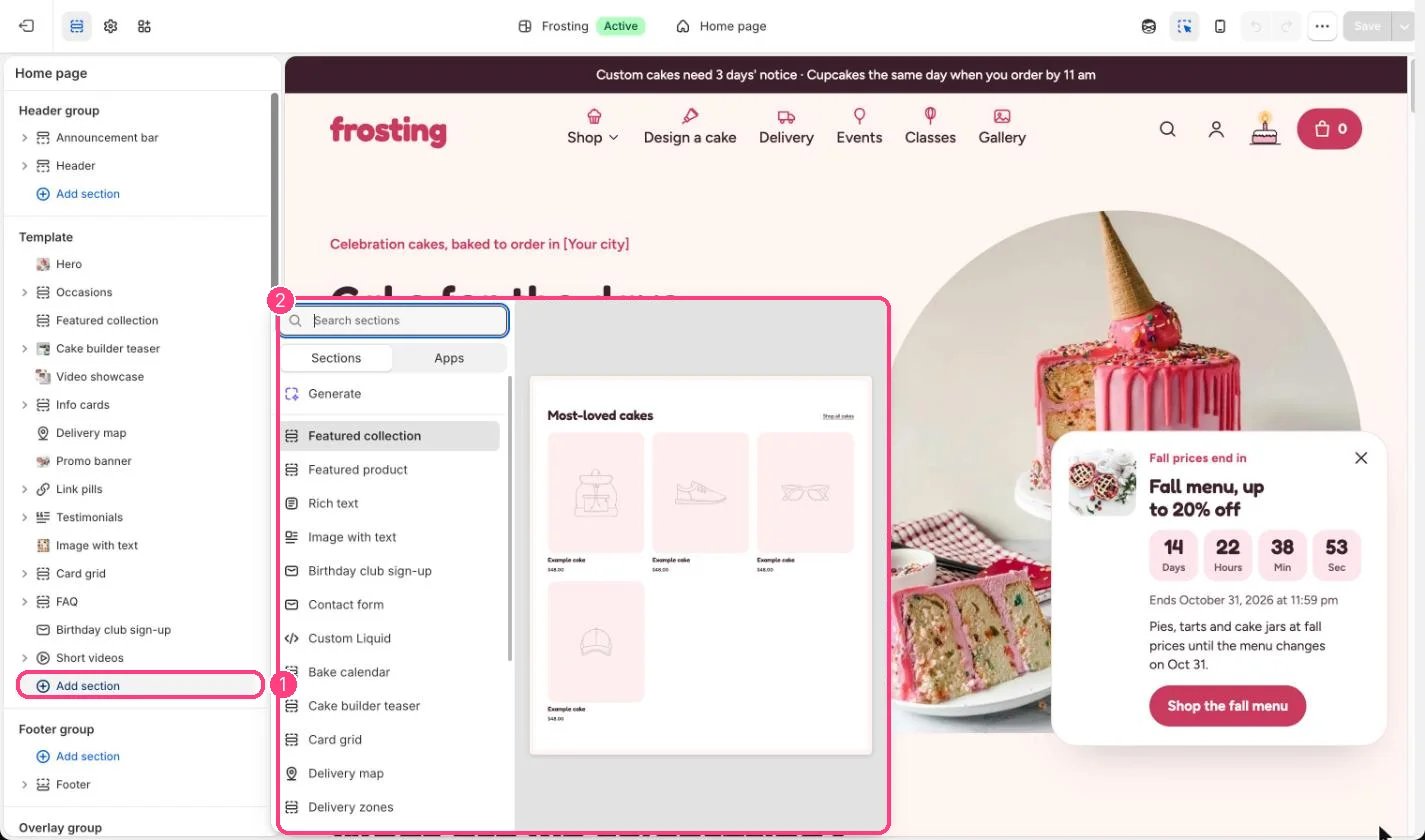 ## Where to find it
Not on any default template. Add it to the home page or any other page with Add section, Featured product. It cannot go in the header or footer.
## How it works
* Blocks: Title, Price, Lead time, Text, Variant picker, Purchase options, Quantity, Buy buttons and app blocks.
* Price shows servings and sale tags like the product page; the variant picker can show sizes as tiles with servings.
* Show link to the product page adds a link to the full details.
## Edit it
* Pick the product, for example a seasonal special.
* Set Option shown as tiles with servings to your size option, usually Size.
* Reorder or remove blocks, and add app blocks from Add block, Apps.
## Settings
| Setting | What it does |
| - | - |
| **Product** | Choose a product. |
| **Color scheme** | Color scheme for this area (edit the schemes in Theme settings → Colors). Default: Scheme 2. |
| **Show thumbnails** | On or off. Default: on. |
| **Loop videos** | On or off. Default: off. |
| **Show link to the product page** | On or off. Default: on. |
## Blocks
Add a block with **Add block** under the section in the sidebar; drag blocks to reorder them.
### App blocks
Blocks from apps you have installed, such as reviews or subscriptions. Click **Add block** and choose one from the Apps tab; its settings come from the app.
### Title (up to 1)
| Setting | What it does |
| - | - |
| **Show product type above the title** | On or off. Default: on. |
### Price (up to 1)
No settings: add or remove it, and drag it into place.
### Lead time (up to 1)
No settings: add or remove it, and drag it into place.
### Text
| Setting | What it does |
| - | - |
| **Text** | Formatted text (one line). |
| **Style** | Options: Body, Large, Subdued. Default: Body. |
### Variant picker (up to 1)
| Setting | What it does |
| - | - |
| **Option shown as tiles with servings** | Text. Option name, for example Size. Default: Size. |
| **Show color swatches when an option has them** | On or off. Default: on. |
### Purchase options (up to 1)
No settings: add or remove it, and drag it into place.
### Quantity (up to 1)
No settings: add or remove it, and drag it into place.
### Buy buttons (up to 1)
| Setting | What it does |
| - | - |
| **Show the total on the add to cart button** | On or off. Default: on. |
| **Show dynamic checkout buttons** | On or off. Default: on. |
| **Show recipient form for gift cards** | On or off. Default: on. |
This documentation is built and hosted on [Mintlify](https://mintlify.com), a developer documentation platform.
## Where to find it
Not on any default template. Add it to the home page or any other page with Add section, Featured product. It cannot go in the header or footer.
## How it works
* Blocks: Title, Price, Lead time, Text, Variant picker, Purchase options, Quantity, Buy buttons and app blocks.
* Price shows servings and sale tags like the product page; the variant picker can show sizes as tiles with servings.
* Show link to the product page adds a link to the full details.
## Edit it
* Pick the product, for example a seasonal special.
* Set Option shown as tiles with servings to your size option, usually Size.
* Reorder or remove blocks, and add app blocks from Add block, Apps.
## Settings
| Setting | What it does |
| - | - |
| **Product** | Choose a product. |
| **Color scheme** | Color scheme for this area (edit the schemes in Theme settings → Colors). Default: Scheme 2. |
| **Show thumbnails** | On or off. Default: on. |
| **Loop videos** | On or off. Default: off. |
| **Show link to the product page** | On or off. Default: on. |
## Blocks
Add a block with **Add block** under the section in the sidebar; drag blocks to reorder them.
### App blocks
Blocks from apps you have installed, such as reviews or subscriptions. Click **Add block** and choose one from the Apps tab; its settings come from the app.
### Title (up to 1)
| Setting | What it does |
| - | - |
| **Show product type above the title** | On or off. Default: on. |
### Price (up to 1)
No settings: add or remove it, and drag it into place.
### Lead time (up to 1)
No settings: add or remove it, and drag it into place.
### Text
| Setting | What it does |
| - | - |
| **Text** | Formatted text (one line). |
| **Style** | Options: Body, Large, Subdued. Default: Body. |
### Variant picker (up to 1)
| Setting | What it does |
| - | - |
| **Option shown as tiles with servings** | Text. Option name, for example Size. Default: Size. |
| **Show color swatches when an option has them** | On or off. Default: on. |
### Purchase options (up to 1)
No settings: add or remove it, and drag it into place.
### Quantity (up to 1)
No settings: add or remove it, and drag it into place.
### Buy buttons (up to 1)
| Setting | What it does |
| - | - |
| **Show the total on the add to cart button** | On or off. Default: on. |
| **Show dynamic checkout buttons** | On or off. Default: on. |
| **Show recipient form for gift cards** | On or off. Default: on. |
This documentation is built and hosted on [Mintlify](https://mintlify.com), a developer documentation platform.