> ## Documentation Index
> Fetch the complete documentation index at: https://docs.kwebby.com/llms.txt
> Use this file to discover all available pages before exploring further.
# Gallery
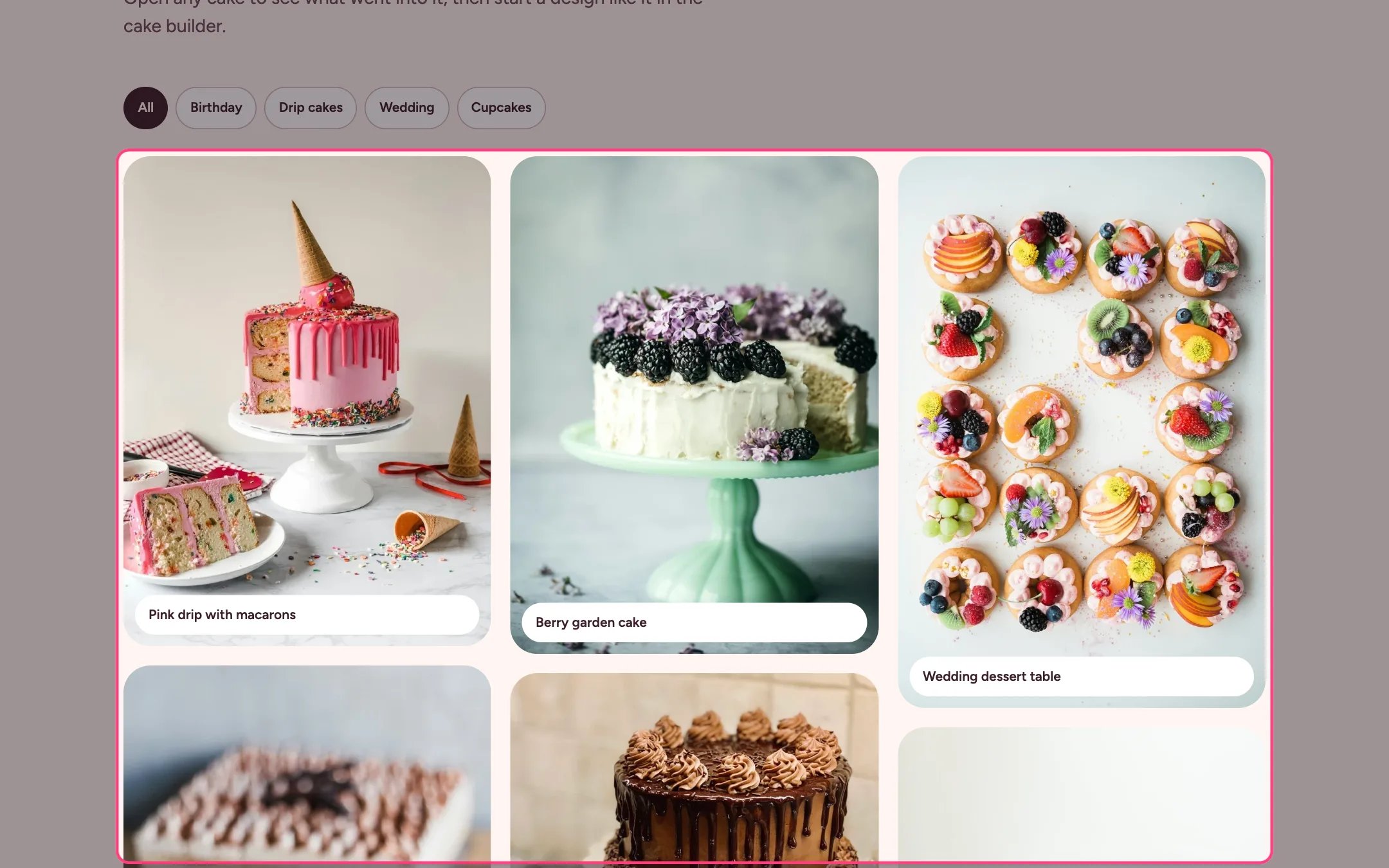
> A masonry wall of cakes you have made, with tag filters and a lightbox that invites shoppers to start a similar design.
 ## Where to find it
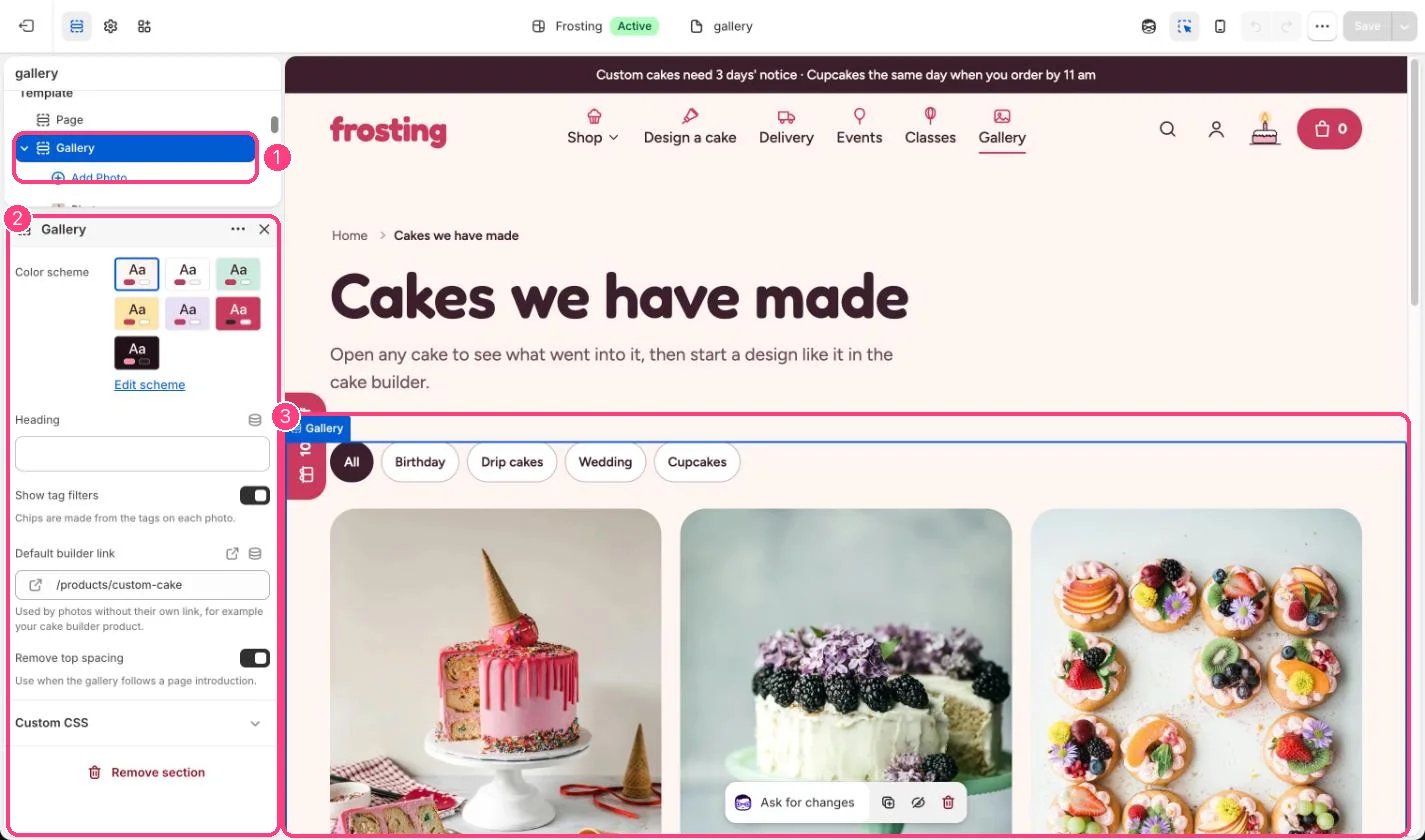
The gallery page. In the theme editor choose Pages, then gallery, and select Gallery. Can be added to any page.
## How it works
* Up to 48 photos in a masonry layout, two across on phones.
* Filter chips are made from the tags on each photo; they appear once there are at least two tags.
* Pressing a photo opens a lightbox with the caption, detail, previous and next buttons, arrow keys and a Start a design like this button.
## Where to find it
The gallery page. In the theme editor choose Pages, then gallery, and select Gallery. Can be added to any page.
## How it works
* Up to 48 photos in a masonry layout, two across on phones.
* Filter chips are made from the tags on each photo; they appear once there are at least two tags.
* Pressing a photo opens a lightbox with the caption, detail, previous and next buttons, arrow keys and a Start a design like this button.
 ## Edit it
* Add a Photo block per cake with a caption, a detail line and comma-separated tags.
* Set Default builder link to your cake builder product; give a photo its own Builder link to override it.
* Builder links can start from a preset design, for example /products/custom-cake?preset=birthday.
## Settings
| Setting | What it does |
| - | - |
| **Color scheme** | Color scheme for this area (edit the schemes in Theme settings → Colors). Default: Scheme 1. |
| **Heading** | Text. |
| **Show tag filters** | On or off. Chips are made from the tags on each photo. Default: on. |
| **Default builder link** | Link: a page, product, collection or web address. Used by photos without their own link, for example your cake builder product. |
| **Remove top spacing** | On or off. Use when the gallery follows a page introduction. Default: off. |
## Blocks
Up to 48 blocks. Add a block with **Add block** under the section in the sidebar; drag blocks to reorder them.
### Photo
| Setting | What it does |
| - | - |
| **Image** | Image: upload one or choose from Content → Files. |
| **Caption** | Text. Default: Pink drip with macarons. |
| **Detail** | Text. Shown in the lightbox. Default: 8 in vanilla, strawberry buttercream, white chocolate drip. |
| **Tags** | Text. Comma separated, for example Birthday, Drip cakes. Default: Birthday. |
| **Builder link** | Link: a page, product, collection or web address. Where Start a design like this goes, for example the builder with a preset. |
This documentation is built and hosted on [Mintlify](https://mintlify.com), a developer documentation platform.
## Edit it
* Add a Photo block per cake with a caption, a detail line and comma-separated tags.
* Set Default builder link to your cake builder product; give a photo its own Builder link to override it.
* Builder links can start from a preset design, for example /products/custom-cake?preset=birthday.
## Settings
| Setting | What it does |
| - | - |
| **Color scheme** | Color scheme for this area (edit the schemes in Theme settings → Colors). Default: Scheme 1. |
| **Heading** | Text. |
| **Show tag filters** | On or off. Chips are made from the tags on each photo. Default: on. |
| **Default builder link** | Link: a page, product, collection or web address. Used by photos without their own link, for example your cake builder product. |
| **Remove top spacing** | On or off. Use when the gallery follows a page introduction. Default: off. |
## Blocks
Up to 48 blocks. Add a block with **Add block** under the section in the sidebar; drag blocks to reorder them.
### Photo
| Setting | What it does |
| - | - |
| **Image** | Image: upload one or choose from Content → Files. |
| **Caption** | Text. Default: Pink drip with macarons. |
| **Detail** | Text. Shown in the lightbox. Default: 8 in vanilla, strawberry buttercream, white chocolate drip. |
| **Tags** | Text. Comma separated, for example Birthday, Drip cakes. Default: Birthday. |
| **Builder link** | Link: a page, product, collection or web address. Where Start a design like this goes, for example the builder with a preset. |
This documentation is built and hosted on [Mintlify](https://mintlify.com), a developer documentation platform.