> ## Documentation Index
> Fetch the complete documentation index at: https://docs.kwebby.com/llms.txt
> Use this file to discover all available pages before exploring further.
# Image with text
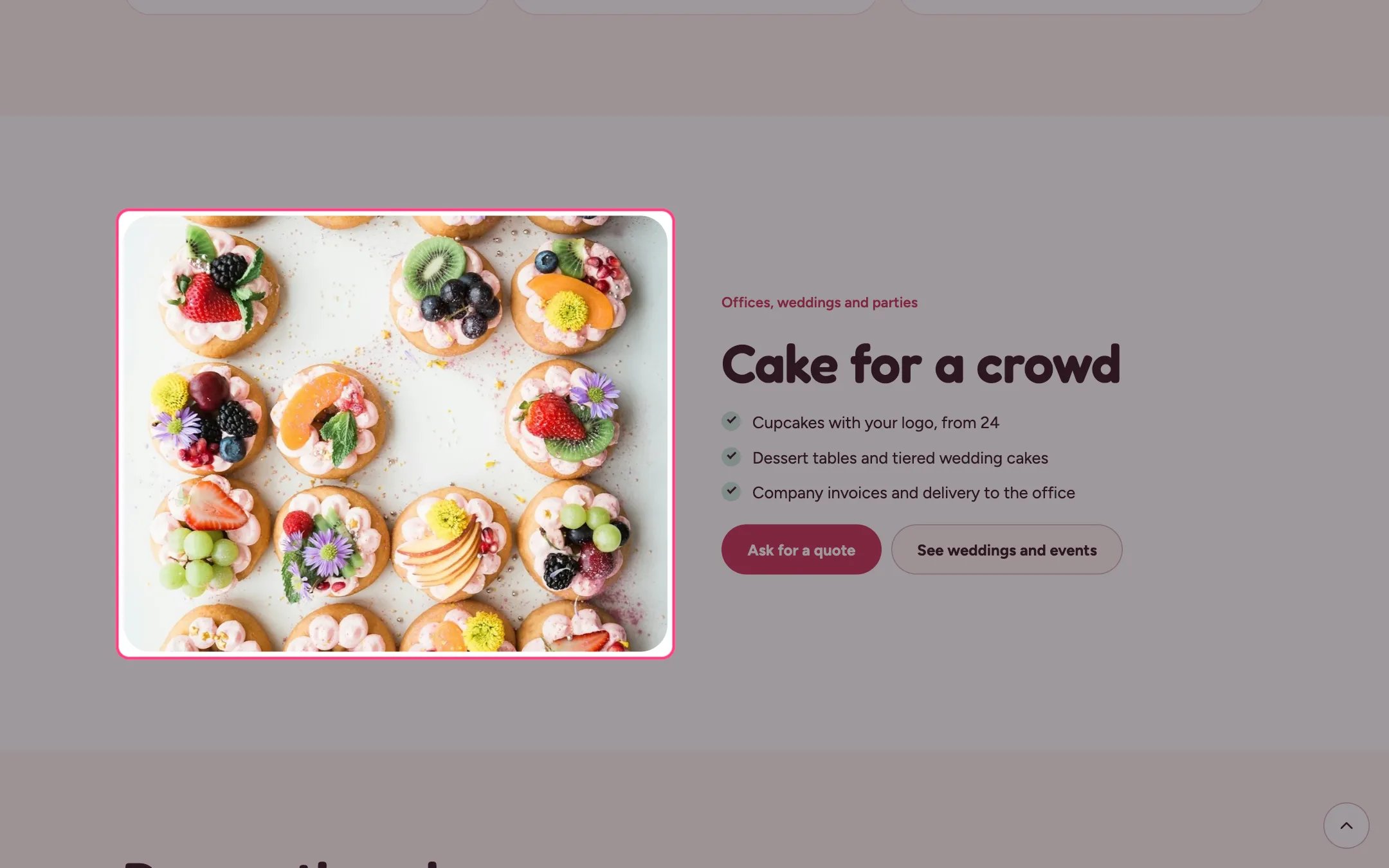
> A photo beside a heading, text, a tick list and up to two buttons, for events, catering, your story or pickup details.
 ## Where to find it
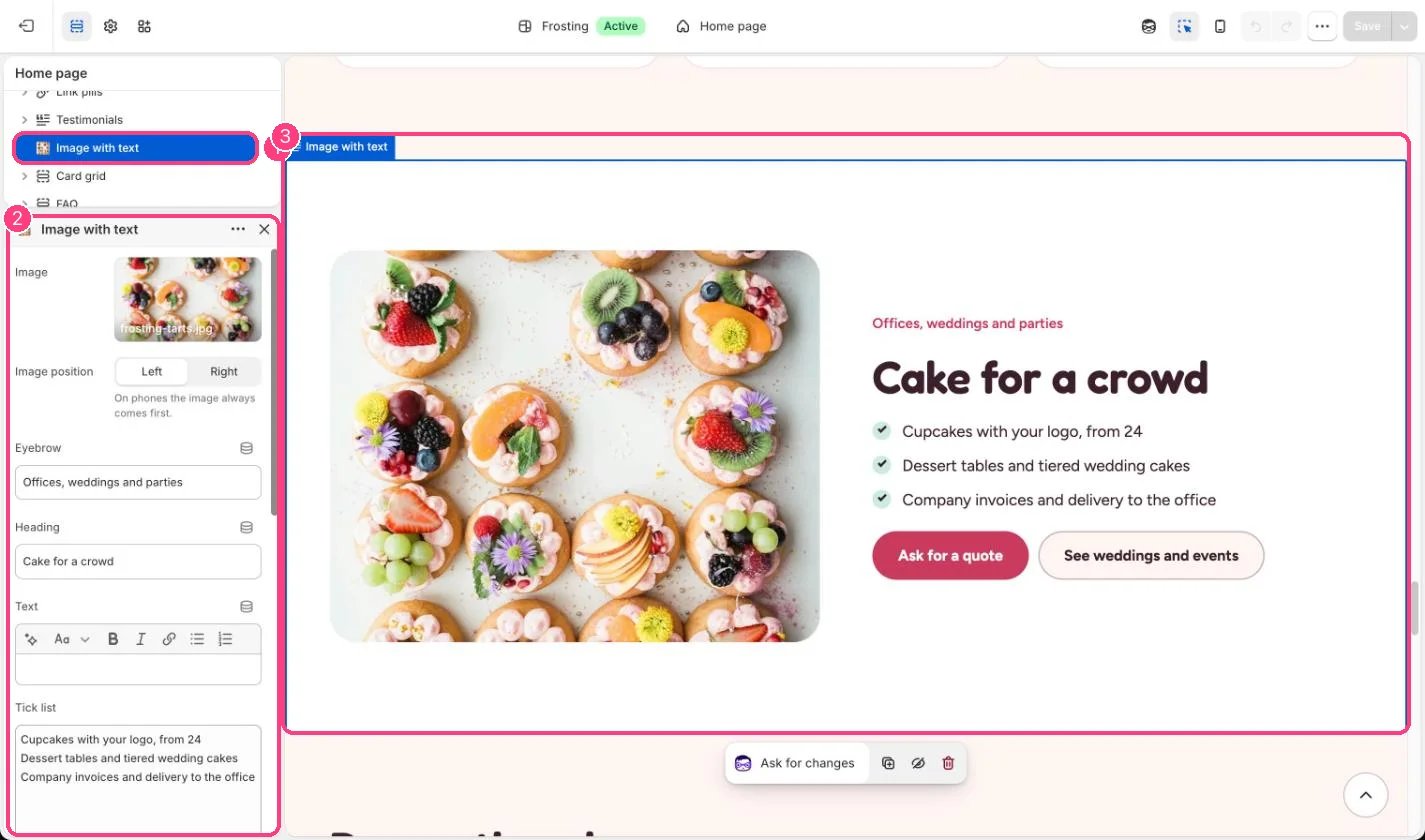
Home page, plus the about, classes, delivery and events pages. In the theme editor choose Home page, then select the section (default heading Cake for a crowd). Can be added to any page.
## How it works
* Image position puts the photo on the left or the right on wide screens. On phones the image always comes first.
* The tick list shows one item per line from the Tick list box, with a check mark.
* The first button is the accent color, the second is light.
## Where to find it
Home page, plus the about, classes, delivery and events pages. In the theme editor choose Home page, then select the section (default heading Cake for a crowd). Can be added to any page.
## How it works
* Image position puts the photo on the left or the right on wide screens. On phones the image always comes first.
* The tick list shows one item per line from the Tick list box, with a check mark.
* The first button is the accent color, the second is light.
 ## Edit it
* Type one tick list item per line, or clear the box to hide the list.
* Leave a button label empty to hide that button.
* Use Color scheme to give the section a mint, butter or lilac band.
## Settings
| Setting | What it does |
| - | - |
| **Image** | Image: upload one or choose from Content → Files. |
| **Image position** | Options: Left, Right. On phones the image always comes first. Default: Left. |
| **Eyebrow** | Text. Default: Offices, weddings and parties. |
| **Heading** | Text. Default: Cake for a crowd. |
| **Text** | Formatted text. |
| **Tick list** | Text (several lines). One item per line. Leave empty to hide the list. Default: Cupcakes with your logo, from 24 Dessert tables and tiered wedding cakes Company invoices and delivery to the office. |
**Buttons**
| Setting | What it does |
| - | - |
| **First button label** | Text. Default: Ask for a quote. |
| **First button link** | Link: a page, product, collection or web address. |
| **Second button label** | Text. Default: See weddings and events. |
| **Second button link** | Link: a page, product, collection or web address. |
**Colors**
| Setting | What it does |
| - | - |
| **Color scheme** | Color scheme for this area (edit the schemes in Theme settings → Colors). Default: Scheme 1. |
This documentation is built and hosted on [Mintlify](https://mintlify.com), a developer documentation platform.
## Edit it
* Type one tick list item per line, or clear the box to hide the list.
* Leave a button label empty to hide that button.
* Use Color scheme to give the section a mint, butter or lilac band.
## Settings
| Setting | What it does |
| - | - |
| **Image** | Image: upload one or choose from Content → Files. |
| **Image position** | Options: Left, Right. On phones the image always comes first. Default: Left. |
| **Eyebrow** | Text. Default: Offices, weddings and parties. |
| **Heading** | Text. Default: Cake for a crowd. |
| **Text** | Formatted text. |
| **Tick list** | Text (several lines). One item per line. Leave empty to hide the list. Default: Cupcakes with your logo, from 24 Dessert tables and tiered wedding cakes Company invoices and delivery to the office. |
**Buttons**
| Setting | What it does |
| - | - |
| **First button label** | Text. Default: Ask for a quote. |
| **First button link** | Link: a page, product, collection or web address. |
| **Second button label** | Text. Default: See weddings and events. |
| **Second button link** | Link: a page, product, collection or web address. |
**Colors**
| Setting | What it does |
| - | - |
| **Color scheme** | Color scheme for this area (edit the schemes in Theme settings → Colors). Default: Scheme 1. |
This documentation is built and hosted on [Mintlify](https://mintlify.com), a developer documentation platform.