> ## Documentation Index
> Fetch the complete documentation index at: https://docs.kwebby.com/llms.txt
> Use this file to discover all available pages before exploring further.
# Local business
> Your shop's address, map position, delivery zones and delivery areas, in one place. It shows nothing by itself but powers the delivery check, map, zones table, area pages and the business details search engines read.
## Where to find it
Every page, in the Overlay group. In the theme editor open any page and select Local business under Overlay group, near the bottom of the sidebar. Only one per store.
## How it works
* Two zones, A and B, each with a name, a delivery fee, a same-day yes or no and a note.
* Each Delivery area block is a postcode, or the start of one followed by \*, with a name, zone, map position and an optional landing page.
* Postcode checks ignore spaces and letter case, and a US ZIP+4 such as 78704-1234 matches 78704.
* Use my location matches the shopper's position to the nearest area on their own device; nothing is sent to an outside service.
* The section writes business details (a Bakery with name, address, phone, hours, map position, price range and the areas you serve) into every page for search engines.
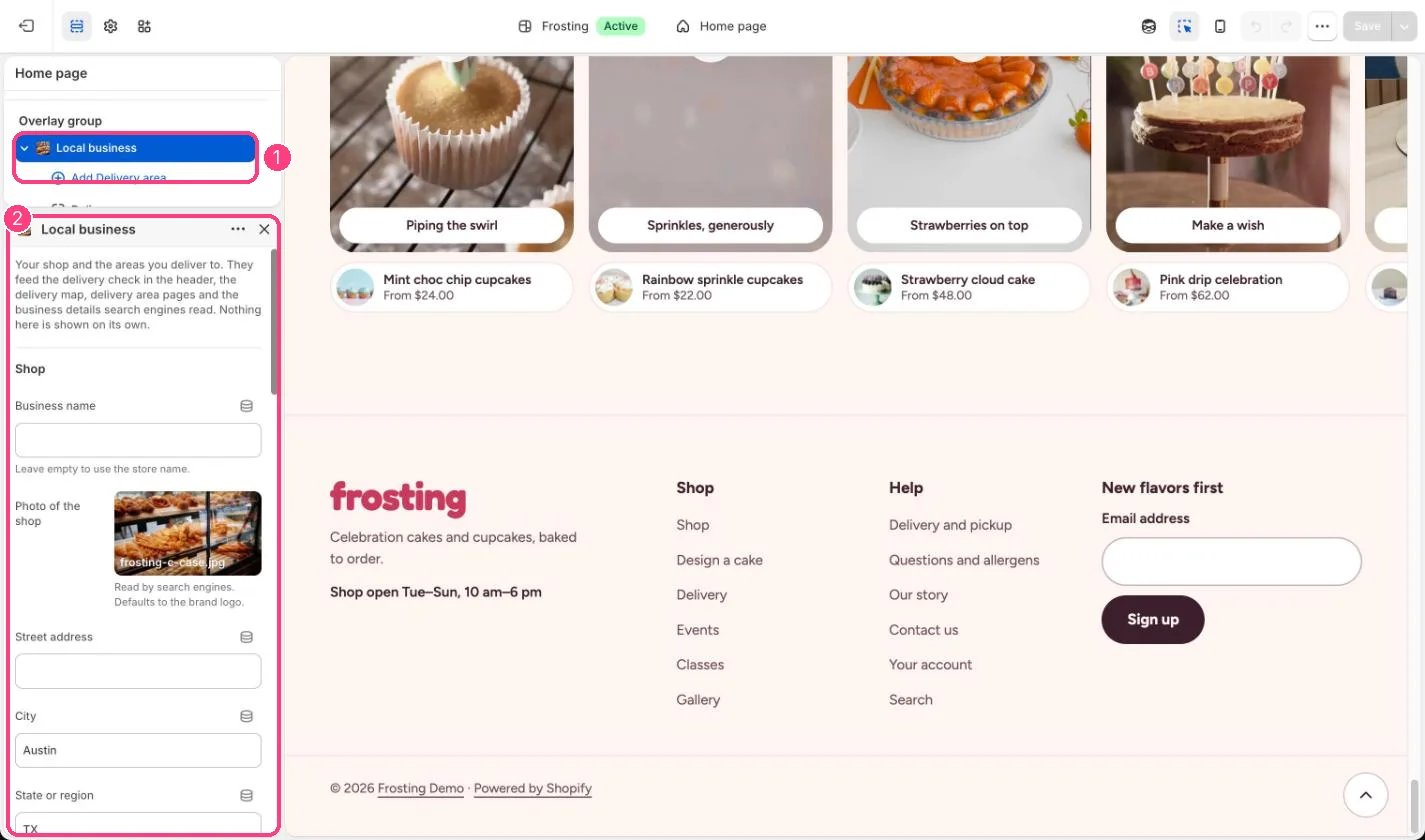 ## Edit it
* Fill in the shop details. Opening hours shown is for people; Opening hours for search engines uses two-letter days and 24-hour times, for example Tu-Su 10:00-18:00.
* Copy your shop's latitude and longitude from an online map (right-click the shop).
* Set the Delivery radius (2 to 50 km) and Street map zoom.
* Name the zones and set their fees, same-day option and notes.
* Add a Delivery area block per postcode with its middle point, and link its landing page if you made one.
## Settings
Your shop and the areas you deliver to. They feed the delivery check in the header, the delivery map, delivery area pages and the business details search engines read. Nothing here is shown on its own.
**Shop**
| Setting | What it does |
| - | - |
| **Business name** | Text. Leave empty to use the store name. |
| **Photo of the shop** | Image: upload one or choose from Content → Files. Read by search engines. Defaults to the brand logo. |
| **Street address** | Text. |
| **City** | Text. Default: Austin. |
| **State or region** | Text. Default: TX. |
| **Postcode** | Text. Default: 78704. |
| **Country code** | Text. Two letters, for example US, CA or GB. Default: US. |
| **Phone** | Text. Default: (512) 555-0142. |
| **Email** | Text. |
| **Latitude** | Text. Decimal degrees, for example 30.2500. Right-click your shop in an online map to copy it. Default: 30.2500. |
| **Longitude** | Text. Decimal degrees, for example -97.7500. Default: -97.7500. |
| **Opening hours shown** | Text. Default: Tuesday to Sunday, 10 am to 6 pm. |
| **Opening hours for search engines** | Text. Two-letter days and 24-hour times, for example Tu-Su 10:00-18:00. Separate several with commas. Default: Tu-Su 10:00-18:00. |
| **Price range** | Text. For search engines, for example $. Default: $. |
**Delivery map**
| Setting | What it does |
| - | - |
| **Delivery radius** | Slider from 2 to 50 km. Default: 14 km. |
| **Street map zoom** | Slider from 10 to 18. Default: 13. |
**Zone A**
| Setting | What it does |
| - | - |
| **Zone A name** | Text. Default: Zone A. |
| **Zone A delivery fee** | Number. In your store currency. Default: 12. |
| **Zone A has same-day delivery** | On or off. Default: on. |
| **Zone A note** | Text. Default: Same-day cupcakes, all time windows. |
**Zone B**
| Setting | What it does |
| - | - |
| **Zone B name** | Text. Default: Zone B. |
| **Zone B delivery fee** | Number. In your store currency. Default: 18. |
| **Zone B has same-day delivery** | On or off. Default: off. |
| **Zone B note** | Text. Default: Cakes only, afternoon windows. |
## Blocks
Add a block with **Add block** under the section in the sidebar; drag blocks to reorder them.
### Delivery area
| Setting | What it does |
| - | - |
| **Postcode** | Text. A full postcode, or the start of one followed by *, for example 787*. |
| **Area name** | Text. For example a neighborhood. Shown on the map, in the area list and to search engines. |
| **Zone** | Options: Zone A, Zone B. Default: Zone A. |
| **Latitude** | Text. The middle of the area. Places it on the map and matches Use my location. |
| **Longitude** | Text. |
| **Landing page** | Link: a page, product, collection or web address. A page that uses the delivery area template. |
Fees here are shown to shoppers only. Set the real local delivery rates in Settings, Shipping and delivery.
Areas without a latitude and longitude still work for postcode checks but do not appear on the map or match Use my location.
This documentation is built and hosted on [Mintlify](https://mintlify.com), a developer documentation platform.
## Edit it
* Fill in the shop details. Opening hours shown is for people; Opening hours for search engines uses two-letter days and 24-hour times, for example Tu-Su 10:00-18:00.
* Copy your shop's latitude and longitude from an online map (right-click the shop).
* Set the Delivery radius (2 to 50 km) and Street map zoom.
* Name the zones and set their fees, same-day option and notes.
* Add a Delivery area block per postcode with its middle point, and link its landing page if you made one.
## Settings
Your shop and the areas you deliver to. They feed the delivery check in the header, the delivery map, delivery area pages and the business details search engines read. Nothing here is shown on its own.
**Shop**
| Setting | What it does |
| - | - |
| **Business name** | Text. Leave empty to use the store name. |
| **Photo of the shop** | Image: upload one or choose from Content → Files. Read by search engines. Defaults to the brand logo. |
| **Street address** | Text. |
| **City** | Text. Default: Austin. |
| **State or region** | Text. Default: TX. |
| **Postcode** | Text. Default: 78704. |
| **Country code** | Text. Two letters, for example US, CA or GB. Default: US. |
| **Phone** | Text. Default: (512) 555-0142. |
| **Email** | Text. |
| **Latitude** | Text. Decimal degrees, for example 30.2500. Right-click your shop in an online map to copy it. Default: 30.2500. |
| **Longitude** | Text. Decimal degrees, for example -97.7500. Default: -97.7500. |
| **Opening hours shown** | Text. Default: Tuesday to Sunday, 10 am to 6 pm. |
| **Opening hours for search engines** | Text. Two-letter days and 24-hour times, for example Tu-Su 10:00-18:00. Separate several with commas. Default: Tu-Su 10:00-18:00. |
| **Price range** | Text. For search engines, for example $. Default: $. |
**Delivery map**
| Setting | What it does |
| - | - |
| **Delivery radius** | Slider from 2 to 50 km. Default: 14 km. |
| **Street map zoom** | Slider from 10 to 18. Default: 13. |
**Zone A**
| Setting | What it does |
| - | - |
| **Zone A name** | Text. Default: Zone A. |
| **Zone A delivery fee** | Number. In your store currency. Default: 12. |
| **Zone A has same-day delivery** | On or off. Default: on. |
| **Zone A note** | Text. Default: Same-day cupcakes, all time windows. |
**Zone B**
| Setting | What it does |
| - | - |
| **Zone B name** | Text. Default: Zone B. |
| **Zone B delivery fee** | Number. In your store currency. Default: 18. |
| **Zone B has same-day delivery** | On or off. Default: off. |
| **Zone B note** | Text. Default: Cakes only, afternoon windows. |
## Blocks
Add a block with **Add block** under the section in the sidebar; drag blocks to reorder them.
### Delivery area
| Setting | What it does |
| - | - |
| **Postcode** | Text. A full postcode, or the start of one followed by *, for example 787*. |
| **Area name** | Text. For example a neighborhood. Shown on the map, in the area list and to search engines. |
| **Zone** | Options: Zone A, Zone B. Default: Zone A. |
| **Latitude** | Text. The middle of the area. Places it on the map and matches Use my location. |
| **Longitude** | Text. |
| **Landing page** | Link: a page, product, collection or web address. A page that uses the delivery area template. |
Fees here are shown to shoppers only. Set the real local delivery rates in Settings, Shipping and delivery.
Areas without a latitude and longitude still work for postcode checks but do not appear on the map or match Use my location.
This documentation is built and hosted on [Mintlify](https://mintlify.com), a developer documentation platform.