> ## Documentation Index
> Fetch the complete documentation index at: https://docs.kwebby.com/llms.txt
> Use this file to discover all available pages before exploring further.
# Rich text
> A flexible block of text with an eyebrow, headings, paragraphs and buttons.
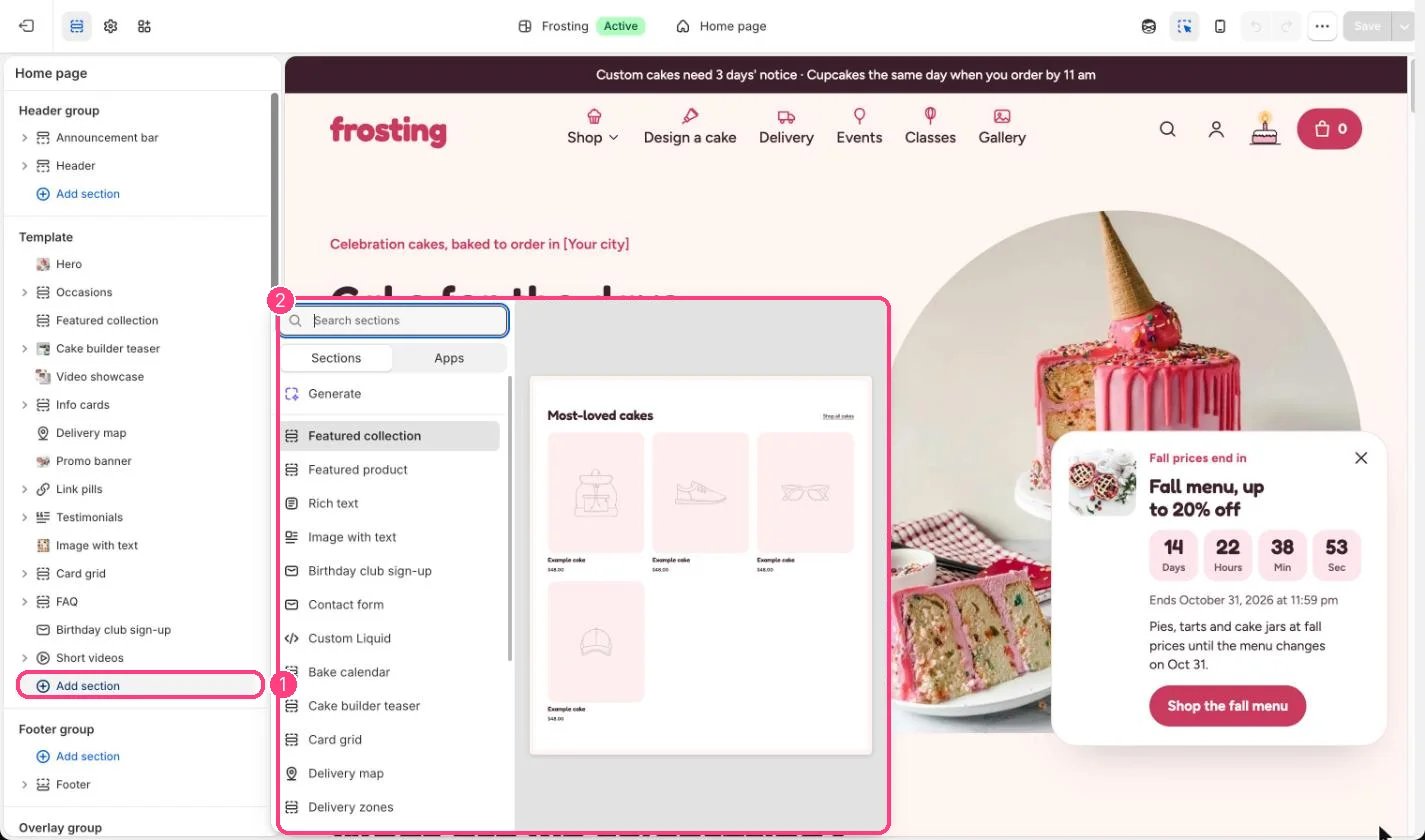 ## Where to find it
Not on any default template. Add it to any page with Add section, Rich text.
## How it works
* Up to 12 blocks: one Eyebrow, plus Heading, Text and Button blocks in any order.
* Text can be left aligned or centered, with a width from 480 to 1200 px.
* Buttons come in four styles: accent, dark, light and outline.
## Edit it
* Use Spacing Tight to sit it closer to the sections around it.
* Tick Larger text on a Text block for an introduction.
* Choose Alignment (left or center) and Text width (480 to 1200 px).
## Settings
| Setting | What it does |
| - | - |
| **Alignment** | Options: Left, Center. Default: Center. |
| **Text width** | Slider from 480 to 1200 px, in steps of 40. Default: 760 px. |
| **Spacing** | Options: Regular, Tight. Default: Regular. |
| **Color scheme** | Color scheme for this area (edit the schemes in Theme settings → Colors). Default: Scheme 1. |
## Blocks
Up to 12 blocks. Add a block with **Add block** under the section in the sidebar; drag blocks to reorder them.
### Eyebrow (up to 1)
| Setting | What it does |
| - | - |
| **Text** | Text. Default: Baked to order. |
### Heading
| Setting | What it does |
| - | - |
| **Heading** | Text. Default: Talk about your bakery. |
| **Size** | Options: Regular, Small. Default: Regular. |
### Text
| Setting | What it does |
| - | - |
| **Text** | Formatted text. |
| **Larger text** | On or off. Default: off. |
### Button
| Setting | What it does |
| - | - |
| **Label** | Text. Default: Shop cakes. |
| **Link** | Link: a page, product, collection or web address. Default: /collections/all. |
| **Style** | Options: Accent, Dark, Light, Outline. Default: Dark. |
This documentation is built and hosted on [Mintlify](https://mintlify.com), a developer documentation platform.
## Where to find it
Not on any default template. Add it to any page with Add section, Rich text.
## How it works
* Up to 12 blocks: one Eyebrow, plus Heading, Text and Button blocks in any order.
* Text can be left aligned or centered, with a width from 480 to 1200 px.
* Buttons come in four styles: accent, dark, light and outline.
## Edit it
* Use Spacing Tight to sit it closer to the sections around it.
* Tick Larger text on a Text block for an introduction.
* Choose Alignment (left or center) and Text width (480 to 1200 px).
## Settings
| Setting | What it does |
| - | - |
| **Alignment** | Options: Left, Center. Default: Center. |
| **Text width** | Slider from 480 to 1200 px, in steps of 40. Default: 760 px. |
| **Spacing** | Options: Regular, Tight. Default: Regular. |
| **Color scheme** | Color scheme for this area (edit the schemes in Theme settings → Colors). Default: Scheme 1. |
## Blocks
Up to 12 blocks. Add a block with **Add block** under the section in the sidebar; drag blocks to reorder them.
### Eyebrow (up to 1)
| Setting | What it does |
| - | - |
| **Text** | Text. Default: Baked to order. |
### Heading
| Setting | What it does |
| - | - |
| **Heading** | Text. Default: Talk about your bakery. |
| **Size** | Options: Regular, Small. Default: Regular. |
### Text
| Setting | What it does |
| - | - |
| **Text** | Formatted text. |
| **Larger text** | On or off. Default: off. |
### Button
| Setting | What it does |
| - | - |
| **Label** | Text. Default: Shop cakes. |
| **Link** | Link: a page, product, collection or web address. Default: /collections/all. |
| **Style** | Options: Accent, Dark, Light, Outline. Default: Dark. |
This documentation is built and hosted on [Mintlify](https://mintlify.com), a developer documentation platform.