> ## Documentation Index
> Fetch the complete documentation index at: https://docs.kwebby.com/llms.txt
> Use this file to discover all available pages before exploring further.
# Sign-up popup
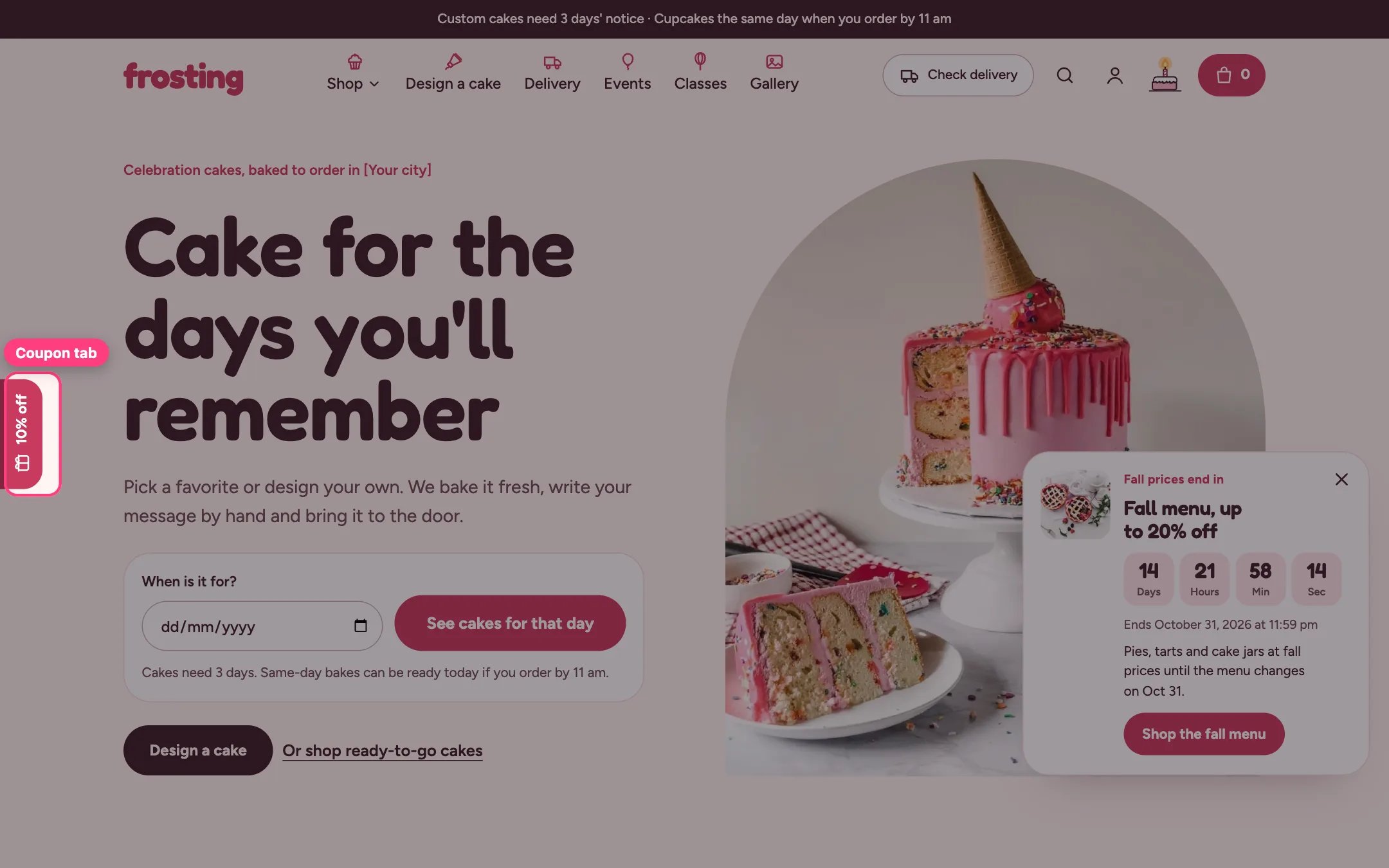
> A welcome offer popup that trades an email sign-up for a discount code, plus a coupon tab on the left edge that reopens it.
 ## Where to find it
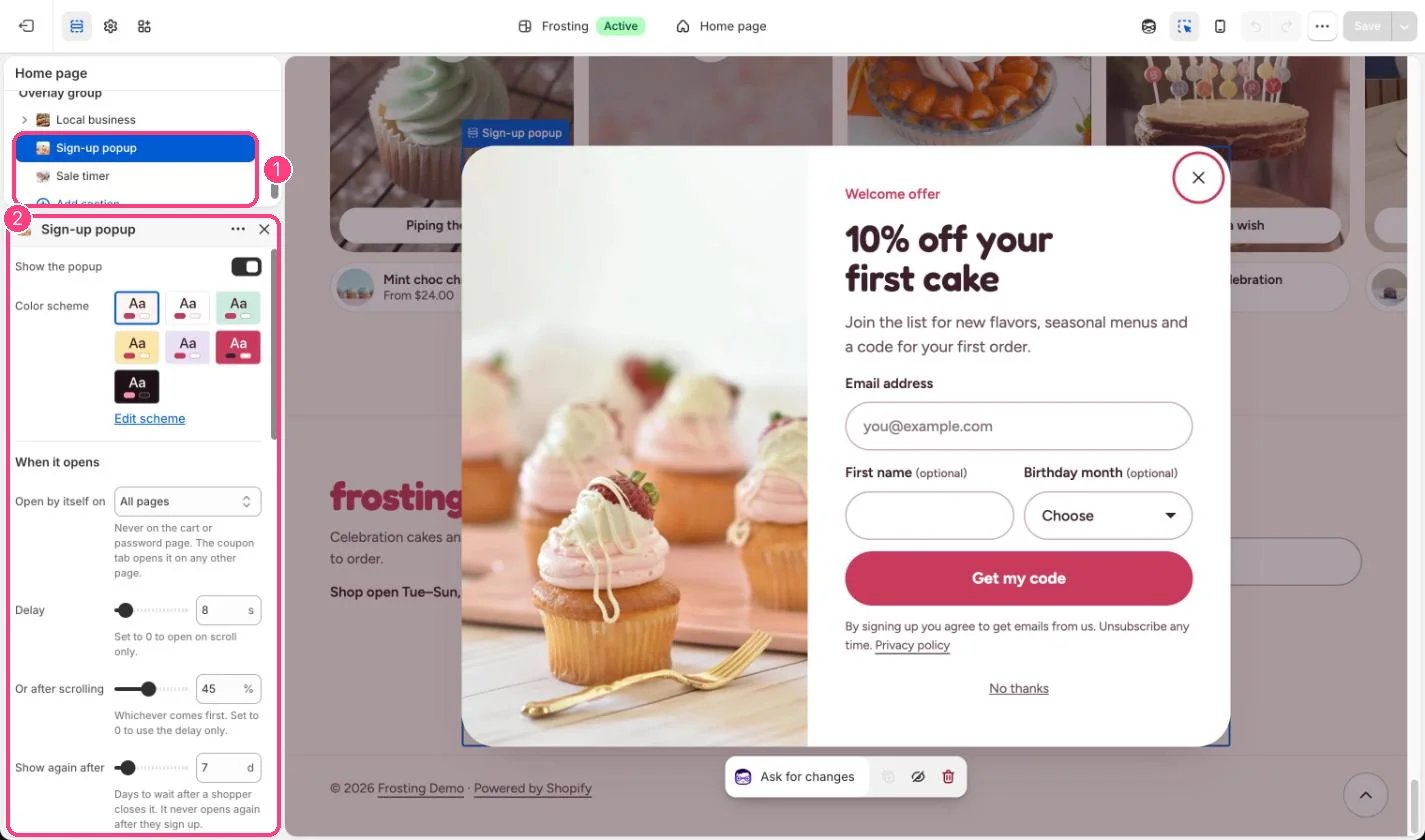
Every page except the cart and password pages, in the Overlay group. In the theme editor select Sign-up popup under Overlay group; selecting it opens the popup for preview.
## How it works
* Opens by itself after the delay or the scroll depth, whichever comes first, on all pages or the home page only.
* It waits while another window is open or the shopper is typing.
* After it is closed it stays away for the number of days you set, and it never opens by itself again after a sign-up.
* The code is revealed after sign-up, with a Copy button and Shop with the code applied, which applies the discount and opens your products.
* Sign-ups are saved as customers tagged newsletter and popup, plus a month tag such as birthday-march when asked.
* The coupon tab opens the popup from any page. It tucks away while scrolling down, near the footer and over the first screen on narrow screens. After sign-up it reads Your code.
## Where to find it
Every page except the cart and password pages, in the Overlay group. In the theme editor select Sign-up popup under Overlay group; selecting it opens the popup for preview.
## How it works
* Opens by itself after the delay or the scroll depth, whichever comes first, on all pages or the home page only.
* It waits while another window is open or the shopper is typing.
* After it is closed it stays away for the number of days you set, and it never opens by itself again after a sign-up.
* The code is revealed after sign-up, with a Copy button and Shop with the code applied, which applies the discount and opens your products.
* Sign-ups are saved as customers tagged newsletter and popup, plus a month tag such as birthday-march when asked.
* The coupon tab opens the popup from any page. It tucks away while scrolling down, near the footer and over the first screen on narrow screens. After sign-up it reads Your code.
 ## Edit it
* Create the discount in Shopify admin, Discounts, first, then type the same code in Discount code.
* Leave Discount code empty for a plain sign-up.
* Set Delay (0 to 120 s), Or after scrolling (0 to 100 percent) and Show again after (1 to 60 days). Set either to 0 to use only the other.
* Write the Terms shoppers see with the code.
* Untick Show coupon tab on the left edge to hide the tab, or change its label.
* Untick Show the popup to turn it off completely.
## Settings
| Setting | What it does |
| - | - |
| **Show the popup** | On or off. Default: on. |
| **Color scheme** | Color scheme for this area (edit the schemes in Theme settings → Colors). Default: Scheme 1. |
**When it opens**
| Setting | What it does |
| - | - |
| **Open by itself on** | Options: All pages, Home page only. Never on the cart or password page. The coupon tab opens it on any other page. Default: All pages. |
| **Delay** | Slider from 0 to 120 s, in steps of 2. Set to 0 to open on scroll only. Default: 8 s. |
| **Or after scrolling** | Slider from 0 to 100 %, in steps of 5. Whichever comes first. Set to 0 to use the delay only. Default: 45 %. |
| **Show again after** | Slider from 1 to 60 d. Days to wait after a shopper closes it. It never opens again after they sign up. Default: 7 d. |
**Content**
| Setting | What it does |
| - | - |
| **Image** | Image: upload one or choose from Content → Files. |
| **Eyebrow** | Text. Default: Welcome offer. |
| **Heading** | Text. Default: 10% off your first cake. |
| **Text** | Formatted text (one line). |
| **Discount code** | Text. Must match a real discount in Shopify admin > Discounts, or the code will not work at checkout. Leave empty for a plain sign-up. Default: WELCOME10. |
| **Terms** | Formatted text (one line). |
**Form**
| Setting | What it does |
| - | - |
| **Ask for first name** | On or off. Default: on. |
| **Ask for birthday month** | On or off. Adds a tag such as birthday-march to the customer, for birthday emails. Default: on. |
Sign-ups are saved as customers with the tags newsletter and popup.
**Coupon tab**
| Setting | What it does |
| - | - |
| **Show coupon tab on the left edge** | On or off. Opens the popup. It tucks away while shoppers scroll down and near the footer. Default: on. |
| **Tab label** | Text. Default: 10% off. |
If the code does not match a real discount, it will not work at checkout.
This documentation is built and hosted on [Mintlify](https://mintlify.com), a developer documentation platform.
## Edit it
* Create the discount in Shopify admin, Discounts, first, then type the same code in Discount code.
* Leave Discount code empty for a plain sign-up.
* Set Delay (0 to 120 s), Or after scrolling (0 to 100 percent) and Show again after (1 to 60 days). Set either to 0 to use only the other.
* Write the Terms shoppers see with the code.
* Untick Show coupon tab on the left edge to hide the tab, or change its label.
* Untick Show the popup to turn it off completely.
## Settings
| Setting | What it does |
| - | - |
| **Show the popup** | On or off. Default: on. |
| **Color scheme** | Color scheme for this area (edit the schemes in Theme settings → Colors). Default: Scheme 1. |
**When it opens**
| Setting | What it does |
| - | - |
| **Open by itself on** | Options: All pages, Home page only. Never on the cart or password page. The coupon tab opens it on any other page. Default: All pages. |
| **Delay** | Slider from 0 to 120 s, in steps of 2. Set to 0 to open on scroll only. Default: 8 s. |
| **Or after scrolling** | Slider from 0 to 100 %, in steps of 5. Whichever comes first. Set to 0 to use the delay only. Default: 45 %. |
| **Show again after** | Slider from 1 to 60 d. Days to wait after a shopper closes it. It never opens again after they sign up. Default: 7 d. |
**Content**
| Setting | What it does |
| - | - |
| **Image** | Image: upload one or choose from Content → Files. |
| **Eyebrow** | Text. Default: Welcome offer. |
| **Heading** | Text. Default: 10% off your first cake. |
| **Text** | Formatted text (one line). |
| **Discount code** | Text. Must match a real discount in Shopify admin > Discounts, or the code will not work at checkout. Leave empty for a plain sign-up. Default: WELCOME10. |
| **Terms** | Formatted text (one line). |
**Form**
| Setting | What it does |
| - | - |
| **Ask for first name** | On or off. Default: on. |
| **Ask for birthday month** | On or off. Adds a tag such as birthday-march to the customer, for birthday emails. Default: on. |
Sign-ups are saved as customers with the tags newsletter and popup.
**Coupon tab**
| Setting | What it does |
| - | - |
| **Show coupon tab on the left edge** | On or off. Opens the popup. It tucks away while shoppers scroll down and near the footer. Default: on. |
| **Tab label** | Text. Default: 10% off. |
If the code does not match a real discount, it will not work at checkout.
This documentation is built and hosted on [Mintlify](https://mintlify.com), a developer documentation platform.