> ## Documentation Index
> Fetch the complete documentation index at: https://docs.kwebby.com/llms.txt
> Use this file to discover all available pages before exploring further.
# Cart drawer
> A bag that slides in from the side after every add, with related products, gift wrap, notes and checkout.
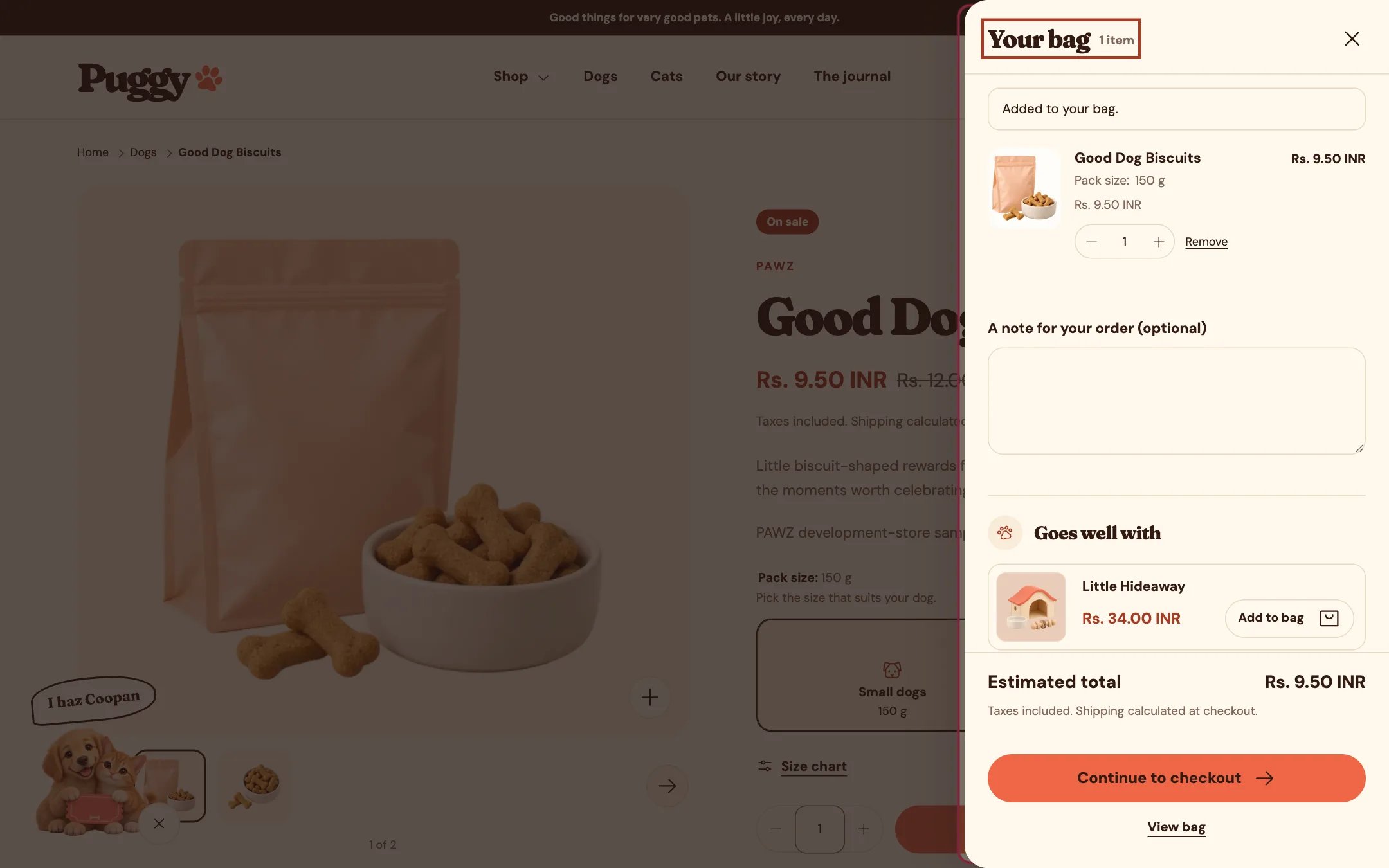
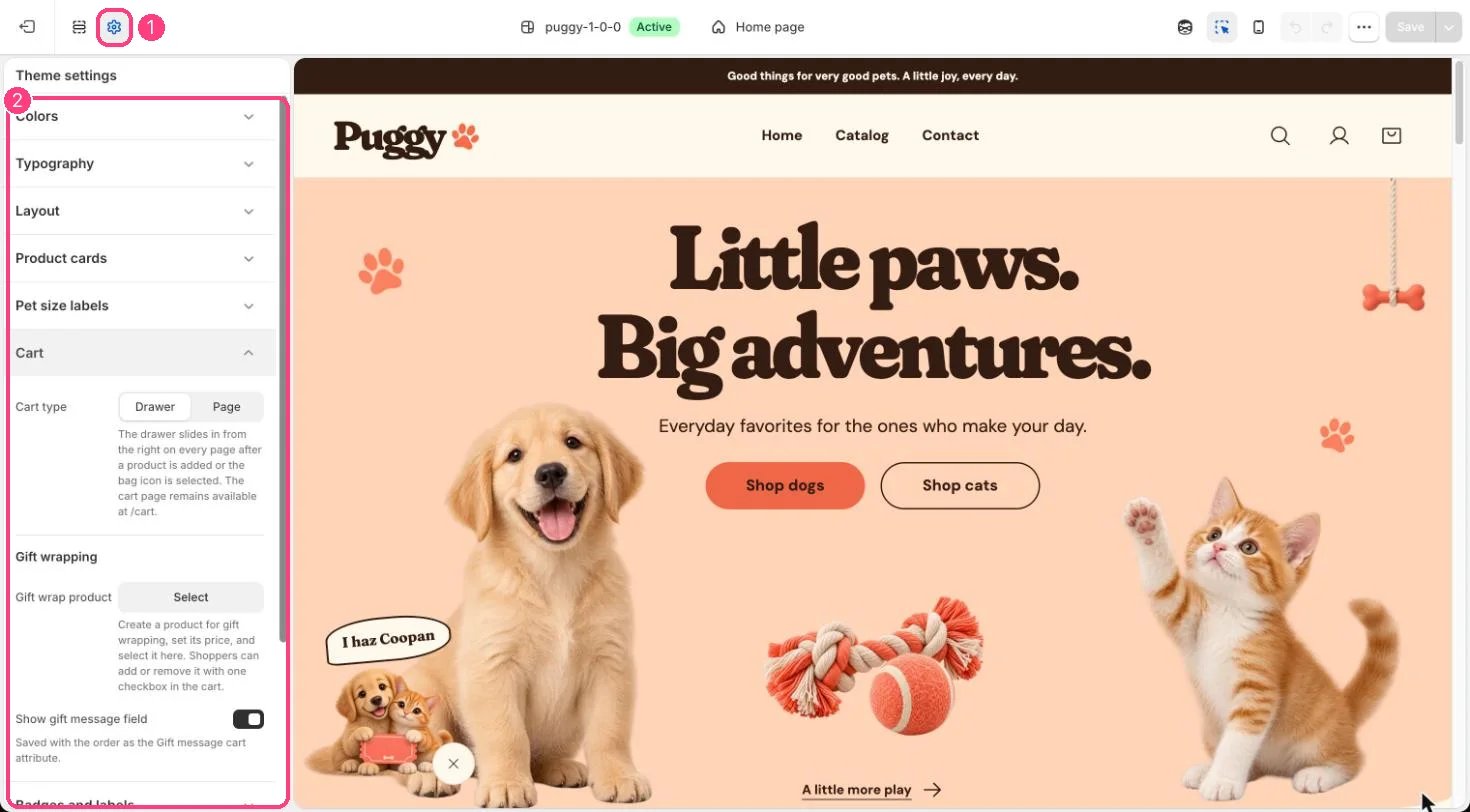 With **Theme settings > Cart > Cart type** set to **Drawer** (the default), adding a product anywhere, or selecting the bag icon, slides the bag in from the side without leaving the page. It works the same on phones and desktops.
## What's inside
* The same items, quantity controls, discounts and totals as the cart page.
* **Goes well with**: products related to the newest item in the bag, from Shopify's recommendations, or your own picks. Items already in the bag are never repeated.
* Gift wrapping, a gift message and an order note, when they are set up.
* **Continue to checkout**, express payment buttons and a **View bag** link to the full cart page.
If an item can't be added, for example because there isn't enough stock, the message appears under the add button that was used.
## Edit it in the theme editor
Open any page other than Cart and select **Cart drawer** in the sidebar. The drawer opens in the preview while it's selected. There you can set:
* **Heading**, **Color scheme** and **Empty bag image**.
* **Show vendor**, **Show order note** and **Show accelerated checkout buttons**.
* **Related products**: Product source (related to the newest bag item, or your selected products), Selected products or fallback, Fallback collection, Products to show (2 to 6) and Show add buttons.
## Good to know
* Express buttons such as Shop Pay, Apple Pay, Google Pay or PayPal appear only when an express method is active in **Settings > Payments**.
* The drawer isn't used on the cart page itself.
* To skip the drawer, set **Cart type** to **Page**. Shoppers then go to the cart page after every add.
This documentation is built and hosted on [Mintlify](https://mintlify.com), a developer documentation platform.
With **Theme settings > Cart > Cart type** set to **Drawer** (the default), adding a product anywhere, or selecting the bag icon, slides the bag in from the side without leaving the page. It works the same on phones and desktops.
## What's inside
* The same items, quantity controls, discounts and totals as the cart page.
* **Goes well with**: products related to the newest item in the bag, from Shopify's recommendations, or your own picks. Items already in the bag are never repeated.
* Gift wrapping, a gift message and an order note, when they are set up.
* **Continue to checkout**, express payment buttons and a **View bag** link to the full cart page.
If an item can't be added, for example because there isn't enough stock, the message appears under the add button that was used.
## Edit it in the theme editor
Open any page other than Cart and select **Cart drawer** in the sidebar. The drawer opens in the preview while it's selected. There you can set:
* **Heading**, **Color scheme** and **Empty bag image**.
* **Show vendor**, **Show order note** and **Show accelerated checkout buttons**.
* **Related products**: Product source (related to the newest bag item, or your selected products), Selected products or fallback, Fallback collection, Products to show (2 to 6) and Show add buttons.
## Good to know
* Express buttons such as Shop Pay, Apple Pay, Google Pay or PayPal appear only when an express method is active in **Settings > Payments**.
* The drawer isn't used on the cart page itself.
* To skip the drawer, set **Cart type** to **Page**. Shoppers then go to the cart page after every add.
This documentation is built and hosted on [Mintlify](https://mintlify.com), a developer documentation platform.