> ## Documentation Index
> Fetch the complete documentation index at: https://docs.kwebby.com/llms.txt
> Use this file to discover all available pages before exploring further.
# Gift wrapping, gift messages and order notes
> Offer gift wrap with one checkbox, collect a gift message and let shoppers leave a note with their order.
 ## Set up gift wrapping
1. In Shopify admin, create a product called something like *Gift wrapping* and set its price.
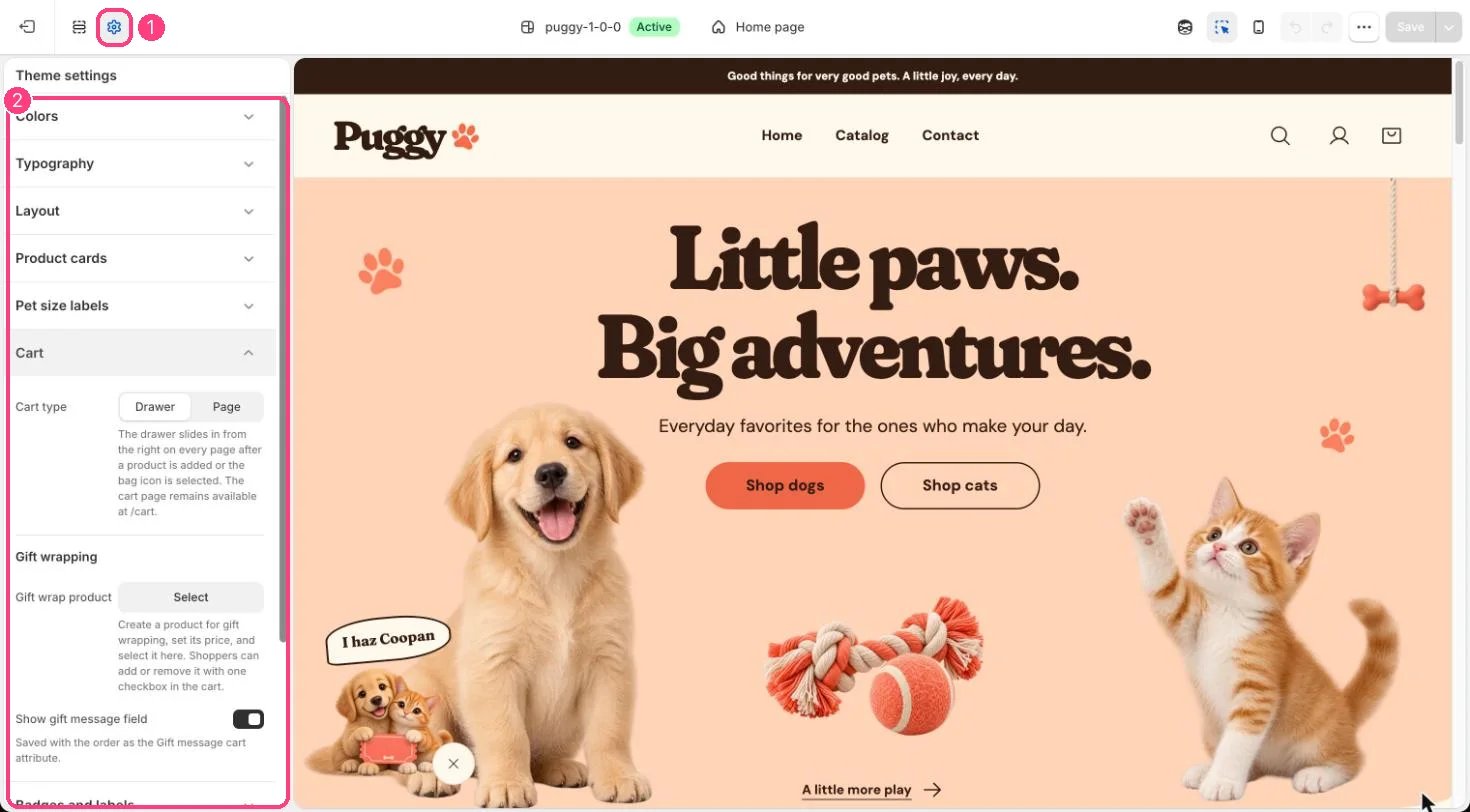
2. In the theme editor, open **Theme settings > Cart** and choose it in **Gift wrap product**.
3. Leave **Show gift message field** on if you want a message box.
Shoppers now see **Add gift wrapping** with its price in the cart drawer and on the cart page. Ticking the box adds one gift wrap item; unticking removes it. If the gift wrap product sells out, the checkbox disappears unless it's already in the bag.
Tip: keep the gift wrap product out of your collections and menus so shoppers only add it from the cart.
## Gift message
The **Gift message** box (up to 300 characters) shows whenever a gift wrap product is chosen and **Show gift message field** is on. It is saved on the order as **Gift message**, which you'll find in the order's additional details in Shopify admin.
## Order note
The order note box is controlled separately on the cart page (**Cart > Show order note**) and in the drawer (**Cart drawer > Show order note**). It becomes the order's note.
Notes and gift messages save as soon as the shopper leaves the field, so they are kept even with Shop Pay, Apple Pay and other express checkouts.
This documentation is built and hosted on [Mintlify](https://mintlify.com), a developer documentation platform.
## Set up gift wrapping
1. In Shopify admin, create a product called something like *Gift wrapping* and set its price.
2. In the theme editor, open **Theme settings > Cart** and choose it in **Gift wrap product**.
3. Leave **Show gift message field** on if you want a message box.
Shoppers now see **Add gift wrapping** with its price in the cart drawer and on the cart page. Ticking the box adds one gift wrap item; unticking removes it. If the gift wrap product sells out, the checkbox disappears unless it's already in the bag.
Tip: keep the gift wrap product out of your collections and menus so shoppers only add it from the cart.
## Gift message
The **Gift message** box (up to 300 characters) shows whenever a gift wrap product is chosen and **Show gift message field** is on. It is saved on the order as **Gift message**, which you'll find in the order's additional details in Shopify admin.
## Order note
The order note box is controlled separately on the cart page (**Cart > Show order note**) and in the drawer (**Cart drawer > Show order note**). It becomes the order's note.
Notes and gift messages save as soon as the shopper leaves the field, so they are kept even with Shop Pay, Apple Pay and other express checkouts.
This documentation is built and hosted on [Mintlify](https://mintlify.com), a developer documentation platform.