> ## Documentation Index
> Fetch the complete documentation index at: https://docs.kwebby.com/llms.txt
> Use this file to discover all available pages before exploring further.
# Night mode and the rope switch
> How shoppers switch between day and night with the hanging rope, and how you control the default look and the dark colors.
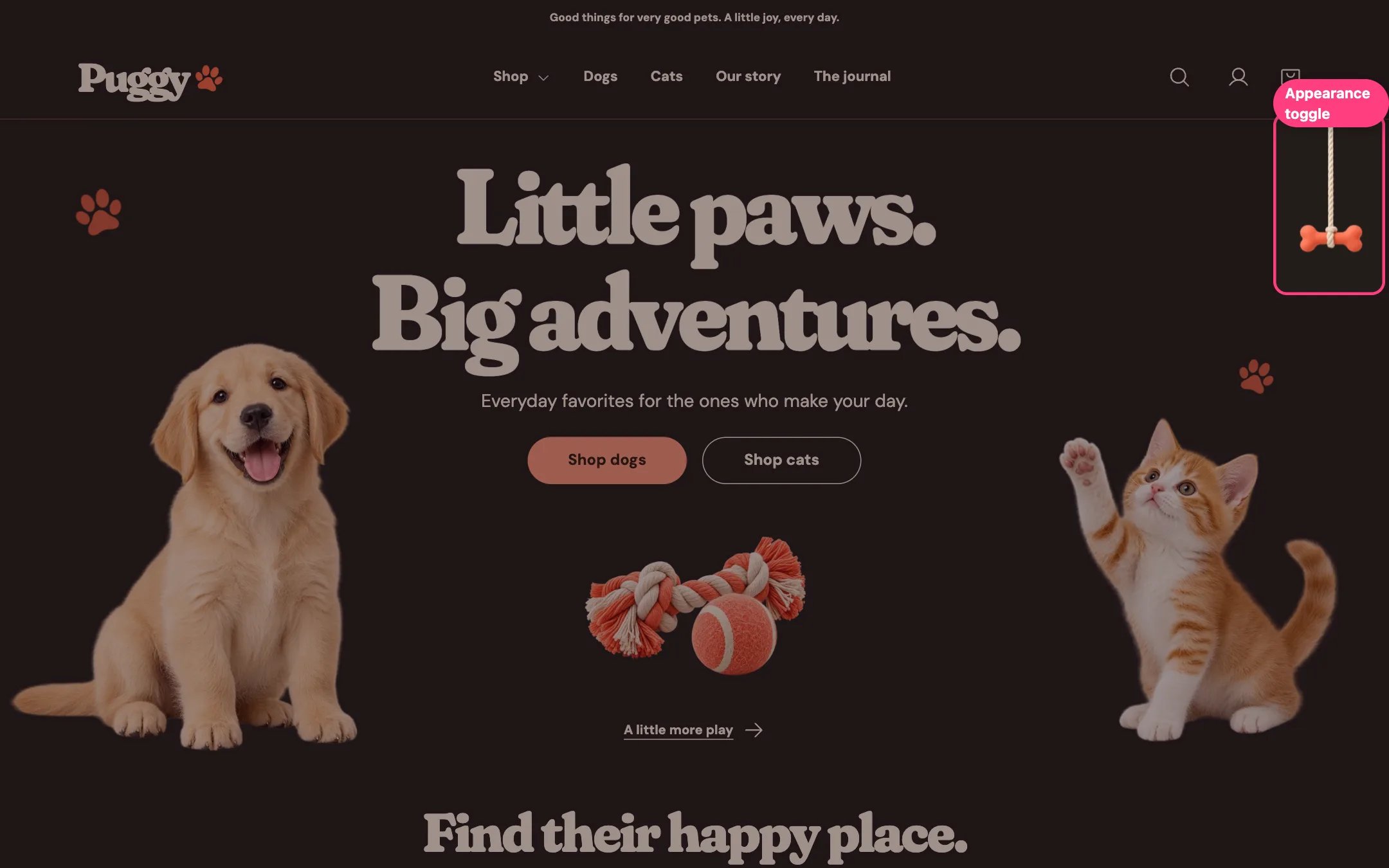
 Puggy has a light and a dark appearance. Shoppers switch with a rope and bone that hangs from the header at the top right (top left in right-to-left languages).
## What shoppers can do
* Click or tap the bone, pull the rope down, or press Tab to reach it and then Enter or Space.
* The label reads **Pull for night** or **Pull for day**. On very wide screens (1500 px and up) it is always shown; on smaller screens it appears on hover or keyboard focus.
* The rope follows the bottom edge of the header, tucks behind it while shoppers scroll down and comes back when they scroll up, so it never covers buttons or links. Only the rope and bone respond to clicks.
* For shoppers who prefer reduced motion, the rope switches without its stretch animation.
## Your settings
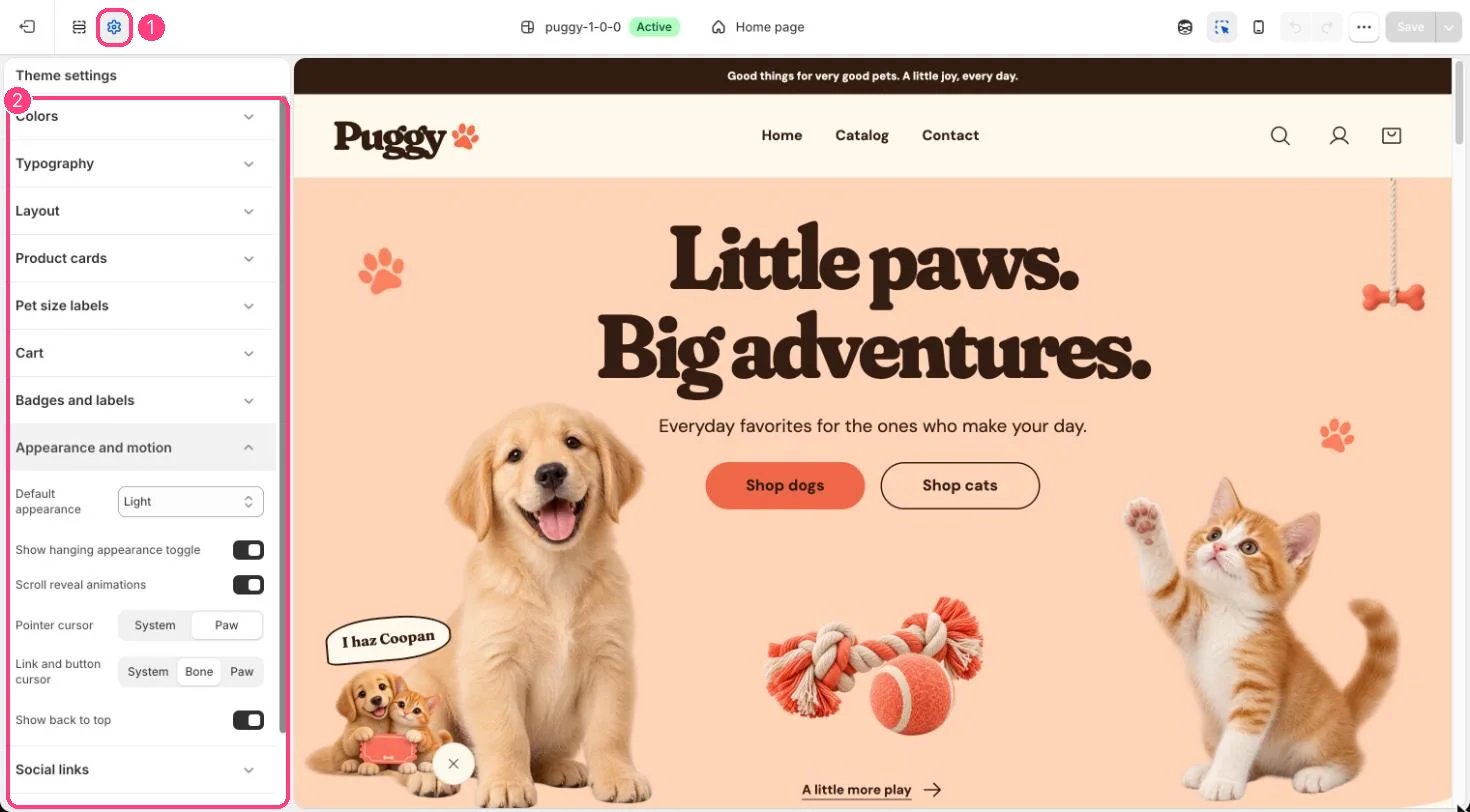
* **Theme settings > Appearance and motion > Default appearance**: Light, Dark or Follow device. Follow device uses the shopper's device setting until they pull the rope.
* **Show hanging appearance toggle** hides or shows the rope.
## Which colors the dark look uses
In the dark appearance, every section uses the colors of **Scheme 3** in **Theme settings > Colors**, whatever scheme the section normally uses. Edit Scheme 3 to change the night colors, keep it dark, and check that text and buttons stay easy to read.
## Remembering the shopper's choice
Puggy remembers a shopper's choice on later pages and visits only where their privacy settings allow it. In regions that need consent, that means after they allow preferences. Otherwise each page starts from your Default appearance. Keep the **Customer privacy** section in Promotions and privacy, even with its banner turned off, because it is what brings a saved choice back.
This documentation is built and hosted on [Mintlify](https://mintlify.com), a developer documentation platform.
Puggy has a light and a dark appearance. Shoppers switch with a rope and bone that hangs from the header at the top right (top left in right-to-left languages).
## What shoppers can do
* Click or tap the bone, pull the rope down, or press Tab to reach it and then Enter or Space.
* The label reads **Pull for night** or **Pull for day**. On very wide screens (1500 px and up) it is always shown; on smaller screens it appears on hover or keyboard focus.
* The rope follows the bottom edge of the header, tucks behind it while shoppers scroll down and comes back when they scroll up, so it never covers buttons or links. Only the rope and bone respond to clicks.
* For shoppers who prefer reduced motion, the rope switches without its stretch animation.
## Your settings
* **Theme settings > Appearance and motion > Default appearance**: Light, Dark or Follow device. Follow device uses the shopper's device setting until they pull the rope.
* **Show hanging appearance toggle** hides or shows the rope.
## Which colors the dark look uses
In the dark appearance, every section uses the colors of **Scheme 3** in **Theme settings > Colors**, whatever scheme the section normally uses. Edit Scheme 3 to change the night colors, keep it dark, and check that text and buttons stay easy to read.
## Remembering the shopper's choice
Puggy remembers a shopper's choice on later pages and visits only where their privacy settings allow it. In regions that need consent, that means after they allow preferences. Otherwise each page starts from your Default appearance. Keep the **Customer privacy** section in Promotions and privacy, even with its banner turned off, because it is what brings a saved choice back.
This documentation is built and hosted on [Mintlify](https://mintlify.com), a developer documentation platform.