> ## Documentation Index
> Fetch the complete documentation index at: https://docs.kwebby.com/llms.txt
> Use this file to discover all available pages before exploring further.
# Age verifier
> A full-screen question that asks visitors to confirm their age before they browse.
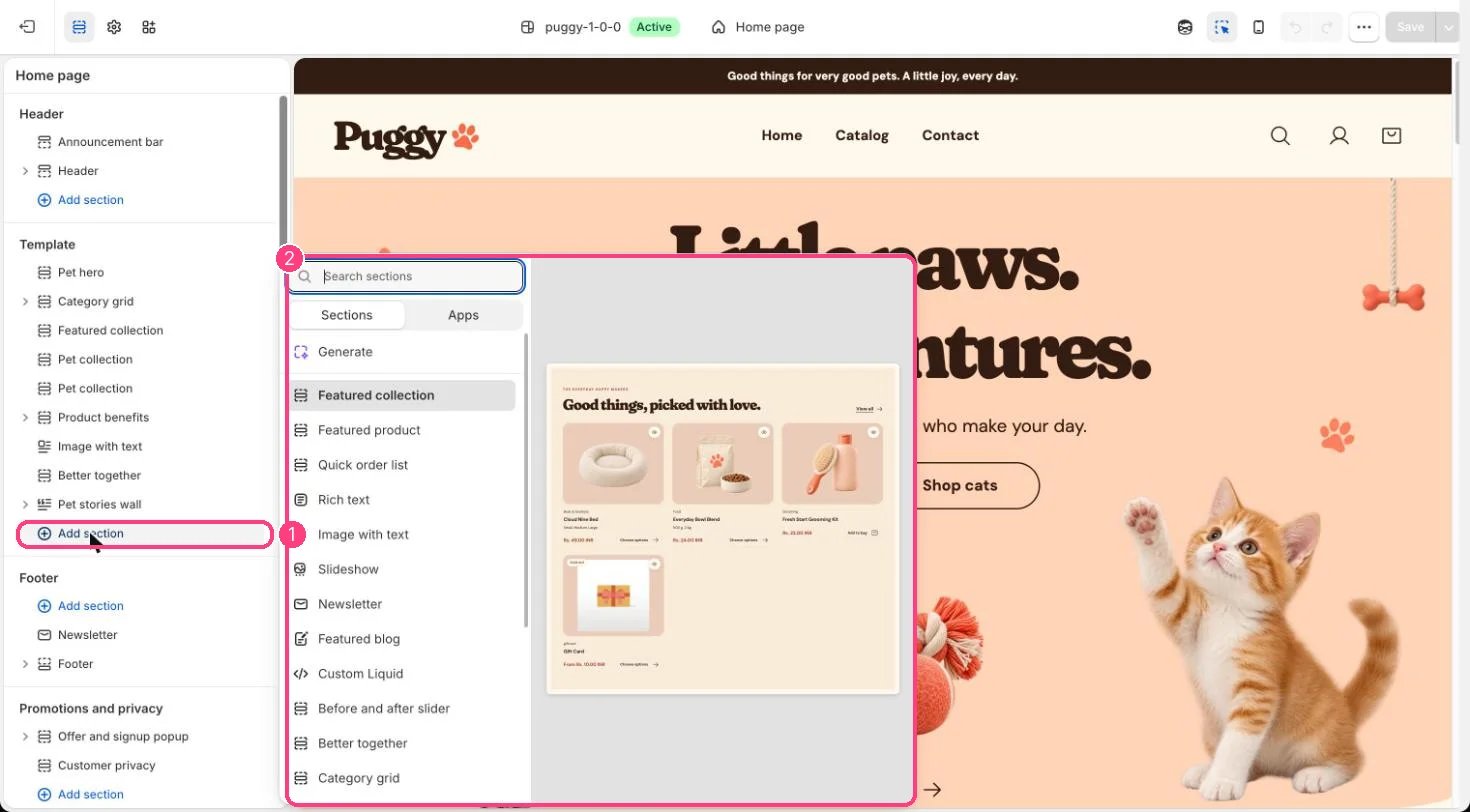 ## Where to find it
Not added by default. In the theme editor, click Add section in the Promotions and privacy area and choose Age verifier (one per store). In the editor it shows only while the section is selected.
## How it works
* Covers the store until the visitor answers. Escape doesn't close it, and the page behind can be blurred.
* Yes remembers the answer on that browser for the number of days you set (1 to 90). Visitors whose browser blocks storage are asked again on their next visit.
* No shows your decline message with a Go back button, or sends the visitor to a URL you choose.
* Shows your logo or image at the top, or your store name when none is chosen.
## Edit it
* Turn Ask visitors to confirm their age on or off.
* Write a Heading that names the minimum age for your products and region, then edit Text, Confirm button label and Decline button label.
* Choose Decline behavior: Show a message or Send to a URL, then fill Decline message or Decline URL.
* Set Remember the answer for, Blur the page behind and Color scheme.
## Settings
| Setting | What it does |
| - | - |
| **Ask visitors to confirm their age** | On or off. Shown before visitors browse the store. In the theme editor it appears only while this section is selected. Default: on. |
**Content**
| Setting | What it does |
| - | - |
| **Logo or image** | Image: upload one or choose from Content → Files. The store name is shown when no image is selected. |
| **Heading** | Text. Include the minimum age that applies to your products and region. Default: Are you 18 or older?. |
| **Text** | Formatted text. |
| **Confirm button label** | Text. Default: Yes, I am. |
| **Decline button label** | Text. Default: No, I am not. |
**When a visitor declines**
| Setting | What it does |
| - | - |
| **Decline behavior** | Options: Show a message, Send to a URL. Default: Show a message. |
| **Decline message** | Formatted text. Also shown when no decline URL is set. |
| **Decline URL** | Link: a page, product, collection or web address. Used when visitors are sent to a URL. The theme editor shows the decline message instead of leaving the page. |
**Behavior**
| Setting | What it does |
| - | - |
| **Remember the answer for** | Slider from 1 to 90 d. Number of days. Visitors whose browser blocks storage are asked again on their next visit. Default: 30 d. |
| **Blur the page behind** | On or off. Default: on. |
| **Color scheme** | Color scheme for this area (edit the schemes in Theme settings → Colors). Default: Scheme 1. |
This is a self-declaration prompt, not proof of age. Check which age rules apply to your products and where you sell.
This documentation is built and hosted on [Mintlify](https://mintlify.com), a developer documentation platform.
## Where to find it
Not added by default. In the theme editor, click Add section in the Promotions and privacy area and choose Age verifier (one per store). In the editor it shows only while the section is selected.
## How it works
* Covers the store until the visitor answers. Escape doesn't close it, and the page behind can be blurred.
* Yes remembers the answer on that browser for the number of days you set (1 to 90). Visitors whose browser blocks storage are asked again on their next visit.
* No shows your decline message with a Go back button, or sends the visitor to a URL you choose.
* Shows your logo or image at the top, or your store name when none is chosen.
## Edit it
* Turn Ask visitors to confirm their age on or off.
* Write a Heading that names the minimum age for your products and region, then edit Text, Confirm button label and Decline button label.
* Choose Decline behavior: Show a message or Send to a URL, then fill Decline message or Decline URL.
* Set Remember the answer for, Blur the page behind and Color scheme.
## Settings
| Setting | What it does |
| - | - |
| **Ask visitors to confirm their age** | On or off. Shown before visitors browse the store. In the theme editor it appears only while this section is selected. Default: on. |
**Content**
| Setting | What it does |
| - | - |
| **Logo or image** | Image: upload one or choose from Content → Files. The store name is shown when no image is selected. |
| **Heading** | Text. Include the minimum age that applies to your products and region. Default: Are you 18 or older?. |
| **Text** | Formatted text. |
| **Confirm button label** | Text. Default: Yes, I am. |
| **Decline button label** | Text. Default: No, I am not. |
**When a visitor declines**
| Setting | What it does |
| - | - |
| **Decline behavior** | Options: Show a message, Send to a URL. Default: Show a message. |
| **Decline message** | Formatted text. Also shown when no decline URL is set. |
| **Decline URL** | Link: a page, product, collection or web address. Used when visitors are sent to a URL. The theme editor shows the decline message instead of leaving the page. |
**Behavior**
| Setting | What it does |
| - | - |
| **Remember the answer for** | Slider from 1 to 90 d. Number of days. Visitors whose browser blocks storage are asked again on their next visit. Default: 30 d. |
| **Blur the page behind** | On or off. Default: on. |
| **Color scheme** | Color scheme for this area (edit the schemes in Theme settings → Colors). Default: Scheme 1. |
This is a self-declaration prompt, not proof of age. Check which age rules apply to your products and where you sell.
This documentation is built and hosted on [Mintlify](https://mintlify.com), a developer documentation platform.