> ## Documentation Index
> Fetch the complete documentation index at: https://docs.kwebby.com/llms.txt
> Use this file to discover all available pages before exploring further.
# Apps
> A container for app blocks from the apps you install, plus Custom Liquid blocks.
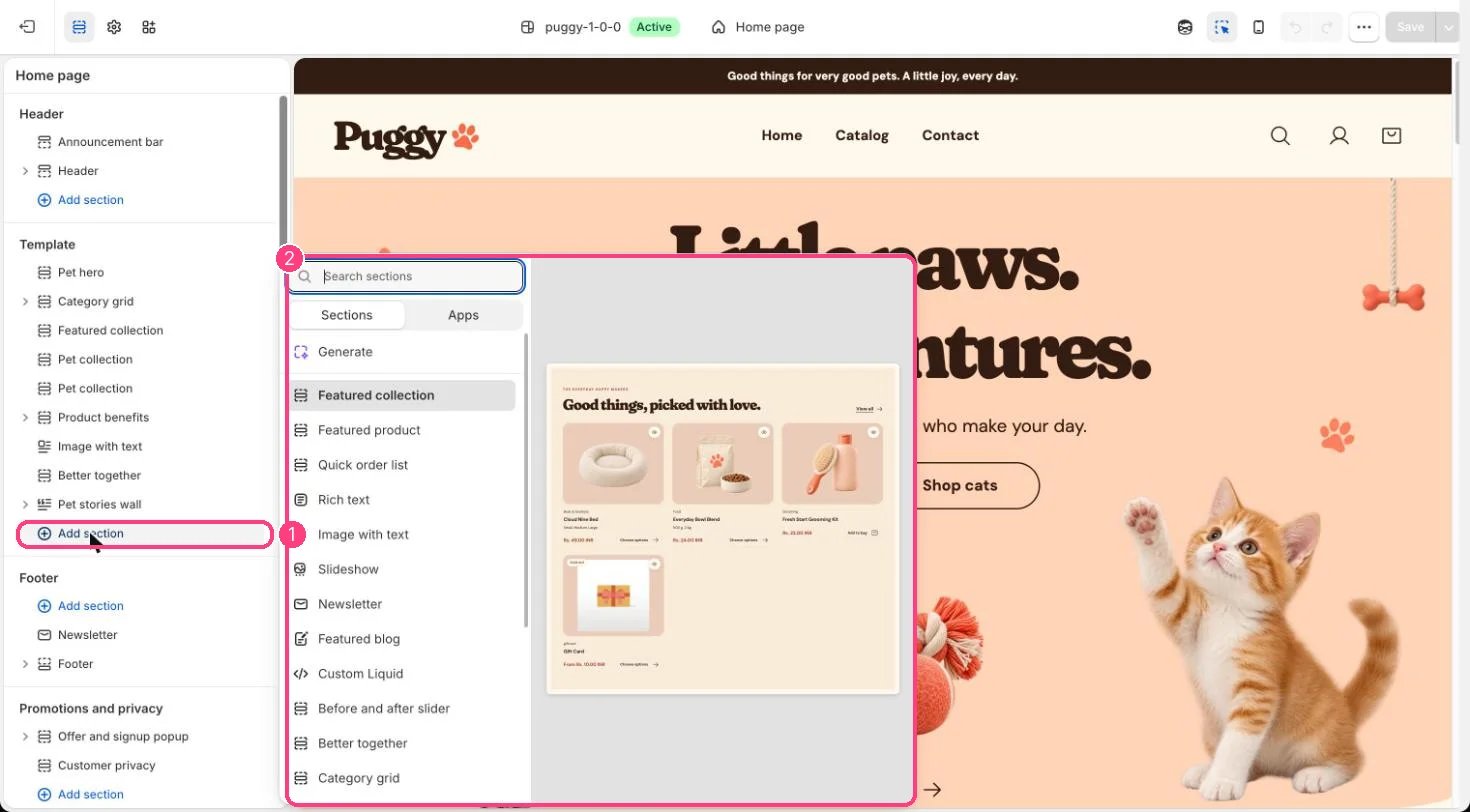 ## Where to find it
Add it to any page with Add section > Apps.
## How it works
* Shows app blocks provided by your installed apps inside the theme's page width, color scheme and spacing.
* Custom Liquid blocks can sit alongside app blocks.
## Edit it
* Click Add block and choose an app block or Custom Liquid.
* Set the Color scheme and spacing.
## Settings
| Setting | What it does |
| - | - |
| **Color scheme** | Color scheme for this area (edit the schemes in Theme settings → Colors). Default: Scheme 1. |
| **Top spacing** | Slider from 0 to 120 px, in steps of 4. Default: 64 px. |
| **Bottom spacing** | Slider from 0 to 120 px, in steps of 4. Default: 64 px. |
## Blocks
Add a block with **Add block** under the section in the sidebar; drag blocks to reorder them.
### App blocks
Blocks from apps you have installed, such as reviews or subscriptions. Click **Add block** and choose one from the Apps tab; its settings come from the app.
### Custom Liquid
| Setting | What it does |
| - | - |
| **Custom Liquid** | Liquid code. |
App blocks are set up inside each app. Puggy's shopping features work without any app installed.
This documentation is built and hosted on [Mintlify](https://mintlify.com), a developer documentation platform.
## Where to find it
Add it to any page with Add section > Apps.
## How it works
* Shows app blocks provided by your installed apps inside the theme's page width, color scheme and spacing.
* Custom Liquid blocks can sit alongside app blocks.
## Edit it
* Click Add block and choose an app block or Custom Liquid.
* Set the Color scheme and spacing.
## Settings
| Setting | What it does |
| - | - |
| **Color scheme** | Color scheme for this area (edit the schemes in Theme settings → Colors). Default: Scheme 1. |
| **Top spacing** | Slider from 0 to 120 px, in steps of 4. Default: 64 px. |
| **Bottom spacing** | Slider from 0 to 120 px, in steps of 4. Default: 64 px. |
## Blocks
Add a block with **Add block** under the section in the sidebar; drag blocks to reorder them.
### App blocks
Blocks from apps you have installed, such as reviews or subscriptions. Click **Add block** and choose one from the Apps tab; its settings come from the app.
### Custom Liquid
| Setting | What it does |
| - | - |
| **Custom Liquid** | Liquid code. |
App blocks are set up inside each app. Puggy's shopping features work without any app installed.
This documentation is built and hosted on [Mintlify](https://mintlify.com), a developer documentation platform.