> ## Documentation Index
> Fetch the complete documentation index at: https://docs.kwebby.com/llms.txt
> Use this file to discover all available pages before exploring further.
# Cart
> The full cart page with items, quantity controls, gift wrap, gift message, order note, discounts, totals, checkout and basket recommendations.
 ## Where to find it
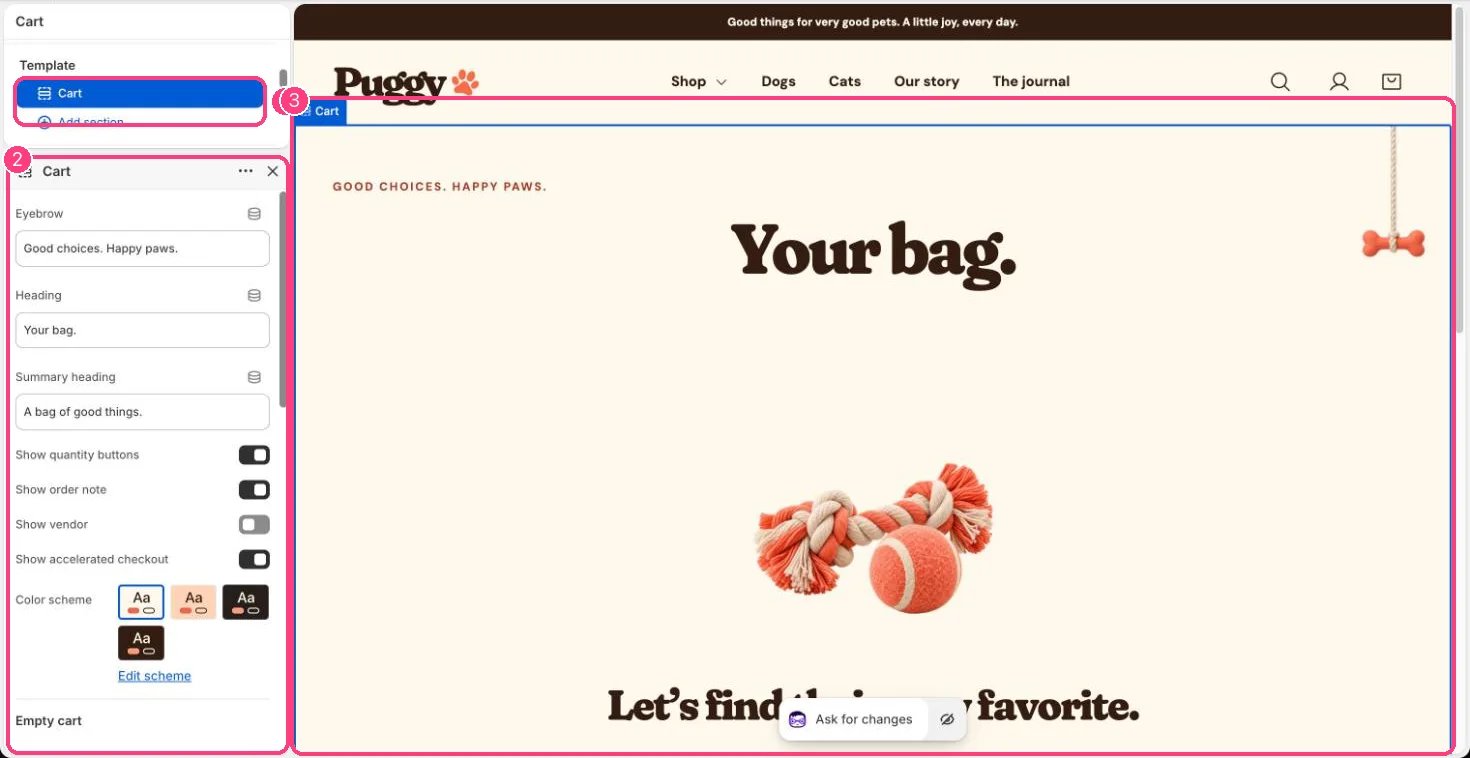
The cart page at /cart. In the theme editor, choose Cart in the top page selector, then select Cart.
## How it works
* Lists each item with image, options, subscription plan, custom details, unit price, discounts and line total.
* Changing a quantity or removing an item updates the cart without reloading. An Update bag button is there too.
* Shows the subtotal, cart discounts, the estimated total and a tax and shipping note that follows your store's tax settings.
* Continue to checkout opens Shopify checkout. Express payment buttons such as Shop Pay, Apple Pay, Google Pay or PayPal appear when turned on here and enabled for your store.
* The order note and gift message save as soon as shoppers leave the field, so they are kept even with express checkout.
* Basket recommendations suggest products related to the first item in the bag, or your own picks, skipping items already in the bag and sold-out products. Add buttons add them without leaving the page.
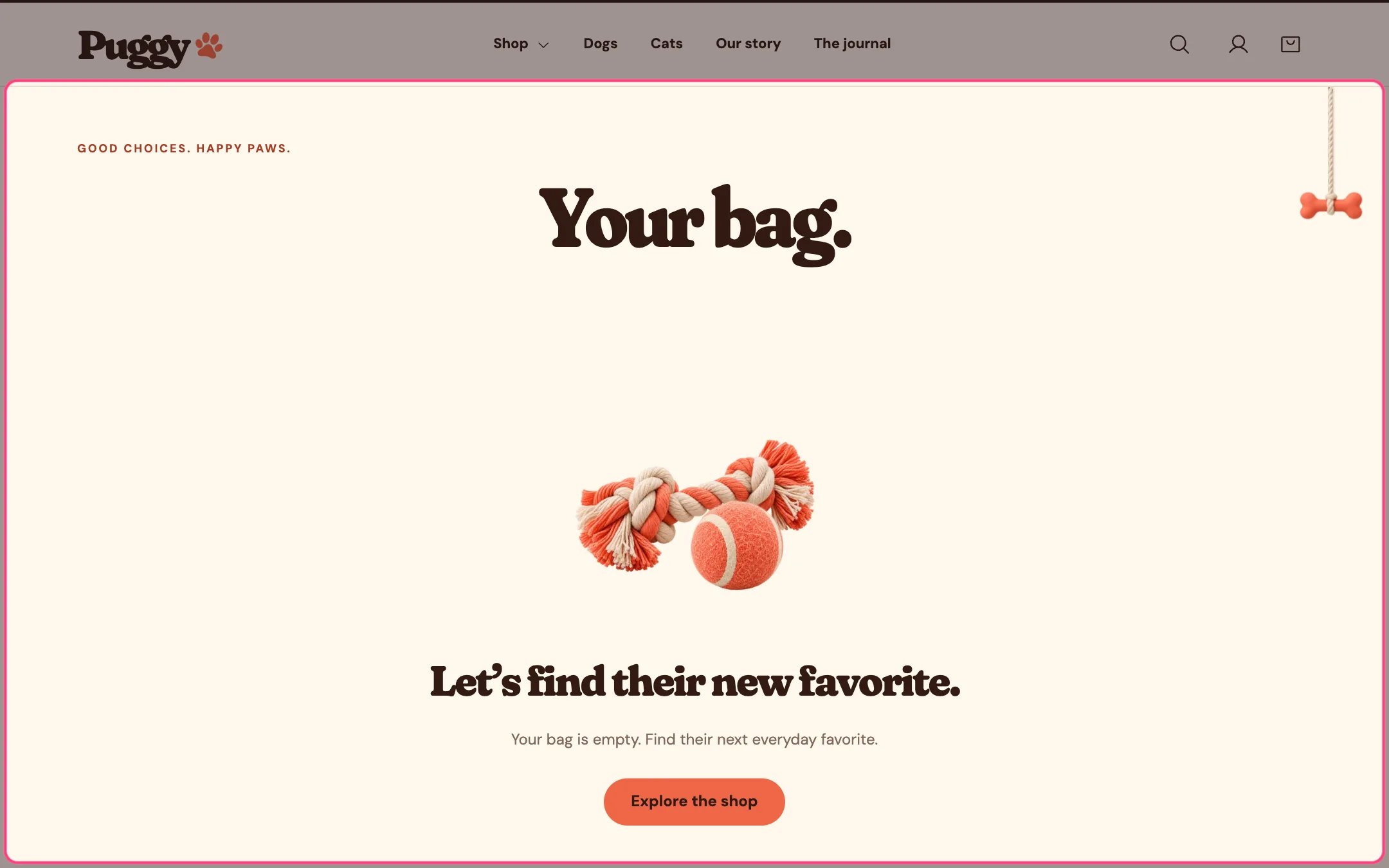
* An empty cart shows an image, a heading and a button to explore the shop.
## Where to find it
The cart page at /cart. In the theme editor, choose Cart in the top page selector, then select Cart.
## How it works
* Lists each item with image, options, subscription plan, custom details, unit price, discounts and line total.
* Changing a quantity or removing an item updates the cart without reloading. An Update bag button is there too.
* Shows the subtotal, cart discounts, the estimated total and a tax and shipping note that follows your store's tax settings.
* Continue to checkout opens Shopify checkout. Express payment buttons such as Shop Pay, Apple Pay, Google Pay or PayPal appear when turned on here and enabled for your store.
* The order note and gift message save as soon as shoppers leave the field, so they are kept even with express checkout.
* Basket recommendations suggest products related to the first item in the bag, or your own picks, skipping items already in the bag and sold-out products. Add buttons add them without leaving the page.
* An empty cart shows an image, a heading and a button to explore the shop.
 ## Edit it
* Edit Eyebrow, Heading and Summary heading.
* Turn Show quantity buttons, Show order note, Show vendor and Show accelerated checkout on or off.
* Under Empty cart, set the Heading and Image.
* Under Basket recommendations, choose Product source, Selected products or fallback, Fallback collection, Products to show (2 to 6) and Show add buttons. Turn it off with Show basket recommendations.
* Gift wrapping and the gift message are set in Theme settings > Cart.
## Settings
| Setting | What it does |
| - | - |
| **Eyebrow** | Text. Default: Good choices. Happy paws. |
| **Heading** | Text. Default: Your bag. |
| **Summary heading** | Text. Default: A bag of good things. |
| **Show quantity buttons** | On or off. Default: on. |
| **Show order note** | On or off. Default: on. |
| **Show vendor** | On or off. Default: off. |
| **Show accelerated checkout** | On or off. Default: on. |
| **Color scheme** | Color scheme for this area (edit the schemes in Theme settings → Colors). Default: Scheme 1. |
**Empty cart**
| Setting | What it does |
| - | - |
| **Heading** | Text. Default: Let’s find their new favorite. |
| **Image** | Image: upload one or choose from Content → Files. |
**Basket recommendations**
| Setting | What it does |
| - | - |
| **Show basket recommendations** | On or off. Default: on. |
| **Heading** | Text. Default: Make Your Basket Even Better. |
| **Description** | Text. Default: A few little extras for more tail wags and happy days. |
| **Product source** | Options: Related to the first basket item, Your selected products. Automatic suggestions use Shopify recommendations. Your selected products or collection are shown while loading and if no suggestions are available. Default: Related to the first basket item. |
| **Selected products or fallback** | Choose products. |
| **Fallback collection** | Choose a collection. Used when no products are selected. Defaults to the store catalog. |
| **Products to show** | Slider from 2 to 6. Default: 4. |
| **Show add buttons** | On or off. Default: on. |
Shopify calculates totals, discounts, shipping and taxes. The theme doesn't apply discount codes itself.
The cart drawer has its own settings in the Cart drawer section.
This documentation is built and hosted on [Mintlify](https://mintlify.com), a developer documentation platform.
## Edit it
* Edit Eyebrow, Heading and Summary heading.
* Turn Show quantity buttons, Show order note, Show vendor and Show accelerated checkout on or off.
* Under Empty cart, set the Heading and Image.
* Under Basket recommendations, choose Product source, Selected products or fallback, Fallback collection, Products to show (2 to 6) and Show add buttons. Turn it off with Show basket recommendations.
* Gift wrapping and the gift message are set in Theme settings > Cart.
## Settings
| Setting | What it does |
| - | - |
| **Eyebrow** | Text. Default: Good choices. Happy paws. |
| **Heading** | Text. Default: Your bag. |
| **Summary heading** | Text. Default: A bag of good things. |
| **Show quantity buttons** | On or off. Default: on. |
| **Show order note** | On or off. Default: on. |
| **Show vendor** | On or off. Default: off. |
| **Show accelerated checkout** | On or off. Default: on. |
| **Color scheme** | Color scheme for this area (edit the schemes in Theme settings → Colors). Default: Scheme 1. |
**Empty cart**
| Setting | What it does |
| - | - |
| **Heading** | Text. Default: Let’s find their new favorite. |
| **Image** | Image: upload one or choose from Content → Files. |
**Basket recommendations**
| Setting | What it does |
| - | - |
| **Show basket recommendations** | On or off. Default: on. |
| **Heading** | Text. Default: Make Your Basket Even Better. |
| **Description** | Text. Default: A few little extras for more tail wags and happy days. |
| **Product source** | Options: Related to the first basket item, Your selected products. Automatic suggestions use Shopify recommendations. Your selected products or collection are shown while loading and if no suggestions are available. Default: Related to the first basket item. |
| **Selected products or fallback** | Choose products. |
| **Fallback collection** | Choose a collection. Used when no products are selected. Defaults to the store catalog. |
| **Products to show** | Slider from 2 to 6. Default: 4. |
| **Show add buttons** | On or off. Default: on. |
Shopify calculates totals, discounts, shipping and taxes. The theme doesn't apply discount codes itself.
The cart drawer has its own settings in the Cart drawer section.
This documentation is built and hosted on [Mintlify](https://mintlify.com), a developer documentation platform.