> ## Documentation Index
> Fetch the complete documentation index at: https://docs.kwebby.com/llms.txt
> Use this file to discover all available pages before exploring further.
# Customer privacy
> A cookie choices panel that works with Shopify's customer privacy settings. It powers the footer's Privacy choices link and can also show itself as a banner.
## Where to find it
Every page, in the Promotions and privacy area of the sidebar. Select Customer privacy. If you removed it, click Add section in Promotions and privacy (one per store).
## How it works
* Offers Preferences, Analytics and Marketing choices with Accept all, Reject optional and Save choices. An option for the sale or sharing of data appears in regions where it applies.
* Choices are saved through Shopify's customer privacy system, the same record Shopify's own banner uses.
* Shoppers whose browser sends a Global Privacy Control signal can't opt in to the sale of data here.
* The footer's Privacy choices link opens the panel at any time.
* With Automatically show Puggy cookie banner on, the panel appears for visitors in regions where Shopify says a banner is needed and who haven't chosen yet.
* When shoppers allow preferences, Puggy can remember their light or dark choice on later visits.
* If saving fails, a message asks the shopper to try again.
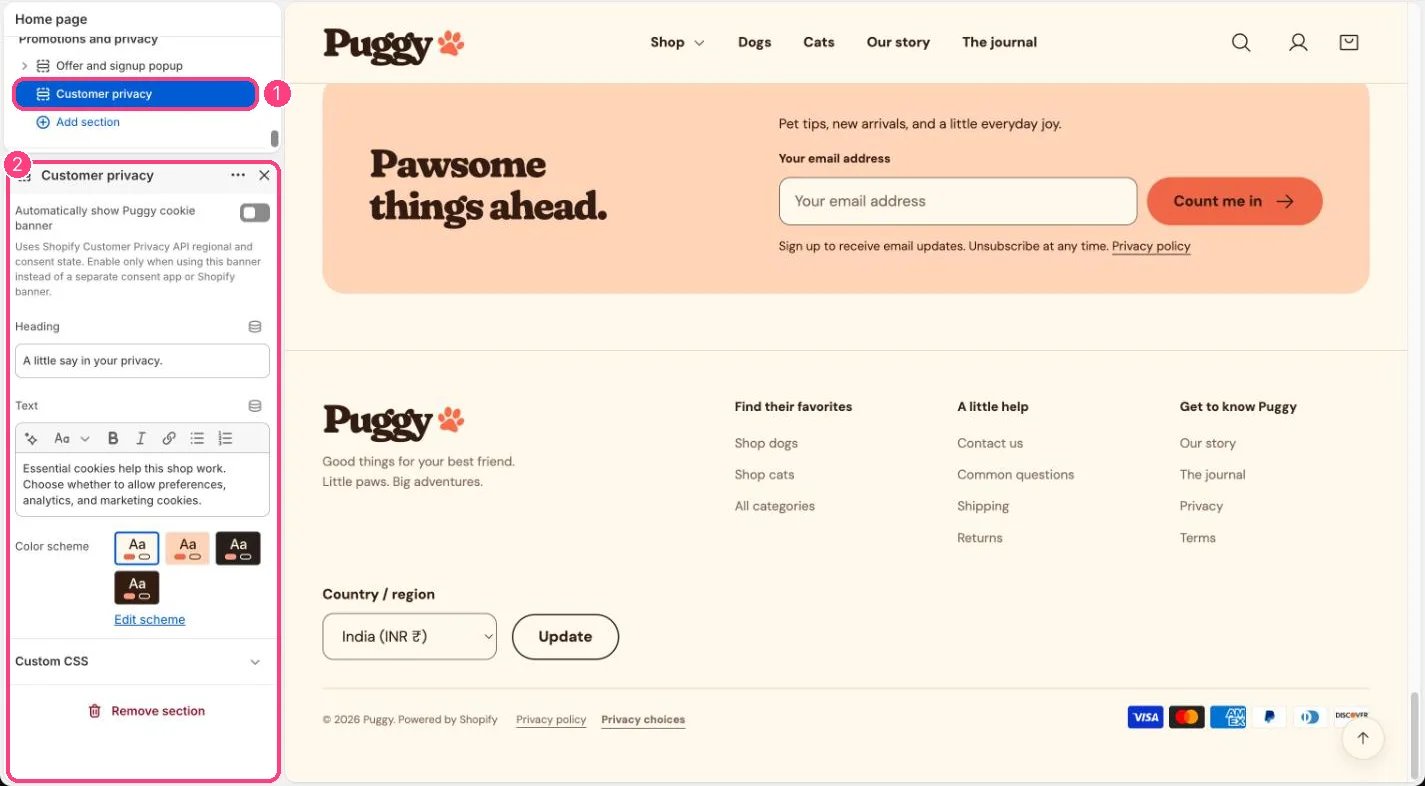 ## Edit it
* Edit Heading, Text and Color scheme.
* Leave Automatically show Puggy cookie banner off if you use Shopify's cookie banner (Settings > Customer privacy) or a consent app.
* Publish your privacy policy in Settings > Policies; the panel links to it.
## Settings
| Setting | What it does |
| - | - |
| **Automatically show Puggy cookie banner** | On or off. Uses Shopify Customer Privacy API regional and consent state. Enable only when using this banner instead of a separate consent app or Shopify banner. Default: off. |
| **Heading** | Text. Default: A little say in your privacy. |
| **Text** | Formatted text. |
| **Color scheme** | Color scheme for this area (edit the schemes in Theme settings → Colors). Default: Scheme 1. |
Use one cookie banner only. Two overlapping banners confuse shoppers.
Whether a banner appears depends on the visitor's region and your setup in Settings > Customer privacy.
This documentation is built and hosted on [Mintlify](https://mintlify.com), a developer documentation platform.
## Edit it
* Edit Heading, Text and Color scheme.
* Leave Automatically show Puggy cookie banner off if you use Shopify's cookie banner (Settings > Customer privacy) or a consent app.
* Publish your privacy policy in Settings > Policies; the panel links to it.
## Settings
| Setting | What it does |
| - | - |
| **Automatically show Puggy cookie banner** | On or off. Uses Shopify Customer Privacy API regional and consent state. Enable only when using this banner instead of a separate consent app or Shopify banner. Default: off. |
| **Heading** | Text. Default: A little say in your privacy. |
| **Text** | Formatted text. |
| **Color scheme** | Color scheme for this area (edit the schemes in Theme settings → Colors). Default: Scheme 1. |
Use one cookie banner only. Two overlapping banners confuse shoppers.
Whether a banner appears depends on the visitor's region and your setup in Settings > Customer privacy.
This documentation is built and hosted on [Mintlify](https://mintlify.com), a developer documentation platform.