> ## Documentation Index
> Fetch the complete documentation index at: https://docs.kwebby.com/llms.txt
> Use this file to discover all available pages before exploring further.
# Featured blog
> Two to four recent articles from a blog you choose, with a View all link.
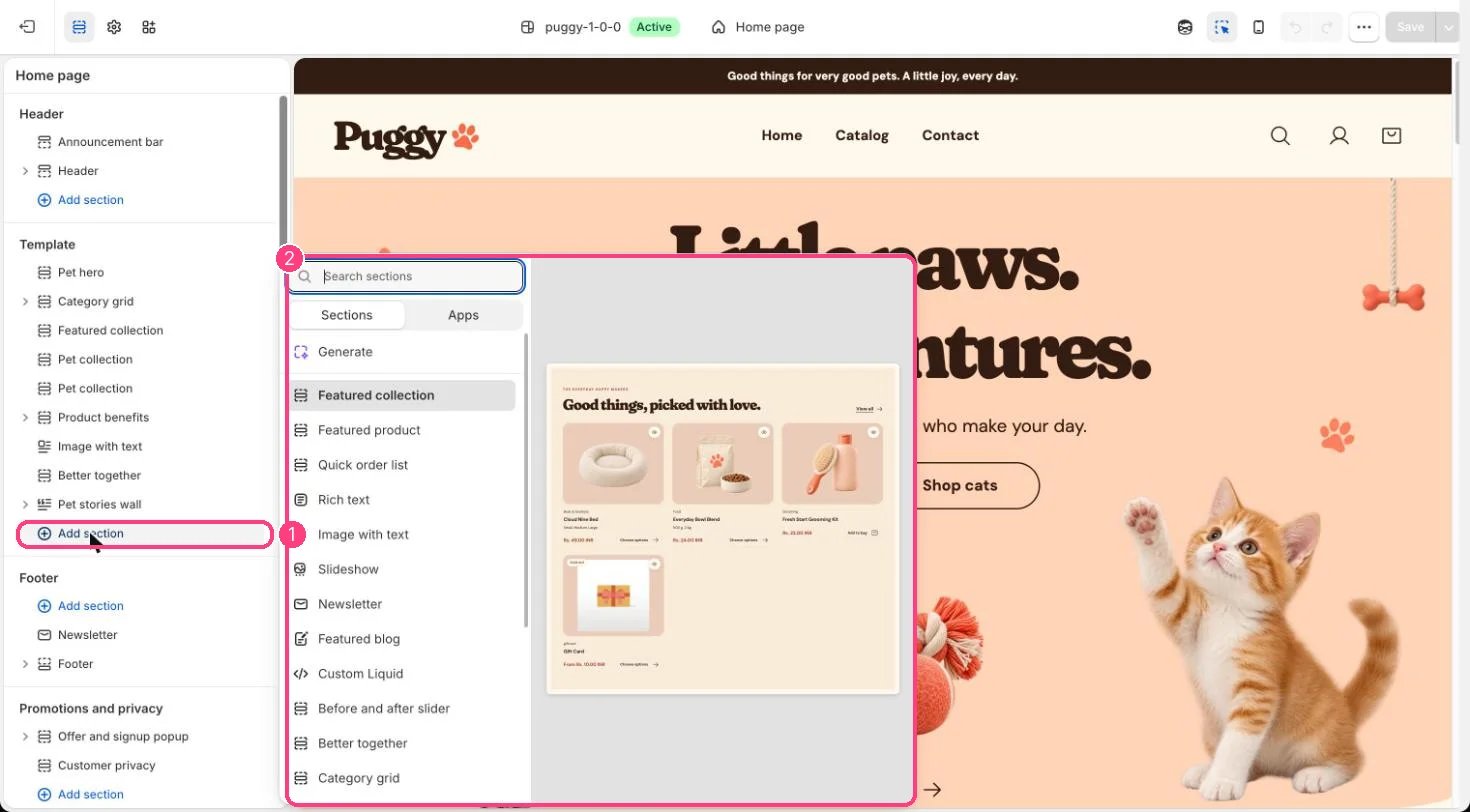 ## Where to find it
Not on a default template. Add it to the home page or any page with Add section > Featured blog, then choose a Blog.
## How it works
* Shows article cards with featured image, date, author, an excerpt and a Read the story link.
* Stays hidden on the storefront until a blog is chosen.
* View all links to the blog.
## Edit it
* Choose the Blog and set Articles (2 to 4).
* Edit Eyebrow and Heading, and set the Color scheme and spacing.
## Settings
| Setting | What it does |
| - | - |
| **Blog** | Choose a blog. |
| **Eyebrow** | Text. Default: Notes from our little corner. |
| **Heading** | Text. Default: For a happier life together. |
| **Articles** | Slider from 2 to 4. Default: 3. |
| **Color scheme** | Color scheme for this area (edit the schemes in Theme settings → Colors). Default: Scheme 1. |
| **Top spacing** | Slider from 0 to 120 px, in steps of 4. Default: 64 px. |
| **Bottom spacing** | Slider from 0 to 120 px, in steps of 4. Default: 64 px. |
This documentation is built and hosted on [Mintlify](https://mintlify.com), a developer documentation platform.
## Where to find it
Not on a default template. Add it to the home page or any page with Add section > Featured blog, then choose a Blog.
## How it works
* Shows article cards with featured image, date, author, an excerpt and a Read the story link.
* Stays hidden on the storefront until a blog is chosen.
* View all links to the blog.
## Edit it
* Choose the Blog and set Articles (2 to 4).
* Edit Eyebrow and Heading, and set the Color scheme and spacing.
## Settings
| Setting | What it does |
| - | - |
| **Blog** | Choose a blog. |
| **Eyebrow** | Text. Default: Notes from our little corner. |
| **Heading** | Text. Default: For a happier life together. |
| **Articles** | Slider from 2 to 4. Default: 3. |
| **Color scheme** | Color scheme for this area (edit the schemes in Theme settings → Colors). Default: Scheme 1. |
| **Top spacing** | Slider from 0 to 120 px, in steps of 4. Default: 64 px. |
| **Bottom spacing** | Slider from 0 to 120 px, in steps of 4. Default: 64 px. |
This documentation is built and hosted on [Mintlify](https://mintlify.com), a developer documentation platform.