> ## Documentation Index
> Fetch the complete documentation index at: https://docs.kwebby.com/llms.txt
> Use this file to discover all available pages before exploring further.
# Offer and signup popup
> A popup with your offer, discount code, optional countdown and email signup, opened by a small mascot in the corner or after a delay.
 ## Where to find it
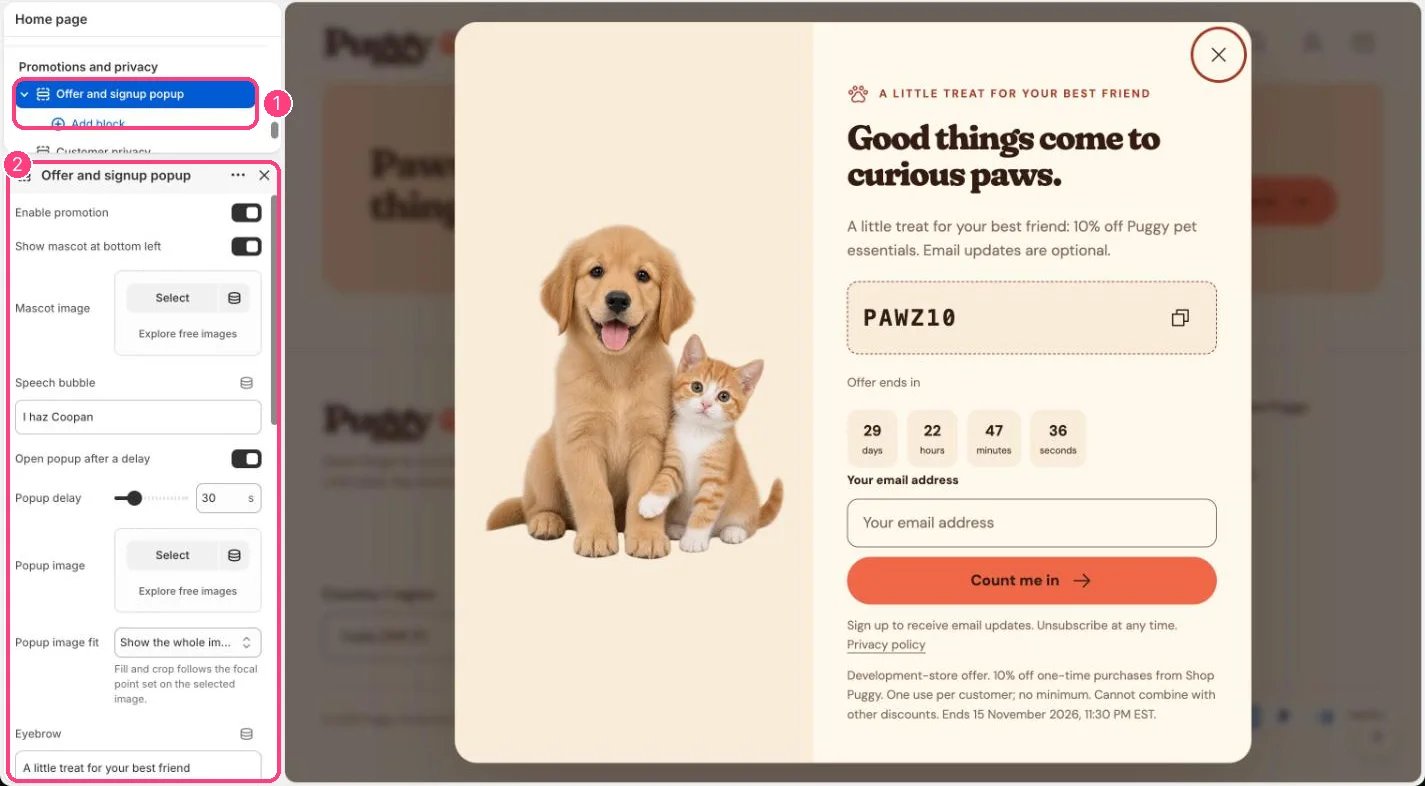
Every page, in the Promotions and privacy area of the sidebar. Select Offer and signup popup; the popup opens in the preview while it's selected. If you removed it, click Add section in Promotions and privacy (one per store).
## How it works
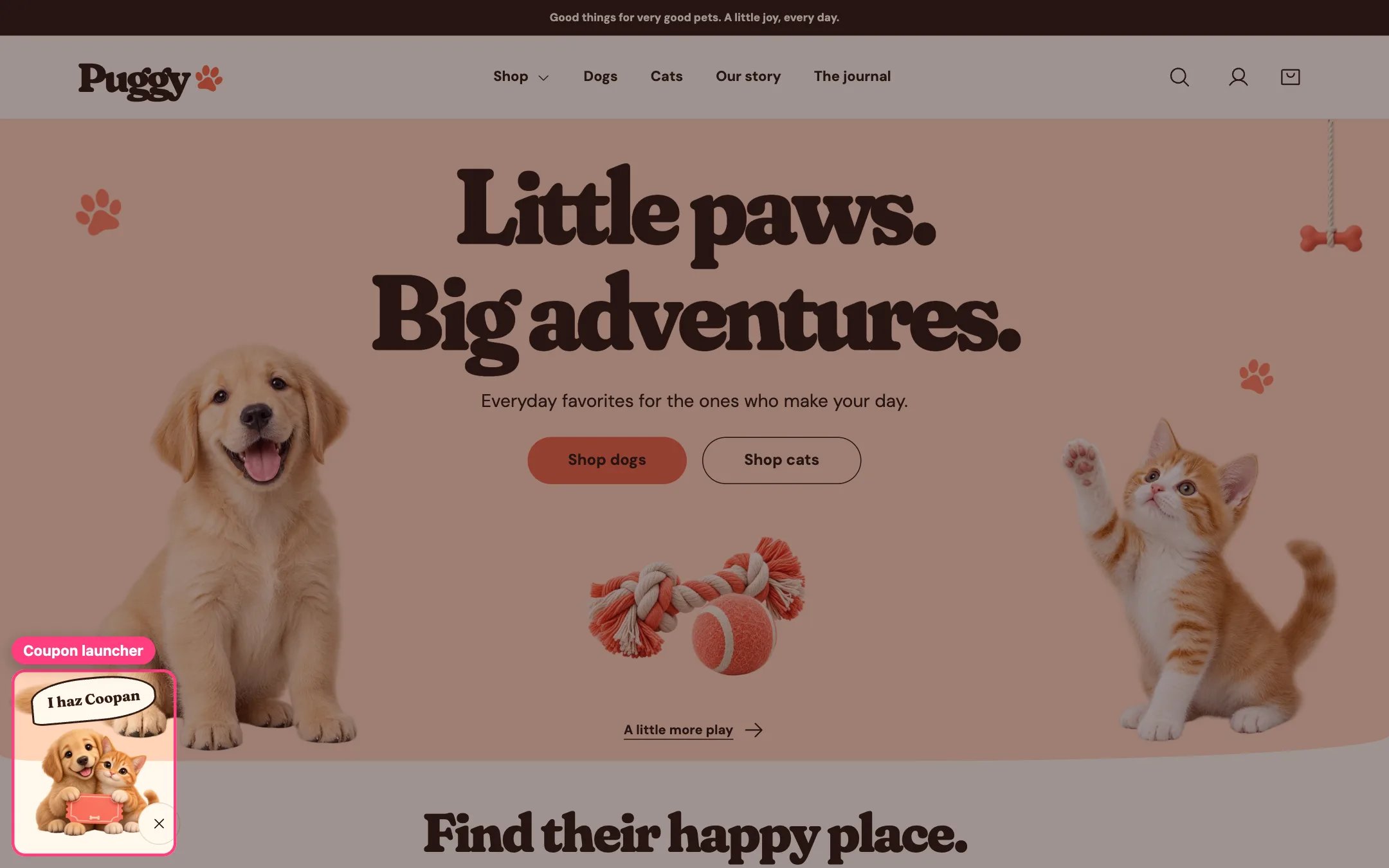
* Off by default. With Enable promotion on, a mascot with a speech bubble sits at the bottom left, and selecting it opens the popup.
* The mascot tucks away while shoppers scroll down or reach the footer, and they can dismiss it for the rest of their visit. It never shows on cart and account pages.
* With Open popup after a delay on, the popup opens by itself once per browser session after 5 to 120 seconds. It doesn't open while a shopper is typing or another window is open, and never opens by itself on cart, account or content pages.
* Shows your discount code with a Copy code button.
* With a valid end time, a countdown shows days, hours, minutes and seconds. At zero it says the offer has ended and copying is turned off.
* The email signup uses Shopify's customer form, like the Newsletter section. After a signup the page reloads and the popup reopens to show the confirmation or any error.
* App blocks and Custom Liquid blocks can add more content inside the popup.
## Where to find it
Every page, in the Promotions and privacy area of the sidebar. Select Offer and signup popup; the popup opens in the preview while it's selected. If you removed it, click Add section in Promotions and privacy (one per store).
## How it works
* Off by default. With Enable promotion on, a mascot with a speech bubble sits at the bottom left, and selecting it opens the popup.
* The mascot tucks away while shoppers scroll down or reach the footer, and they can dismiss it for the rest of their visit. It never shows on cart and account pages.
* With Open popup after a delay on, the popup opens by itself once per browser session after 5 to 120 seconds. It doesn't open while a shopper is typing or another window is open, and never opens by itself on cart, account or content pages.
* Shows your discount code with a Copy code button.
* With a valid end time, a countdown shows days, hours, minutes and seconds. At zero it says the offer has ended and copying is turned off.
* The email signup uses Shopify's customer form, like the Newsletter section. After a signup the page reloads and the popup reopens to show the confirmation or any error.
* App blocks and Custom Liquid blocks can add more content inside the popup.
 ## Edit it
* Create the discount first in Shopify admin under Discounts, then type the same code in Actual Shopify discount code.
* For a countdown, enter Actual offer end with a time zone, for example 2026-12-01T18:30:00+05:30, matching the discount's end. Leave it blank for no countdown.
* Edit Speech bubble, Mascot image, Popup image, Popup image fit, Eyebrow, Heading, Text and Offer terms.
* Turn on Open popup after a delay and set Popup delay.
* Turn Show native email newsletter form on or off, and pick a Color scheme.
## Settings
| Setting | What it does |
| - | - |
| **Enable promotion** | On or off. Default: off. |
| **Show mascot at bottom left** | On or off. Default: on. |
| **Mascot image** | Image: upload one or choose from Content → Files. |
| **Speech bubble** | Text. Default: I haz Coopan. |
| **Open popup after a delay** | On or off. Default: off. |
| **Popup delay** | Slider from 5 to 120 s, in steps of 5. Default: 30 s. |
| **Popup image** | Image: upload one or choose from Content → Files. |
| **Popup image fit** | Options: Show the whole image, Fill and crop. Fill and crop follows the focal point set on the selected image. Default: Show the whole image. |
| **Eyebrow** | Text. Default: A little treat for your best friend. |
| **Heading** | Text. Default: Good things come to curious paws. |
| **Text** | Formatted text. |
| **Actual Shopify discount code** | Text. Create and configure the real discount under Shopify Discounts. This field displays it only. |
| **Actual offer end (ISO 8601)** | Text. Example format: 2026-12-01T18:30:00+05:30. Must match the discount end time. Blank disables the countdown. |
| **Show native email newsletter form** | On or off. Default: on. |
| **Offer terms** | Formatted text. |
| **Color scheme** | Color scheme for this area (edit the schemes in Theme settings → Colors). Default: Scheme 1. |
## Blocks
Add a block with **Add block** under the section in the sidebar; drag blocks to reorder them.
### App blocks
Blocks from apps you have installed, such as reviews or subscriptions. Click **Add block** and choose one from the Apps tab; its settings come from the app.
### Custom Liquid
| Setting | What it does |
| - | - |
| **Custom Liquid** | Liquid code. |
Only show real offers. The countdown must match a real end time and never restarts for each visitor.
Showing a code here doesn't create or check it. Shopify checks eligibility at checkout.
If Shopify Forms or another app shows its own popup, turn off Open popup after a delay so shoppers don't get two.
This documentation is built and hosted on [Mintlify](https://mintlify.com), a developer documentation platform.
## Edit it
* Create the discount first in Shopify admin under Discounts, then type the same code in Actual Shopify discount code.
* For a countdown, enter Actual offer end with a time zone, for example 2026-12-01T18:30:00+05:30, matching the discount's end. Leave it blank for no countdown.
* Edit Speech bubble, Mascot image, Popup image, Popup image fit, Eyebrow, Heading, Text and Offer terms.
* Turn on Open popup after a delay and set Popup delay.
* Turn Show native email newsletter form on or off, and pick a Color scheme.
## Settings
| Setting | What it does |
| - | - |
| **Enable promotion** | On or off. Default: off. |
| **Show mascot at bottom left** | On or off. Default: on. |
| **Mascot image** | Image: upload one or choose from Content → Files. |
| **Speech bubble** | Text. Default: I haz Coopan. |
| **Open popup after a delay** | On or off. Default: off. |
| **Popup delay** | Slider from 5 to 120 s, in steps of 5. Default: 30 s. |
| **Popup image** | Image: upload one or choose from Content → Files. |
| **Popup image fit** | Options: Show the whole image, Fill and crop. Fill and crop follows the focal point set on the selected image. Default: Show the whole image. |
| **Eyebrow** | Text. Default: A little treat for your best friend. |
| **Heading** | Text. Default: Good things come to curious paws. |
| **Text** | Formatted text. |
| **Actual Shopify discount code** | Text. Create and configure the real discount under Shopify Discounts. This field displays it only. |
| **Actual offer end (ISO 8601)** | Text. Example format: 2026-12-01T18:30:00+05:30. Must match the discount end time. Blank disables the countdown. |
| **Show native email newsletter form** | On or off. Default: on. |
| **Offer terms** | Formatted text. |
| **Color scheme** | Color scheme for this area (edit the schemes in Theme settings → Colors). Default: Scheme 1. |
## Blocks
Add a block with **Add block** under the section in the sidebar; drag blocks to reorder them.
### App blocks
Blocks from apps you have installed, such as reviews or subscriptions. Click **Add block** and choose one from the Apps tab; its settings come from the app.
### Custom Liquid
| Setting | What it does |
| - | - |
| **Custom Liquid** | Liquid code. |
Only show real offers. The countdown must match a real end time and never restarts for each visitor.
Showing a code here doesn't create or check it. Shopify checks eligibility at checkout.
If Shopify Forms or another app shows its own popup, turn off Open popup after a delay so shoppers don't get two.
This documentation is built and hosted on [Mintlify](https://mintlify.com), a developer documentation platform.