> ## Documentation Index
> Fetch the complete documentation index at: https://docs.kwebby.com/llms.txt
> Use this file to discover all available pages before exploring further.
# Pet collection
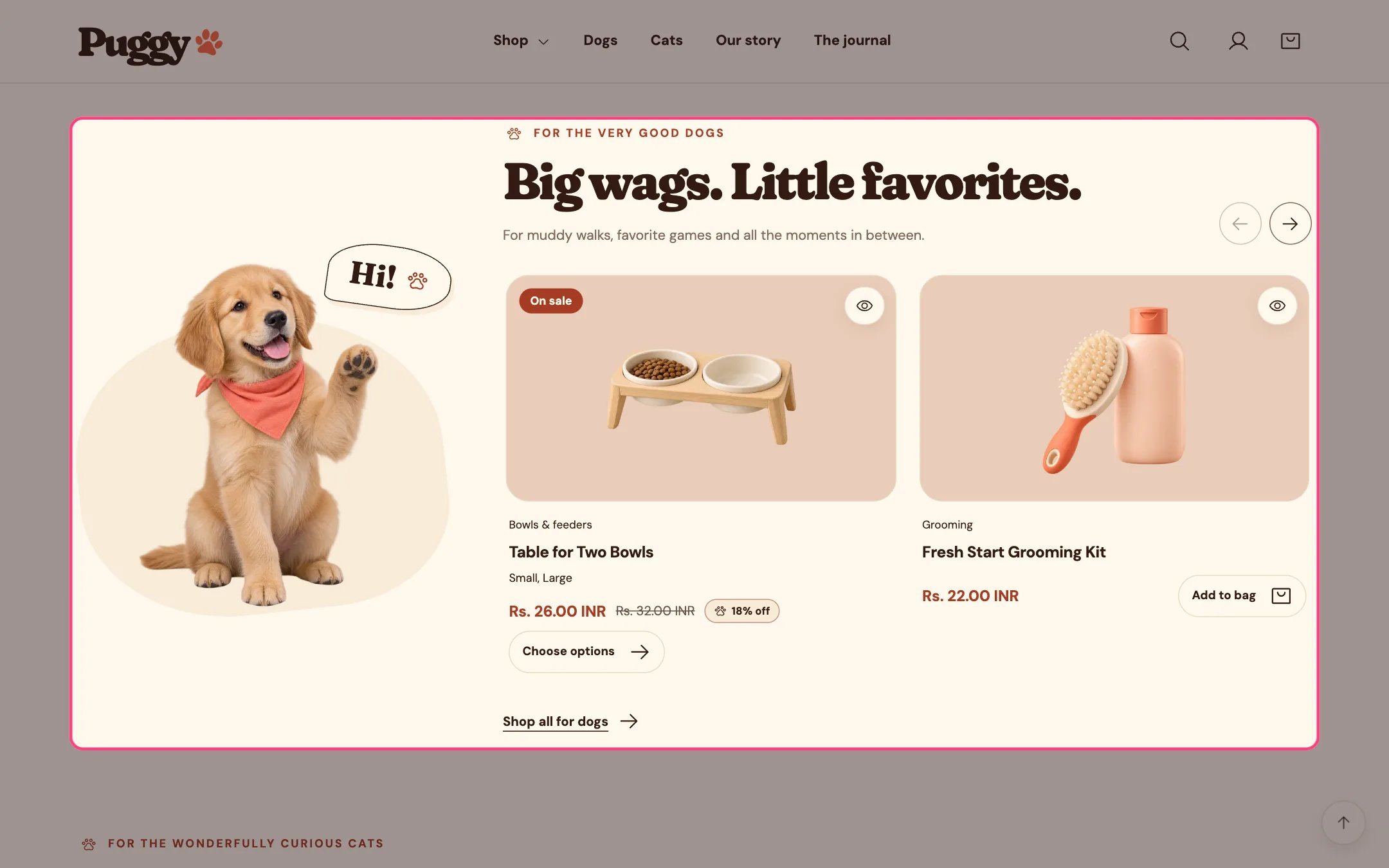
> A sliding row of products with a big pet character and speech bubble beside it. The home page has two of them, one for dogs and one for cats.
 ## Where to find it
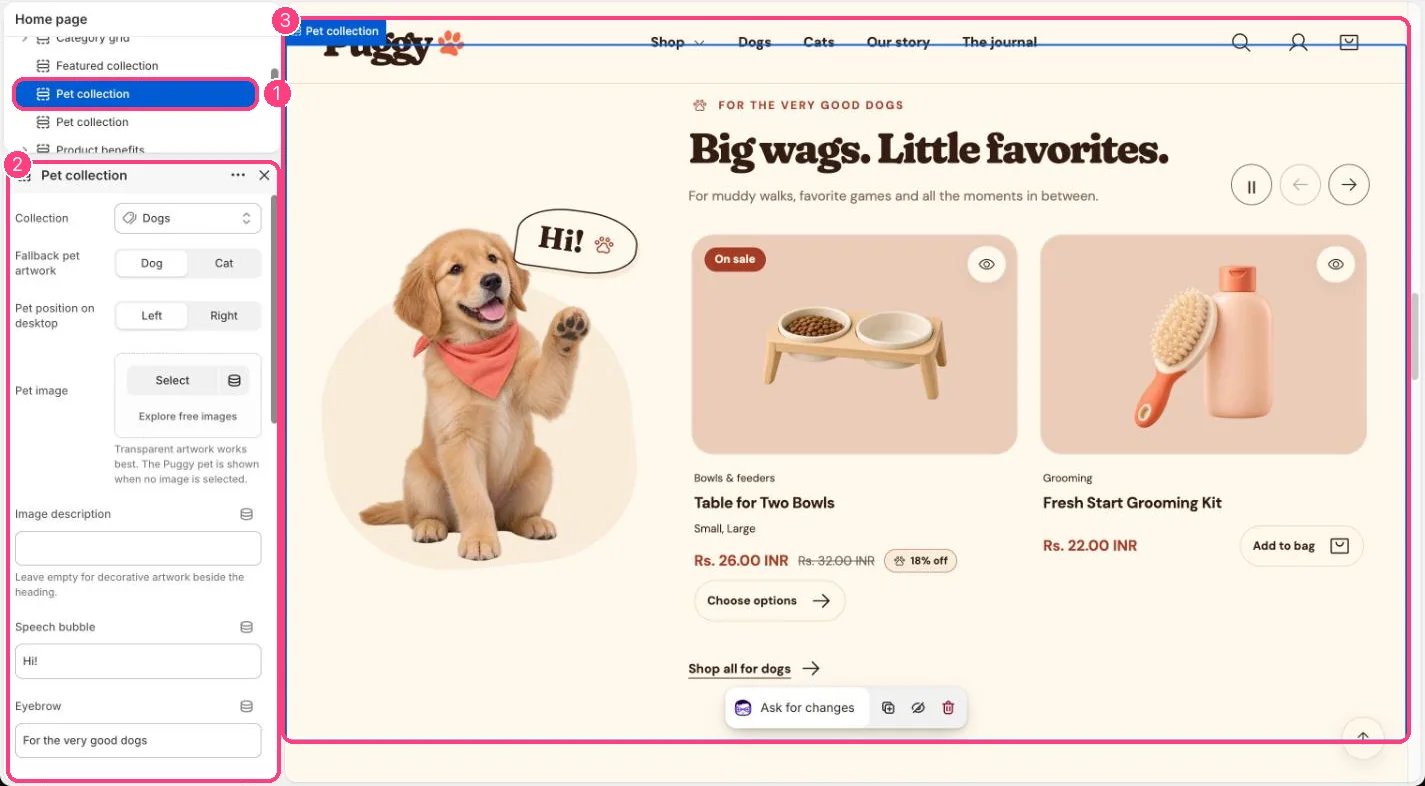
Home page. Choose Home page in the top page selector, then select the first Pet collection (dogs) or the second (cats). Each one has its own settings.
## How it works
* Shows 2 to 12 products in a sideways row with previous and next arrows. Shoppers can also swipe, or focus the row and use the arrow, Home and End keys.
* With Automatically slide products on, the row moves one product at a time and loops back to the start.
* Movement pauses on hover, on keyboard focus, when the row is off screen or the browser tab is hidden, and stops after a touch swipe. A pause button lets shoppers stop or resume it.
* Automatic movement never runs for shoppers who prefer reduced motion, or inside the theme editor.
* The arrows hide when every product already fits on screen.
* Without your own image, the built-in Puggy dog or cat appears. On desktop it sits on the left or right.
* If the collection is empty or not chosen, three placeholder cards and a friendly message appear.
## Where to find it
Home page. Choose Home page in the top page selector, then select the first Pet collection (dogs) or the second (cats). Each one has its own settings.
## How it works
* Shows 2 to 12 products in a sideways row with previous and next arrows. Shoppers can also swipe, or focus the row and use the arrow, Home and End keys.
* With Automatically slide products on, the row moves one product at a time and loops back to the start.
* Movement pauses on hover, on keyboard focus, when the row is off screen or the browser tab is hidden, and stops after a touch swipe. A pause button lets shoppers stop or resume it.
* Automatic movement never runs for shoppers who prefer reduced motion, or inside the theme editor.
* The arrows hide when every product already fits on screen.
* Without your own image, the built-in Puggy dog or cat appears. On desktop it sits on the left or right.
* If the collection is empty or not chosen, three placeholder cards and a friendly message appear.
 ## Edit it
* Choose the Collection, for example Dogs.
* Pick Fallback pet artwork (Dog or Cat), or upload your own Pet image. Transparent artwork works best.
* Fill Image description only when the image carries meaning; leave it empty for decorative art.
* Edit Speech bubble, Eyebrow, Heading, Introduction and Collection link label.
* Set Products (2 to 12), and turn Show product type, Show vendor and Show quick add on or off.
* Set Time between slides (3 to 12 seconds), or turn off Automatically slide products to keep only the arrows.
* Use Pet position on desktop to put the pet on the left or right.
## Settings
| Setting | What it does |
| - | - |
| **Collection** | Choose a collection. |
| **Fallback pet artwork** | Options: Dog, Cat. Default: Dog. |
| **Pet position on desktop** | Options: Left, Right. Default: Left. |
| **Pet image** | Image: upload one or choose from Content → Files. Transparent artwork works best. The Puggy pet is shown when no image is selected. |
| **Image description** | Text. Leave empty for decorative artwork beside the heading. |
| **Speech bubble** | Text. Default: Hi!. |
| **Eyebrow** | Text. Default: For the very good dogs. |
| **Heading** | Text. Default: Big wags. Little favorites. |
| **Introduction** | Formatted text. |
| **Collection link label** | Text. Default: Explore their favorites. |
| **Products** | Slider from 2 to 12. Default: 6. |
| **Show product type** | On or off. Default: on. |
| **Show vendor** | On or off. Default: off. |
| **Show quick add** | On or off. Default: on. |
| **Automatically slide products** | On or off. Pauses while hovered, focused, off-screen or when reduced motion is preferred. Shoppers can pause it at any time. Default: on. |
| **Time between slides** | Slider from 3 to 12 s. Default: 5 s. |
| **Color scheme** | Color scheme for this area (edit the schemes in Theme settings → Colors). Default: Scheme 1. |
| **Top spacing** | Slider from 0 to 120 px, in steps of 4. Default: 56 px. |
| **Bottom spacing** | Slider from 0 to 120 px, in steps of 4. Default: 56 px. |
This documentation is built and hosted on [Mintlify](https://mintlify.com), a developer documentation platform.
## Edit it
* Choose the Collection, for example Dogs.
* Pick Fallback pet artwork (Dog or Cat), or upload your own Pet image. Transparent artwork works best.
* Fill Image description only when the image carries meaning; leave it empty for decorative art.
* Edit Speech bubble, Eyebrow, Heading, Introduction and Collection link label.
* Set Products (2 to 12), and turn Show product type, Show vendor and Show quick add on or off.
* Set Time between slides (3 to 12 seconds), or turn off Automatically slide products to keep only the arrows.
* Use Pet position on desktop to put the pet on the left or right.
## Settings
| Setting | What it does |
| - | - |
| **Collection** | Choose a collection. |
| **Fallback pet artwork** | Options: Dog, Cat. Default: Dog. |
| **Pet position on desktop** | Options: Left, Right. Default: Left. |
| **Pet image** | Image: upload one or choose from Content → Files. Transparent artwork works best. The Puggy pet is shown when no image is selected. |
| **Image description** | Text. Leave empty for decorative artwork beside the heading. |
| **Speech bubble** | Text. Default: Hi!. |
| **Eyebrow** | Text. Default: For the very good dogs. |
| **Heading** | Text. Default: Big wags. Little favorites. |
| **Introduction** | Formatted text. |
| **Collection link label** | Text. Default: Explore their favorites. |
| **Products** | Slider from 2 to 12. Default: 6. |
| **Show product type** | On or off. Default: on. |
| **Show vendor** | On or off. Default: off. |
| **Show quick add** | On or off. Default: on. |
| **Automatically slide products** | On or off. Pauses while hovered, focused, off-screen or when reduced motion is preferred. Shoppers can pause it at any time. Default: on. |
| **Time between slides** | Slider from 3 to 12 s. Default: 5 s. |
| **Color scheme** | Color scheme for this area (edit the schemes in Theme settings → Colors). Default: Scheme 1. |
| **Top spacing** | Slider from 0 to 120 px, in steps of 4. Default: 56 px. |
| **Bottom spacing** | Slider from 0 to 120 px, in steps of 4. Default: 56 px. |
This documentation is built and hosted on [Mintlify](https://mintlify.com), a developer documentation platform.