> ## Documentation Index
> Fetch the complete documentation index at: https://docs.kwebby.com/llms.txt
> Use this file to discover all available pages before exploring further.
# Pet hero
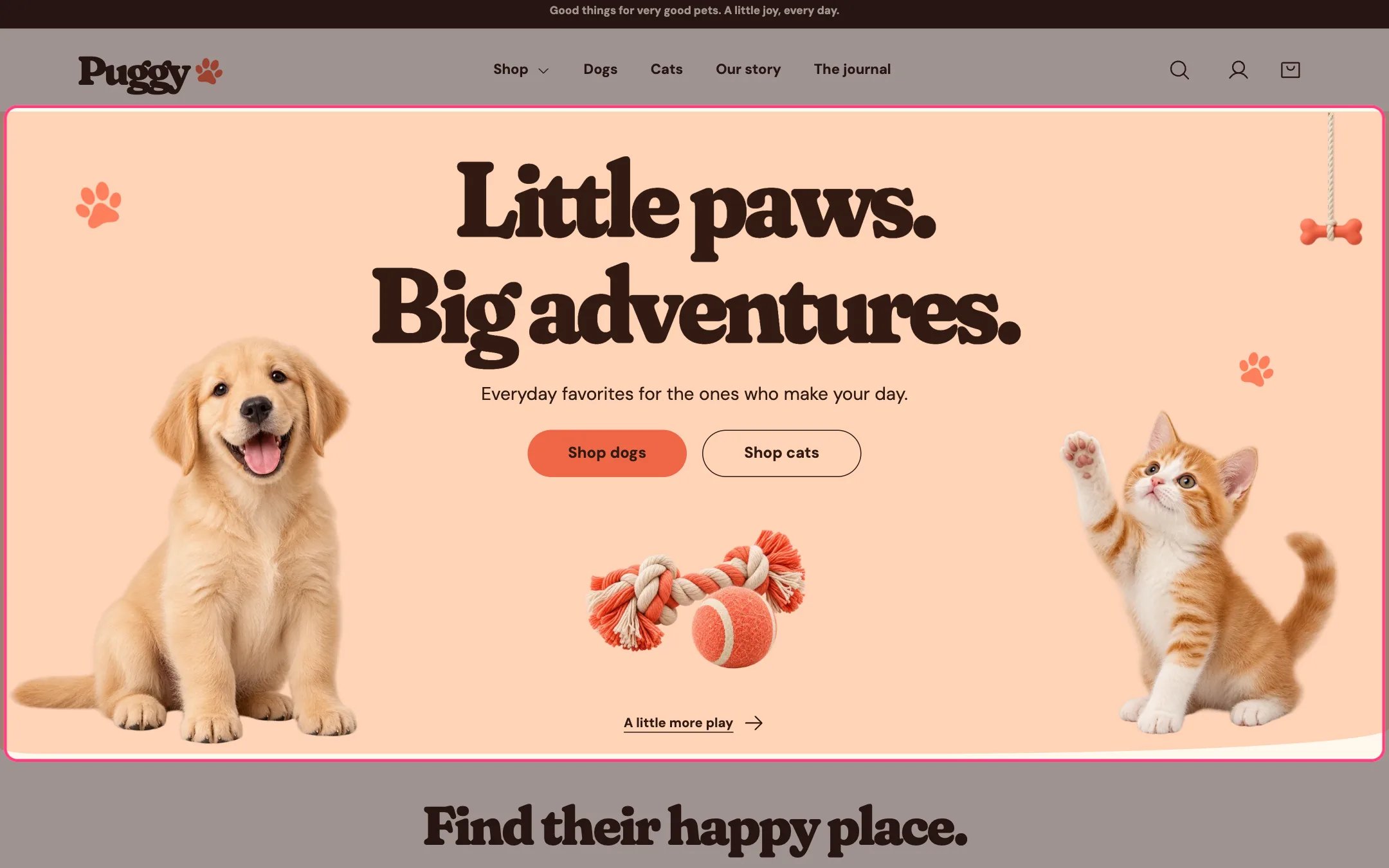
> The big welcome at the top of the home page: a heading, short text, two buttons and pet artwork with a puppy on one side and a kitten on the other.
 ## Where to find it
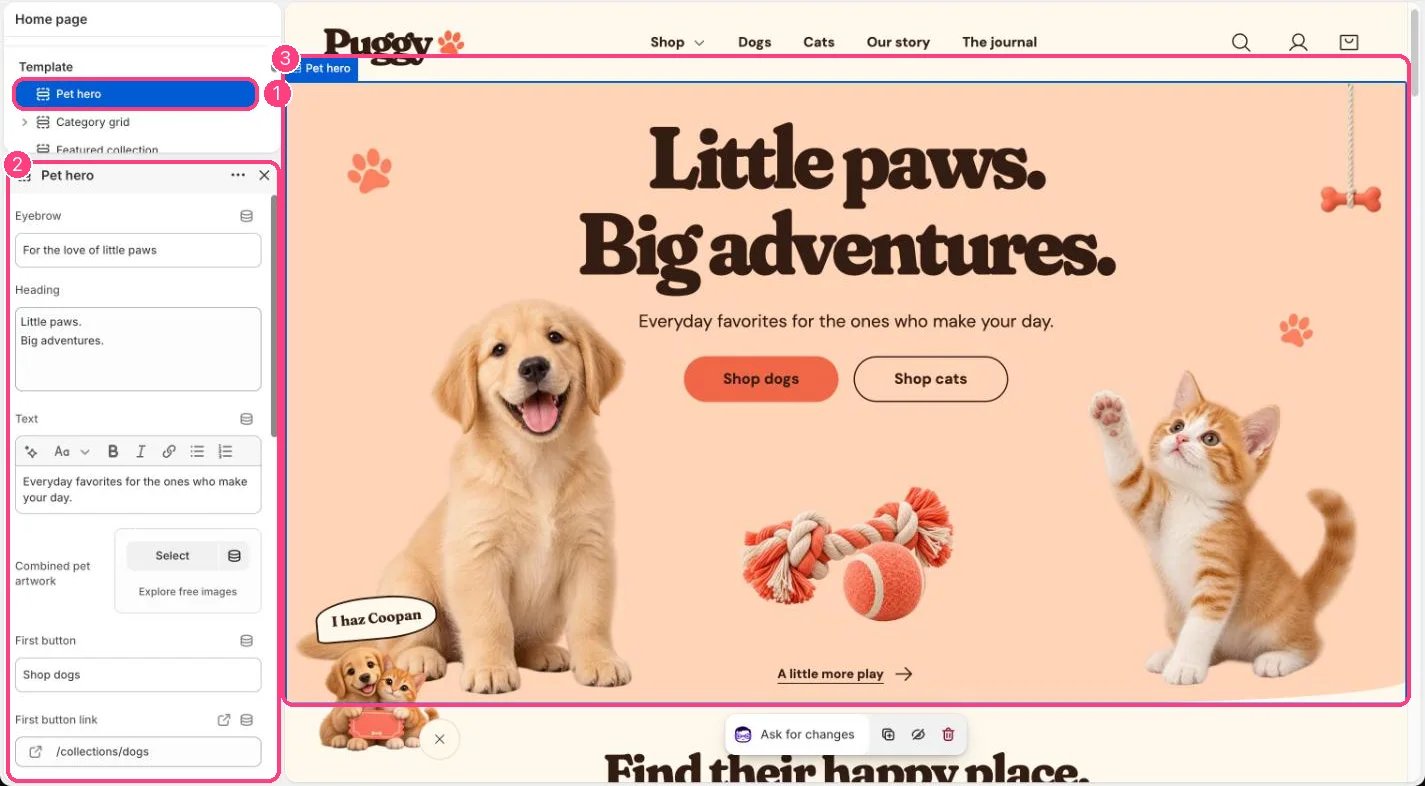
Home page. In the theme editor, choose Home page in the top page selector, then select Pet hero in the sidebar.
## How it works
* The split layout shows the left half of one wide image on the left and its right half on the right, with a toy image and a small link in the middle.
* The Single centered image layout shows one image under the text instead.
* With no images chosen, the built-in puppy, kitten and toy artwork appears.
* A button without a link goes to your all products page. A button with an empty label is hidden.
* The toy link appears when Toy link label has text. Without a Toy link it goes to your collections list.
* The heading is the page's main title. Press Enter in Heading to start a new line.
* Decorative paw prints sit beside the text unless you turn them off.
## Where to find it
Home page. In the theme editor, choose Home page in the top page selector, then select Pet hero in the sidebar.
## How it works
* The split layout shows the left half of one wide image on the left and its right half on the right, with a toy image and a small link in the middle.
* The Single centered image layout shows one image under the text instead.
* With no images chosen, the built-in puppy, kitten and toy artwork appears.
* A button without a link goes to your all products page. A button with an empty label is hidden.
* The toy link appears when Toy link label has text. Without a Toy link it goes to your collections list.
* The heading is the page's main title. Press Enter in Heading to start a new line.
* Decorative paw prints sit beside the text unless you turn them off.
 ## Edit it
* Write the Heading and Text, and edit the First button and Second button labels.
* Set First button link and Second button link, for example to your Dogs and Cats collections.
* For your own pets, upload a wide image to Combined pet artwork with one pet near each side. In the split layout the same image is shown in two halves.
* Choose Pet image layout: Puppy left / kitten right, or Single centered image.
* Replace the middle toy with Center toy image, and set Toy link label and Toy link.
* Turn on Show eyebrow to show the small line above the heading.
## Settings
| Setting | What it does |
| - | - |
| **Eyebrow** | Text. Default: For the love of little paws. |
| **Heading** | Text (several lines). Default: Little paws. Big adventures. |
| **Text** | Formatted text. |
| **Combined pet artwork** | Image: upload one or choose from Content → Files. |
| **First button** | Text. Default: Shop dogs. |
| **First button link** | Link: a page, product, collection or web address. |
| **Second button** | Text. Default: Shop cats. |
| **Second button link** | Link: a page, product, collection or web address. |
| **Color scheme** | Color scheme for this area (edit the schemes in Theme settings → Colors). Default: Scheme 1. |
| **Top spacing** | Slider from 0 to 120 px, in steps of 4. Default: 0 px. |
| **Bottom spacing** | Slider from 0 to 120 px, in steps of 4. Default: 0 px. |
| **Show eyebrow** | On or off. Default: off. |
| **Pet image layout** | Options: Puppy left / kitten right, Single centered image. Default: Puppy left / kitten right. |
| **Center toy image** | Image: upload one or choose from Content → Files. |
| **Toy link label** | Text. Default: A little more play. |
| **Toy link** | Link: a page, product, collection or web address. |
| **Show decorative paws** | On or off. Default: on. |
Preview the hero on a phone after changing images. The split windows crop the artwork at fixed sizes.
This documentation is built and hosted on [Mintlify](https://mintlify.com), a developer documentation platform.
## Edit it
* Write the Heading and Text, and edit the First button and Second button labels.
* Set First button link and Second button link, for example to your Dogs and Cats collections.
* For your own pets, upload a wide image to Combined pet artwork with one pet near each side. In the split layout the same image is shown in two halves.
* Choose Pet image layout: Puppy left / kitten right, or Single centered image.
* Replace the middle toy with Center toy image, and set Toy link label and Toy link.
* Turn on Show eyebrow to show the small line above the heading.
## Settings
| Setting | What it does |
| - | - |
| **Eyebrow** | Text. Default: For the love of little paws. |
| **Heading** | Text (several lines). Default: Little paws. Big adventures. |
| **Text** | Formatted text. |
| **Combined pet artwork** | Image: upload one or choose from Content → Files. |
| **First button** | Text. Default: Shop dogs. |
| **First button link** | Link: a page, product, collection or web address. |
| **Second button** | Text. Default: Shop cats. |
| **Second button link** | Link: a page, product, collection or web address. |
| **Color scheme** | Color scheme for this area (edit the schemes in Theme settings → Colors). Default: Scheme 1. |
| **Top spacing** | Slider from 0 to 120 px, in steps of 4. Default: 0 px. |
| **Bottom spacing** | Slider from 0 to 120 px, in steps of 4. Default: 0 px. |
| **Show eyebrow** | On or off. Default: off. |
| **Pet image layout** | Options: Puppy left / kitten right, Single centered image. Default: Puppy left / kitten right. |
| **Center toy image** | Image: upload one or choose from Content → Files. |
| **Toy link label** | Text. Default: A little more play. |
| **Toy link** | Link: a page, product, collection or web address. |
| **Show decorative paws** | On or off. Default: on. |
Preview the hero on a phone after changing images. The split windows crop the artwork at fixed sizes.
This documentation is built and hosted on [Mintlify](https://mintlify.com), a developer documentation platform.