> ## Documentation Index
> Fetch the complete documentation index at: https://docs.kwebby.com/llms.txt
> Use this file to discover all available pages before exploring further.
# Pet stories wall
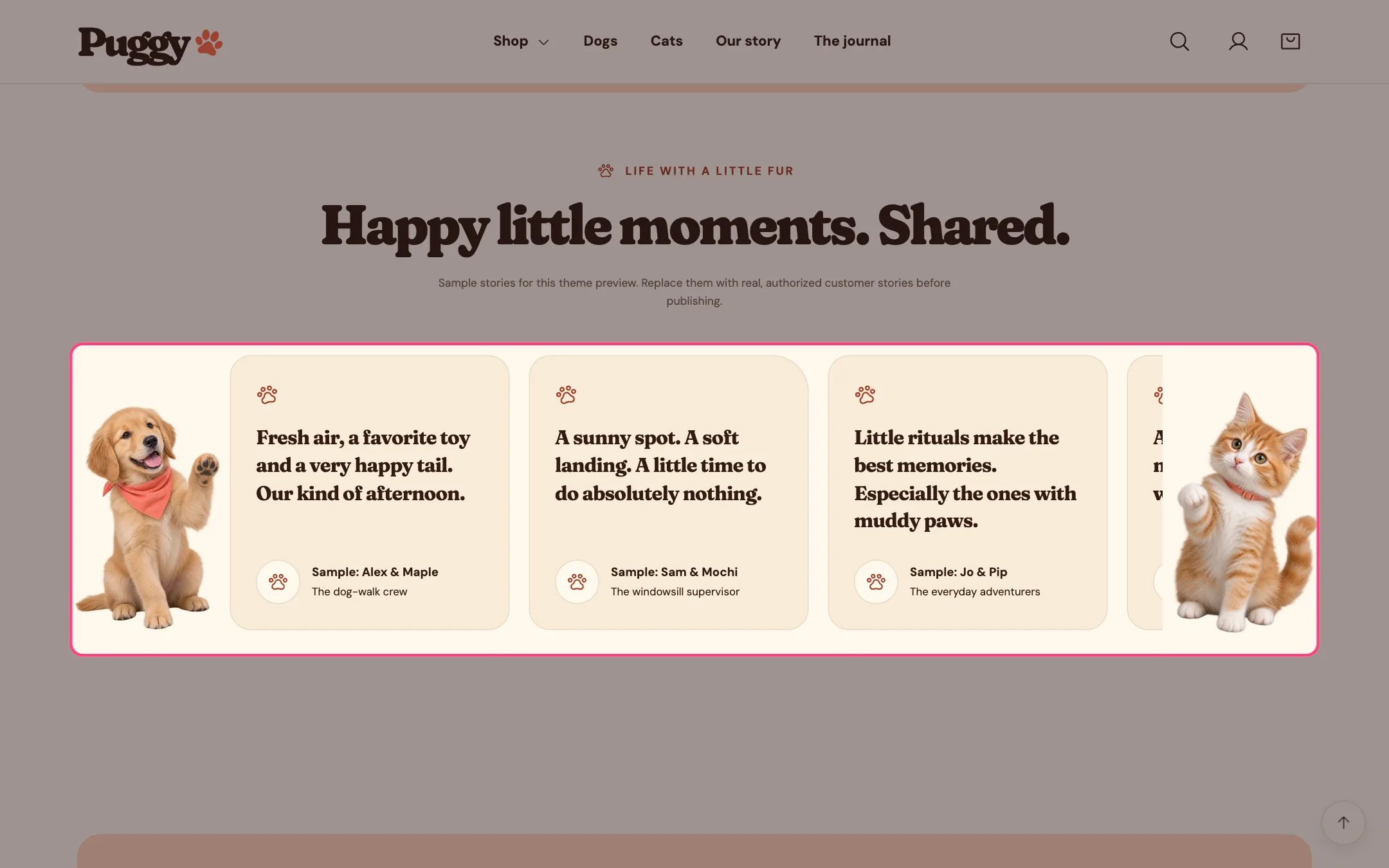
> A slowly drifting wall of customer stories with names, pet details and avatars, framed by a dog and a cat on large screens.
 ## Where to find it
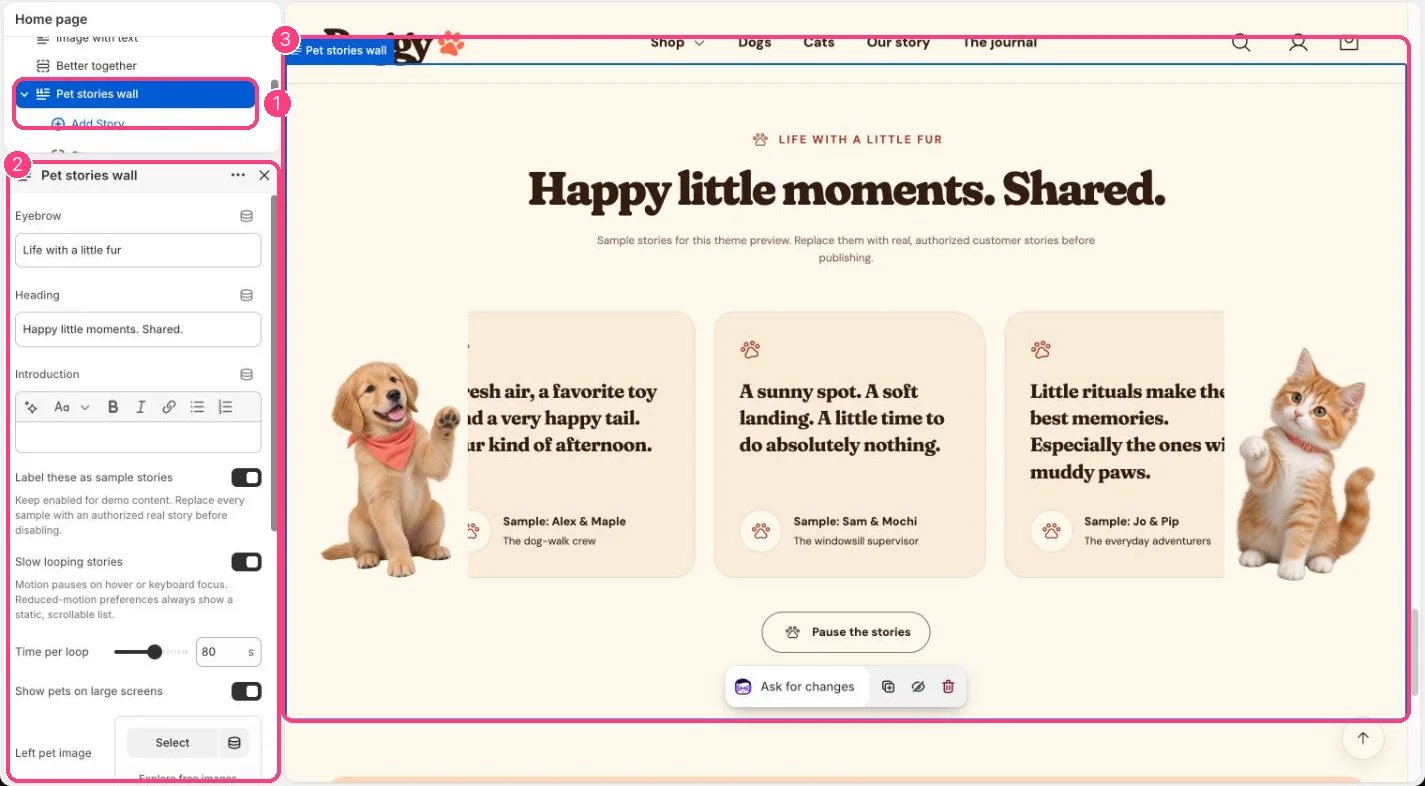
Home page. Choose Home page in the top page selector, then select Pet stories wall.
## How it works
* When the stories don't all fit, they loop sideways. The loop pauses on hover or keyboard focus, and a Pause the stories button stops it.
* Shoppers who prefer reduced motion see a still list they can scroll.
* The dog and cat appear only on screens 1200 px and wider.
* Stories without an avatar show a paw instead.
* With Label these as sample stories on, a note under the heading says the stories are samples.
* Holds up to 12 stories. It shows quotes only; no star ratings or review data are added.
## Where to find it
Home page. Choose Home page in the top page selector, then select Pet stories wall.
## How it works
* When the stories don't all fit, they loop sideways. The loop pauses on hover or keyboard focus, and a Pause the stories button stops it.
* Shoppers who prefer reduced motion see a still list they can scroll.
* The dog and cat appear only on screens 1200 px and wider.
* Stories without an avatar show a paw instead.
* With Label these as sample stories on, a note under the heading says the stories are samples.
* Holds up to 12 stories. It shows quotes only; no star ratings or review data are added.
 ## Edit it
* Click Add block > Story, then write the Quote, Name and Pet name or additional detail, and add an Avatar.
* Set Time per loop (30 to 120 seconds), or turn off Slow looping stories.
* Replace the side pets with Left pet image and Right pet image, or turn off Show pets on large screens.
* Turn off Label these as sample stories only after every story is real.
## Settings
| Setting | What it does |
| - | - |
| **Eyebrow** | Text. Default: From the Puggy community. |
| **Heading** | Text. Default: Happy little moments. Shared. |
| **Introduction** | Formatted text. |
| **Label these as sample stories** | On or off. Keep enabled for demo content. Replace every sample with an authorized real story before disabling. Default: on. |
| **Slow looping stories** | On or off. Motion pauses on hover or keyboard focus. Reduced-motion preferences always show a static, scrollable list. Default: on. |
| **Time per loop** | Slider from 30 to 120 s, in steps of 10. Default: 80 s. |
| **Show pets on large screens** | On or off. Default: on. |
| **Left pet image** | Image: upload one or choose from Content → Files. |
| **Right pet image** | Image: upload one or choose from Content → Files. |
| **Color scheme** | Color scheme for this area (edit the schemes in Theme settings → Colors). Default: Scheme 1. |
| **Top spacing** | Slider from 0 to 120 px, in steps of 4. Default: 72 px. |
| **Bottom spacing** | Slider from 0 to 120 px, in steps of 4. Default: 72 px. |
## Blocks
Up to 12 blocks. Add a block with **Add block** under the section in the sidebar; drag blocks to reorder them.
### Story
| Setting | What it does |
| - | - |
| **Quote** | Formatted text. |
| **Name** | Text. Default: Sample customer. |
| **Pet name or additional detail** | Text. Default: Sample story. |
| **Avatar** | Image: upload one or choose from Content → Files. |
Only publish stories customers agreed to share. The default stories are placeholders.
This documentation is built and hosted on [Mintlify](https://mintlify.com), a developer documentation platform.
## Edit it
* Click Add block > Story, then write the Quote, Name and Pet name or additional detail, and add an Avatar.
* Set Time per loop (30 to 120 seconds), or turn off Slow looping stories.
* Replace the side pets with Left pet image and Right pet image, or turn off Show pets on large screens.
* Turn off Label these as sample stories only after every story is real.
## Settings
| Setting | What it does |
| - | - |
| **Eyebrow** | Text. Default: From the Puggy community. |
| **Heading** | Text. Default: Happy little moments. Shared. |
| **Introduction** | Formatted text. |
| **Label these as sample stories** | On or off. Keep enabled for demo content. Replace every sample with an authorized real story before disabling. Default: on. |
| **Slow looping stories** | On or off. Motion pauses on hover or keyboard focus. Reduced-motion preferences always show a static, scrollable list. Default: on. |
| **Time per loop** | Slider from 30 to 120 s, in steps of 10. Default: 80 s. |
| **Show pets on large screens** | On or off. Default: on. |
| **Left pet image** | Image: upload one or choose from Content → Files. |
| **Right pet image** | Image: upload one or choose from Content → Files. |
| **Color scheme** | Color scheme for this area (edit the schemes in Theme settings → Colors). Default: Scheme 1. |
| **Top spacing** | Slider from 0 to 120 px, in steps of 4. Default: 72 px. |
| **Bottom spacing** | Slider from 0 to 120 px, in steps of 4. Default: 72 px. |
## Blocks
Up to 12 blocks. Add a block with **Add block** under the section in the sidebar; drag blocks to reorder them.
### Story
| Setting | What it does |
| - | - |
| **Quote** | Formatted text. |
| **Name** | Text. Default: Sample customer. |
| **Pet name or additional detail** | Text. Default: Sample story. |
| **Avatar** | Image: upload one or choose from Content → Files. |
Only publish stories customers agreed to share. The default stories are placeholders.
This documentation is built and hosted on [Mintlify](https://mintlify.com), a developer documentation platform.