> ## Documentation Index
> Fetch the complete documentation index at: https://docs.kwebby.com/llms.txt
> Use this file to discover all available pages before exploring further.
# Product benefits
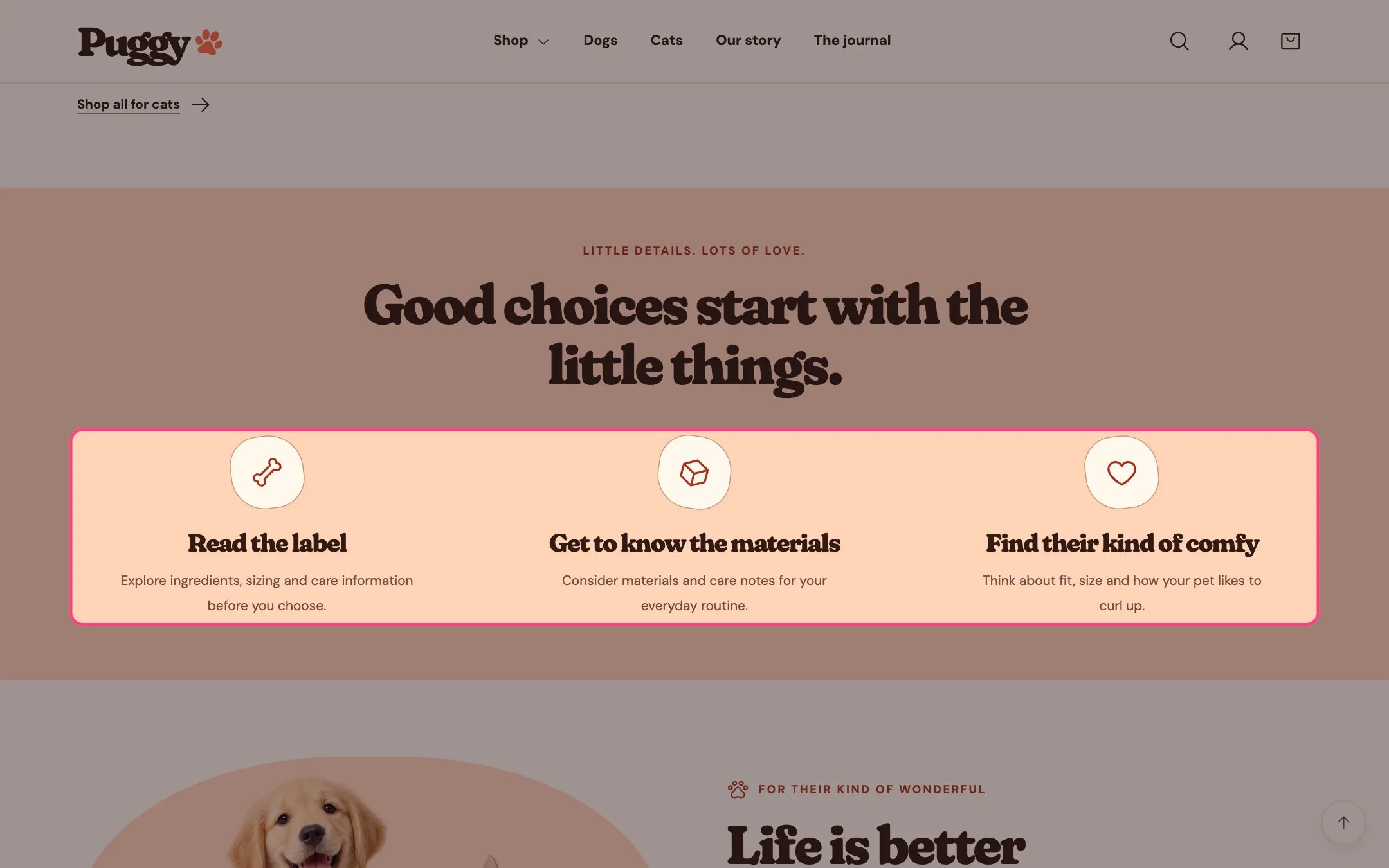
> Up to six short cards, each with an icon, heading and text, that explain what to look for in your products.
 ## Where to find it
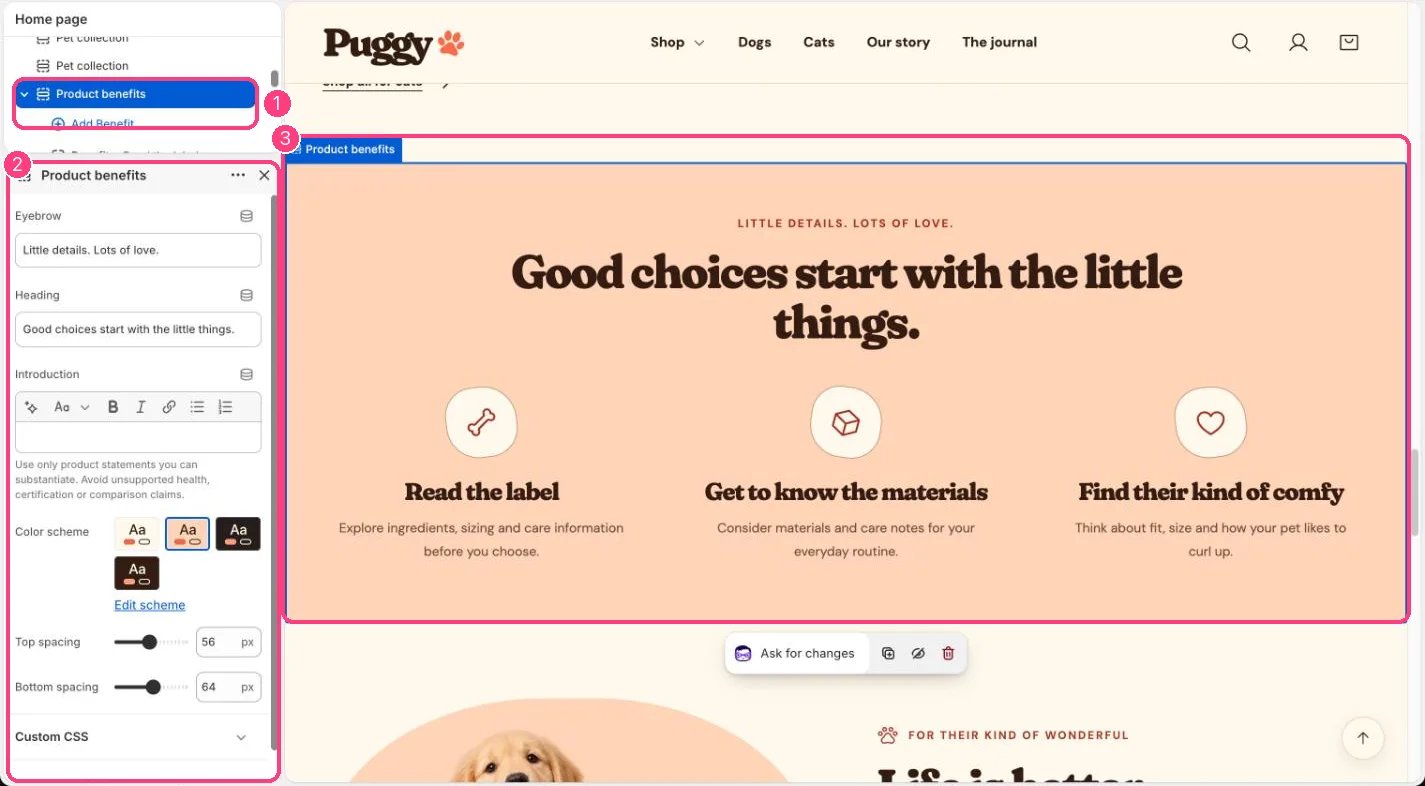
Home page. Choose Home page in the top page selector, then select Product benefits. Add it to other pages with Add section > Product benefits.
## How it works
* Each Benefit block shows an icon (Paw, Bone, Heart, Package or Check), a heading and text.
* The eyebrow, heading and introduction are centered above the cards; blank fields are hidden.
* Cards fade in as they scroll into view when scroll animations are on.
* Holds up to six benefits. The default color scheme is Scheme 2 (peach).
## Where to find it
Home page. Choose Home page in the top page selector, then select Product benefits. Add it to other pages with Add section > Product benefits.
## How it works
* Each Benefit block shows an icon (Paw, Bone, Heart, Package or Check), a heading and text.
* The eyebrow, heading and introduction are centered above the cards; blank fields are hidden.
* Cards fade in as they scroll into view when scroll animations are on.
* Holds up to six benefits. The default color scheme is Scheme 2 (peach).
 ## Edit it
* Click Add block > Benefit, choose an Icon, and write the Heading and Text.
* Drag blocks to reorder them.
* Edit the section Eyebrow, Heading and Introduction.
## Settings
| Setting | What it does |
| - | - |
| **Eyebrow** | Text. Default: Little details. Lots of love. |
| **Heading** | Text. Default: Good choices start with the little things. |
| **Introduction** | Formatted text. Use only product statements you can substantiate. Avoid unsupported health, certification or comparison claims. |
| **Color scheme** | Color scheme for this area (edit the schemes in Theme settings → Colors). Default: Scheme 2. |
| **Top spacing** | Slider from 0 to 120 px, in steps of 4. Default: 56 px. |
| **Bottom spacing** | Slider from 0 to 120 px, in steps of 4. Default: 64 px. |
## Blocks
Up to 6 blocks. Add a block with **Add block** under the section in the sidebar; drag blocks to reorder them.
### Benefit
| Setting | What it does |
| - | - |
| **Icon** | Options: Paw, Bone, Heart, Package, Check. Default: Paw. |
| **Heading** | Text. Default: The little details. |
| **Text** | Formatted text. |
Only state benefits you can back up. Avoid health, certification or comparison claims you can't support.
This documentation is built and hosted on [Mintlify](https://mintlify.com), a developer documentation platform.
## Edit it
* Click Add block > Benefit, choose an Icon, and write the Heading and Text.
* Drag blocks to reorder them.
* Edit the section Eyebrow, Heading and Introduction.
## Settings
| Setting | What it does |
| - | - |
| **Eyebrow** | Text. Default: Little details. Lots of love. |
| **Heading** | Text. Default: Good choices start with the little things. |
| **Introduction** | Formatted text. Use only product statements you can substantiate. Avoid unsupported health, certification or comparison claims. |
| **Color scheme** | Color scheme for this area (edit the schemes in Theme settings → Colors). Default: Scheme 2. |
| **Top spacing** | Slider from 0 to 120 px, in steps of 4. Default: 56 px. |
| **Bottom spacing** | Slider from 0 to 120 px, in steps of 4. Default: 64 px. |
## Blocks
Up to 6 blocks. Add a block with **Add block** under the section in the sidebar; drag blocks to reorder them.
### Benefit
| Setting | What it does |
| - | - |
| **Icon** | Options: Paw, Bone, Heart, Package, Check. Default: Paw. |
| **Heading** | Text. Default: The little details. |
| **Text** | Formatted text. |
Only state benefits you can back up. Avoid health, certification or comparison claims you can't support.
This documentation is built and hosted on [Mintlify](https://mintlify.com), a developer documentation platform.