> ## Documentation Index
> Fetch the complete documentation index at: https://docs.kwebby.com/llms.txt
> Use this file to discover all available pages before exploring further.
# Quick view
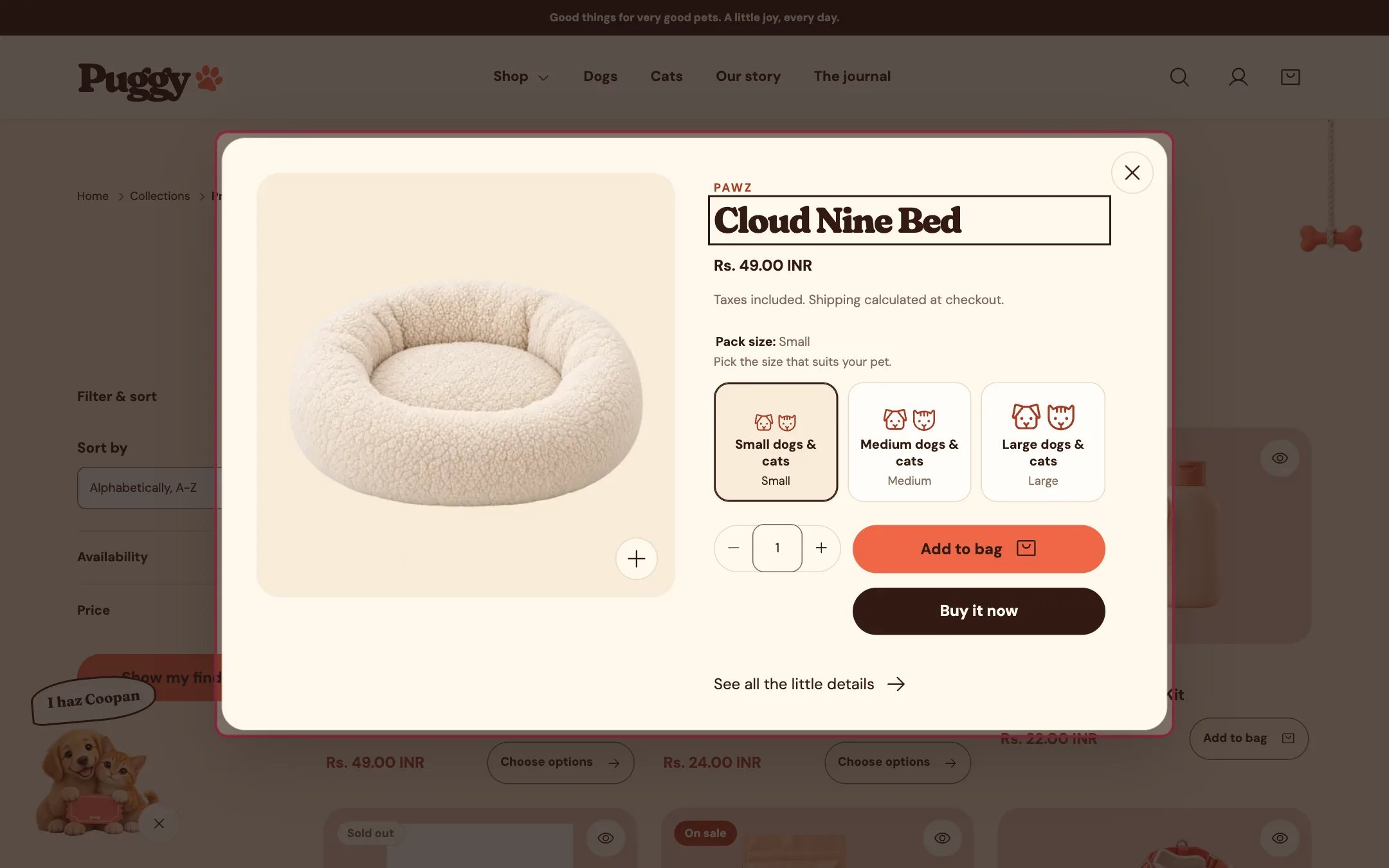
> A pop-up product preview opened from the eye button on product cards. Shoppers see media, choose options and add to the bag without leaving the page.
 ## Where to find it
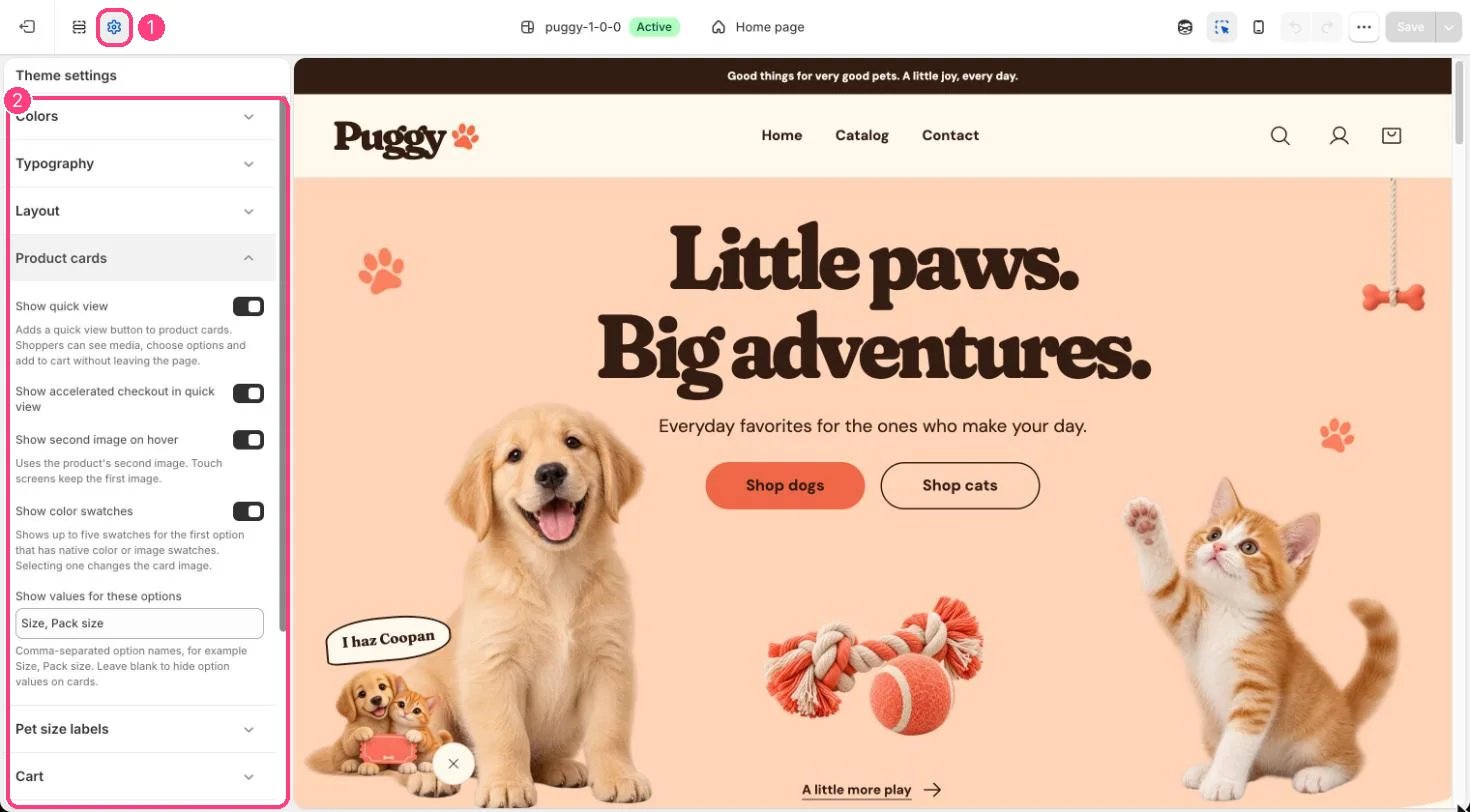
You don't place this one. Turn it on or off in Theme settings > Product cards > Show quick view. It works on product cards in home page sections, collections, search, recommendations, recently viewed and the cart page.
## How it works
* To open it, select the eye button in the top corner of any product card. On hover the button widens to read Quick view.
* Shows the product's photos, videos and 3D models, vendor, title, price, options as buttons, quantity, Add to bag and, when turned on, Buy it now.
* On phones it slides up from the bottom as a sheet.
* Adding to the bag closes quick view and opens the cart drawer, or goes to the cart page when Cart type is Page.
* See all the little details links to the full product page.
* Escape, the close button or a click outside closes it and returns focus to the card. Any playing video stops.
* If the product can't load, a message and a link to the product page appear.
* It isn't offered on the product cards inside the cart drawer.
## Where to find it
You don't place this one. Turn it on or off in Theme settings > Product cards > Show quick view. It works on product cards in home page sections, collections, search, recommendations, recently viewed and the cart page.
## How it works
* To open it, select the eye button in the top corner of any product card. On hover the button widens to read Quick view.
* Shows the product's photos, videos and 3D models, vendor, title, price, options as buttons, quantity, Add to bag and, when turned on, Buy it now.
* On phones it slides up from the bottom as a sheet.
* Adding to the bag closes quick view and opens the cart drawer, or goes to the cart page when Cart type is Page.
* See all the little details links to the full product page.
* Escape, the close button or a click outside closes it and returns focus to the card. Any playing video stops.
* If the product can't load, a message and a link to the product page appear.
* It isn't offered on the product cards inside the cart drawer.
 ## Edit it
* Theme settings > Product cards > Show quick view turns the eye button on or off everywhere.
* Show accelerated checkout in quick view controls the Buy it now and express buttons.
* Pet size cards and swatches follow the same settings as product pages.
## Settings
| Setting | What it does |
| - | - |
| **Image fit** | Options: Contain, Cover. Default: Contain. |
| **Thumbnail size** | Slider from 56 to 96 px, in steps of 4. Default: 64 px. |
| **Show gallery arrows** | On or off. Default: on. |
There is nothing to set up per product. Quick view uses the media, options and prices from Shopify admin.
This documentation is built and hosted on [Mintlify](https://mintlify.com), a developer documentation platform.
## Edit it
* Theme settings > Product cards > Show quick view turns the eye button on or off everywhere.
* Show accelerated checkout in quick view controls the Buy it now and express buttons.
* Pet size cards and swatches follow the same settings as product pages.
## Settings
| Setting | What it does |
| - | - |
| **Image fit** | Options: Contain, Cover. Default: Contain. |
| **Thumbnail size** | Slider from 56 to 96 px, in steps of 4. Default: 64 px. |
| **Show gallery arrows** | On or off. Default: on. |
There is nothing to set up per product. Quick view uses the media, options and prices from Shopify admin.
This documentation is built and hosted on [Mintlify](https://mintlify.com), a developer documentation platform.