> ## Documentation Index
> Fetch the complete documentation index at: https://docs.kwebby.com/llms.txt
> Use this file to discover all available pages before exploring further.
# Recently viewed products
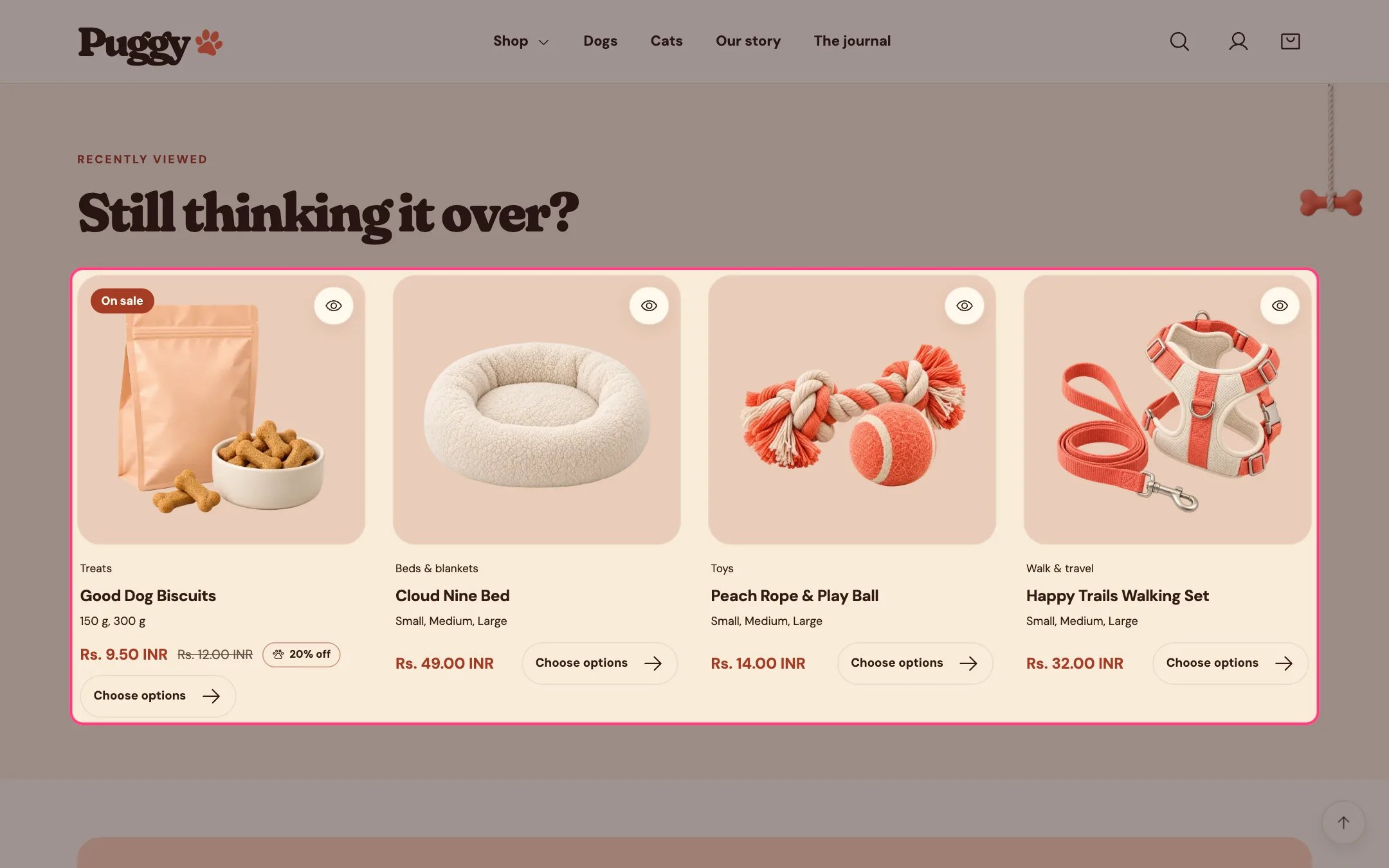
> Shows the products a shopper opened most recently, newest first, so they can get back to them quickly.
 ## Where to find it
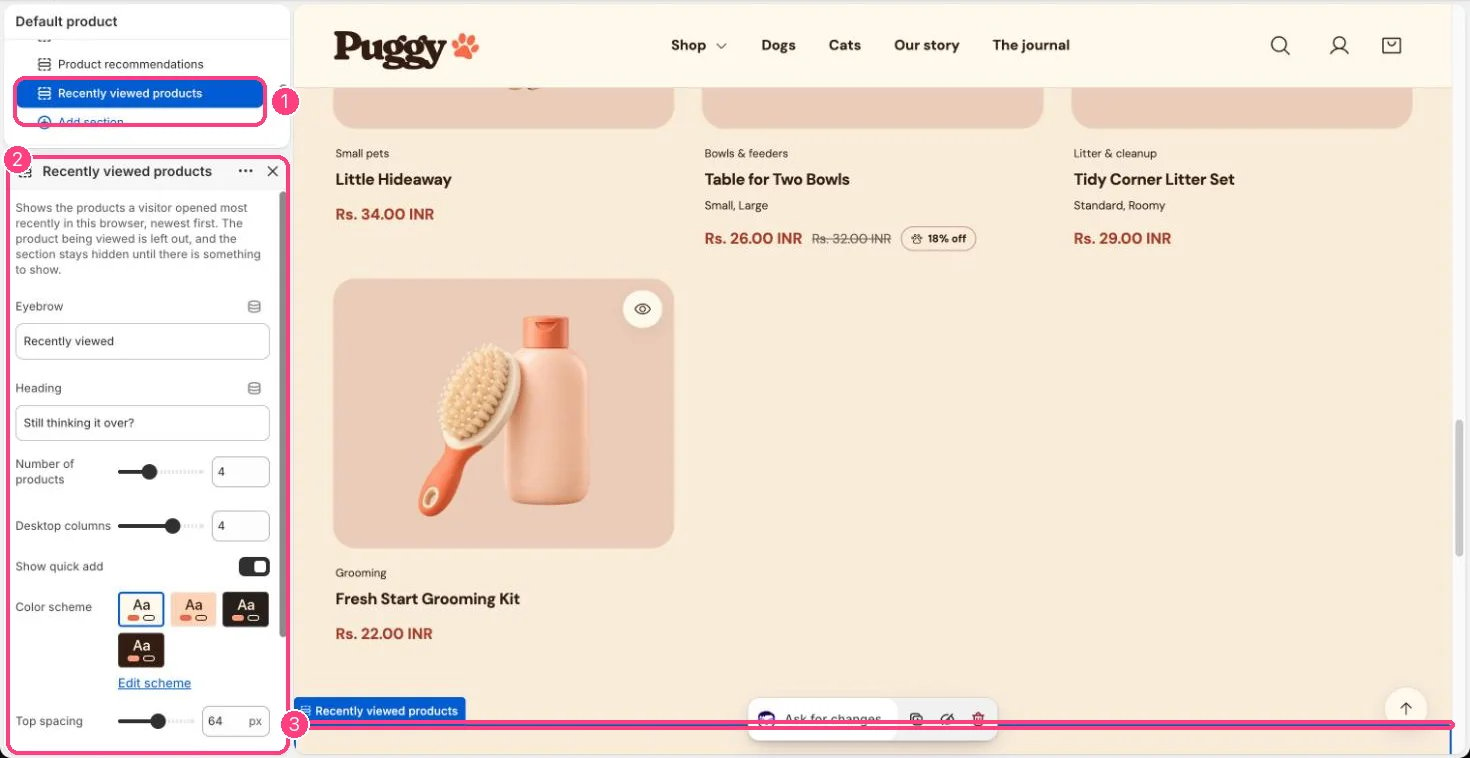
Product pages, near the bottom. Choose Products > Default product in the top page selector, then select Recently viewed products. You can add it to other pages with Add section > Recently viewed products.
## How it works
* Remembers up to 12 products each shopper viewed, in their own browser only. Nothing is sent to your admin.
* The product being viewed is left out, and the section stays hidden until there is something to show.
* Cards load as the shopper scrolls near the section. Products that no longer exist are dropped automatically.
* Product pages you open in the theme editor are not added to the list.
* Shoppers whose browser blocks storage, such as in some private windows, won't see the section.
## Where to find it
Product pages, near the bottom. Choose Products > Default product in the top page selector, then select Recently viewed products. You can add it to other pages with Add section > Recently viewed products.
## How it works
* Remembers up to 12 products each shopper viewed, in their own browser only. Nothing is sent to your admin.
* The product being viewed is left out, and the section stays hidden until there is something to show.
* Cards load as the shopper scrolls near the section. Products that no longer exist are dropped automatically.
* Product pages you open in the theme editor are not added to the list.
* Shoppers whose browser blocks storage, such as in some private windows, won't see the section.
 ## Edit it
* Set Number of products (2 to 8) and Desktop columns (2 to 5).
* Edit Eyebrow and Heading, and turn Show quick add on or off.
* To preview it on your storefront, open two or three products first, then visit another product page.
## Settings
Shows the products a visitor opened most recently in this browser, newest first. The product being viewed is left out, and the section stays hidden until there is something to show.
| Setting | What it does |
| - | - |
| **Eyebrow** | Text. Default: Recently viewed. |
| **Heading** | Text. Default: Still thinking it over?. |
| **Number of products** | Slider from 2 to 8. Default: 4. |
| **Desktop columns** | Slider from 2 to 5. Default: 4. |
| **Show quick add** | On or off. Default: on. |
| **Color scheme** | Color scheme for this area (edit the schemes in Theme settings → Colors). Default: Scheme 1. |
| **Top spacing** | Slider from 0 to 120 px, in steps of 4. Default: 64 px. |
| **Bottom spacing** | Slider from 0 to 120 px, in steps of 4. Default: 64 px. |
This documentation is built and hosted on [Mintlify](https://mintlify.com), a developer documentation platform.
## Edit it
* Set Number of products (2 to 8) and Desktop columns (2 to 5).
* Edit Eyebrow and Heading, and turn Show quick add on or off.
* To preview it on your storefront, open two or three products first, then visit another product page.
## Settings
Shows the products a visitor opened most recently in this browser, newest first. The product being viewed is left out, and the section stays hidden until there is something to show.
| Setting | What it does |
| - | - |
| **Eyebrow** | Text. Default: Recently viewed. |
| **Heading** | Text. Default: Still thinking it over?. |
| **Number of products** | Slider from 2 to 8. Default: 4. |
| **Desktop columns** | Slider from 2 to 5. Default: 4. |
| **Show quick add** | On or off. Default: on. |
| **Color scheme** | Color scheme for this area (edit the schemes in Theme settings → Colors). Default: Scheme 1. |
| **Top spacing** | Slider from 0 to 120 px, in steps of 4. Default: 64 px. |
| **Bottom spacing** | Slider from 0 to 120 px, in steps of 4. Default: 64 px. |
This documentation is built and hosted on [Mintlify](https://mintlify.com), a developer documentation platform.