> ## Documentation Index
> Fetch the complete documentation index at: https://docs.kwebby.com/llms.txt
> Use this file to discover all available pages before exploring further.
# Badges and labels
> Which badges appear on product cards and in the Product badges block, and how pre-orders work.
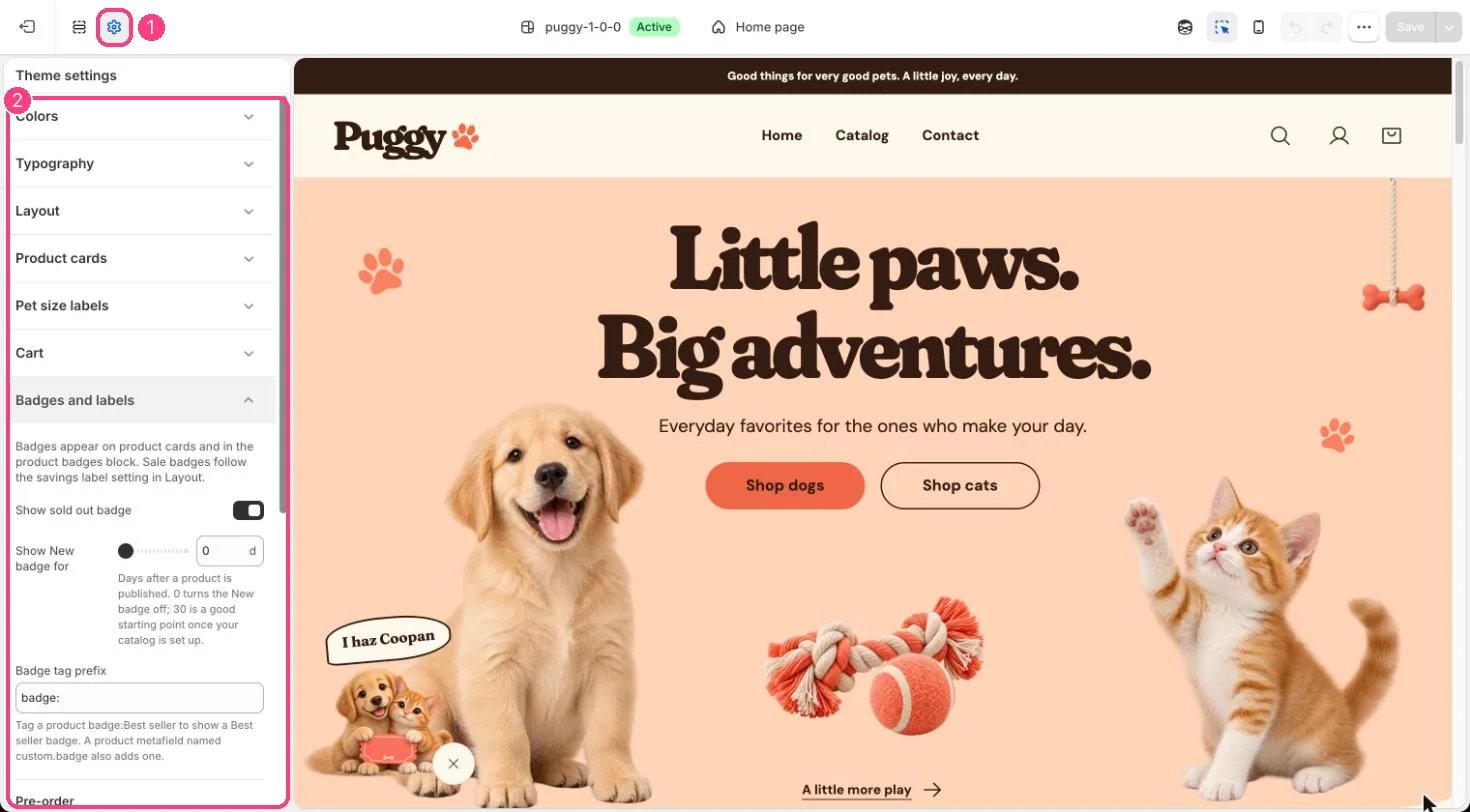
**Where:** in the theme editor, open **Theme settings** (the gear icon at the top of the left sidebar) and choose **Badges and labels**.
 ## How it works
* Up to three badges show per product, in this order: Sold out, Pre-order, On sale, New, then your own badges.
* Sale badges follow the compare-at price and savings label settings in Theme settings > Layout.
* Show New badge for (0 to 90 days) marks products published within that many days. 0 turns it off.
* Tag a product with the Badge tag prefix plus your text, for example badge:Best seller, or fill a product metafield named custom.badge, to add your own badge.
* Products with the Pre-order tag, or tracked variants at zero stock that keep selling, show Pre-order instead of Add to bag, with a note under the button.
## Edit it
* Turn Show sold out badge on or off.
* Set Show New badge for; 30 days is a good start once your catalog is set up.
* Change Badge tag prefix if you prefer a different prefix.
* Set the Pre-order tag, turn Show Pre-order for out-of-stock variants that keep selling on or off, and write a Pre-order note (leave it blank for the default).
## Settings
Badges appear on product cards and in the product badges block. Sale badges follow the savings label setting in Layout.
| Setting | What it does |
| - | - |
| **Show sold out badge** | On or off. Default: on. |
| **Show New badge for** | Slider from 0 to 90 d. Days after a product is published. 0 turns the New badge off; 30 is a good starting point once your catalog is set up. Default: 0 d. |
| **Badge tag prefix** | Text. Tag a product badge:Best seller to show a Best seller badge. A product metafield named custom.badge also adds one. Default: badge:. |
**Pre-order**
| Setting | What it does |
| - | - |
| **Pre-order tag** | Text. Products with this tag show Pre-order instead of Add to cart. Default: pre-order. |
| **Show Pre-order for out-of-stock variants that keep selling** | On or off. Applies when inventory is tracked and Continue selling when out of stock is on. Default: on. |
| **Pre-order note** | Text. Shown under the Pre-order button. Leave blank for the default note. |
This documentation is built and hosted on [Mintlify](https://mintlify.com), a developer documentation platform.
## How it works
* Up to three badges show per product, in this order: Sold out, Pre-order, On sale, New, then your own badges.
* Sale badges follow the compare-at price and savings label settings in Theme settings > Layout.
* Show New badge for (0 to 90 days) marks products published within that many days. 0 turns it off.
* Tag a product with the Badge tag prefix plus your text, for example badge:Best seller, or fill a product metafield named custom.badge, to add your own badge.
* Products with the Pre-order tag, or tracked variants at zero stock that keep selling, show Pre-order instead of Add to bag, with a note under the button.
## Edit it
* Turn Show sold out badge on or off.
* Set Show New badge for; 30 days is a good start once your catalog is set up.
* Change Badge tag prefix if you prefer a different prefix.
* Set the Pre-order tag, turn Show Pre-order for out-of-stock variants that keep selling on or off, and write a Pre-order note (leave it blank for the default).
## Settings
Badges appear on product cards and in the product badges block. Sale badges follow the savings label setting in Layout.
| Setting | What it does |
| - | - |
| **Show sold out badge** | On or off. Default: on. |
| **Show New badge for** | Slider from 0 to 90 d. Days after a product is published. 0 turns the New badge off; 30 is a good starting point once your catalog is set up. Default: 0 d. |
| **Badge tag prefix** | Text. Tag a product badge:Best seller to show a Best seller badge. A product metafield named custom.badge also adds one. Default: badge:. |
**Pre-order**
| Setting | What it does |
| - | - |
| **Pre-order tag** | Text. Products with this tag show Pre-order instead of Add to cart. Default: pre-order. |
| **Show Pre-order for out-of-stock variants that keep selling** | On or off. Applies when inventory is tracked and Continue selling when out of stock is on. Default: on. |
| **Pre-order note** | Text. Shown under the Pre-order button. Leave blank for the default note. |
This documentation is built and hosted on [Mintlify](https://mintlify.com), a developer documentation platform.