> ## Documentation Index
> Fetch the complete documentation index at: https://docs.kwebby.com/llms.txt
> Use this file to discover all available pages before exploring further.
# Colors
> Your color schemes. Every section picks one, and the dark appearance borrows one of them for the whole store.
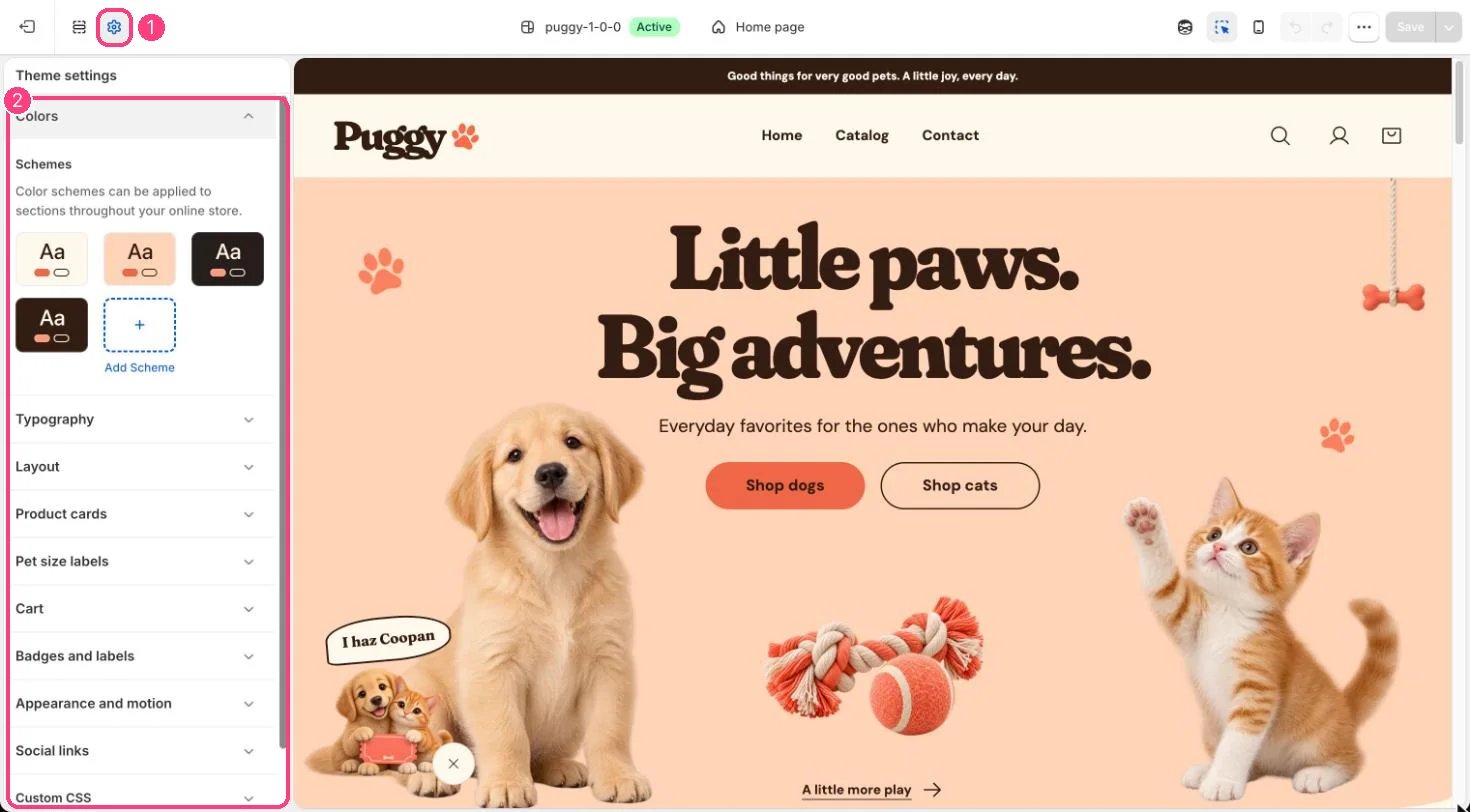
**Where:** in the theme editor, open **Theme settings** (the gear icon at the top of the left sidebar) and choose **Colors**.
 ## How it works
* Puggy starts with four schemes: Scheme 1 (cream), Scheme 2 (peach), Scheme 3 (night) and Scheme 4 (cocoa).
* Each scheme sets Background, Text, Secondary text, Surface, Accent, Button, Button label, Secondary button label, Border, Shadow and an optional Background gradient.
* Scheme 3 doubles as the dark appearance. When a shopper switches to night, or Default appearance is Dark, every section uses Scheme 3's colors.
* In light mode, Scheme 2's background is the peach tint used by Peach image backgrounds and peach panels across the theme.
* Sections that show a product grid use their scheme's Surface color as the section background.
* Background gradient is optional. When it's blank, the plain Background color shows.
## Edit it
* Open Theme settings > Colors, select a scheme and change its colors.
* Click Add scheme to create another one, then pick it in any section's Color scheme setting.
* Keep Scheme 3 dark, because night mode shows it everywhere.
* After changing colors, check that text and buttons stay easy to read in both light and dark appearance.
## Settings
| Setting | What it does |
| - | - |
| **color\_schemes** | The color schemes themselves. |
This documentation is built and hosted on [Mintlify](https://mintlify.com), a developer documentation platform.
## How it works
* Puggy starts with four schemes: Scheme 1 (cream), Scheme 2 (peach), Scheme 3 (night) and Scheme 4 (cocoa).
* Each scheme sets Background, Text, Secondary text, Surface, Accent, Button, Button label, Secondary button label, Border, Shadow and an optional Background gradient.
* Scheme 3 doubles as the dark appearance. When a shopper switches to night, or Default appearance is Dark, every section uses Scheme 3's colors.
* In light mode, Scheme 2's background is the peach tint used by Peach image backgrounds and peach panels across the theme.
* Sections that show a product grid use their scheme's Surface color as the section background.
* Background gradient is optional. When it's blank, the plain Background color shows.
## Edit it
* Open Theme settings > Colors, select a scheme and change its colors.
* Click Add scheme to create another one, then pick it in any section's Color scheme setting.
* Keep Scheme 3 dark, because night mode shows it everywhere.
* After changing colors, check that text and buttons stay easy to read in both light and dark appearance.
## Settings
| Setting | What it does |
| - | - |
| **color\_schemes** | The color schemes themselves. |
This documentation is built and hosted on [Mintlify](https://mintlify.com), a developer documentation platform.