> ## Documentation Index
> Fetch the complete documentation index at: https://docs.kwebby.com/llms.txt
> Use this file to discover all available pages before exploring further.
# Layout
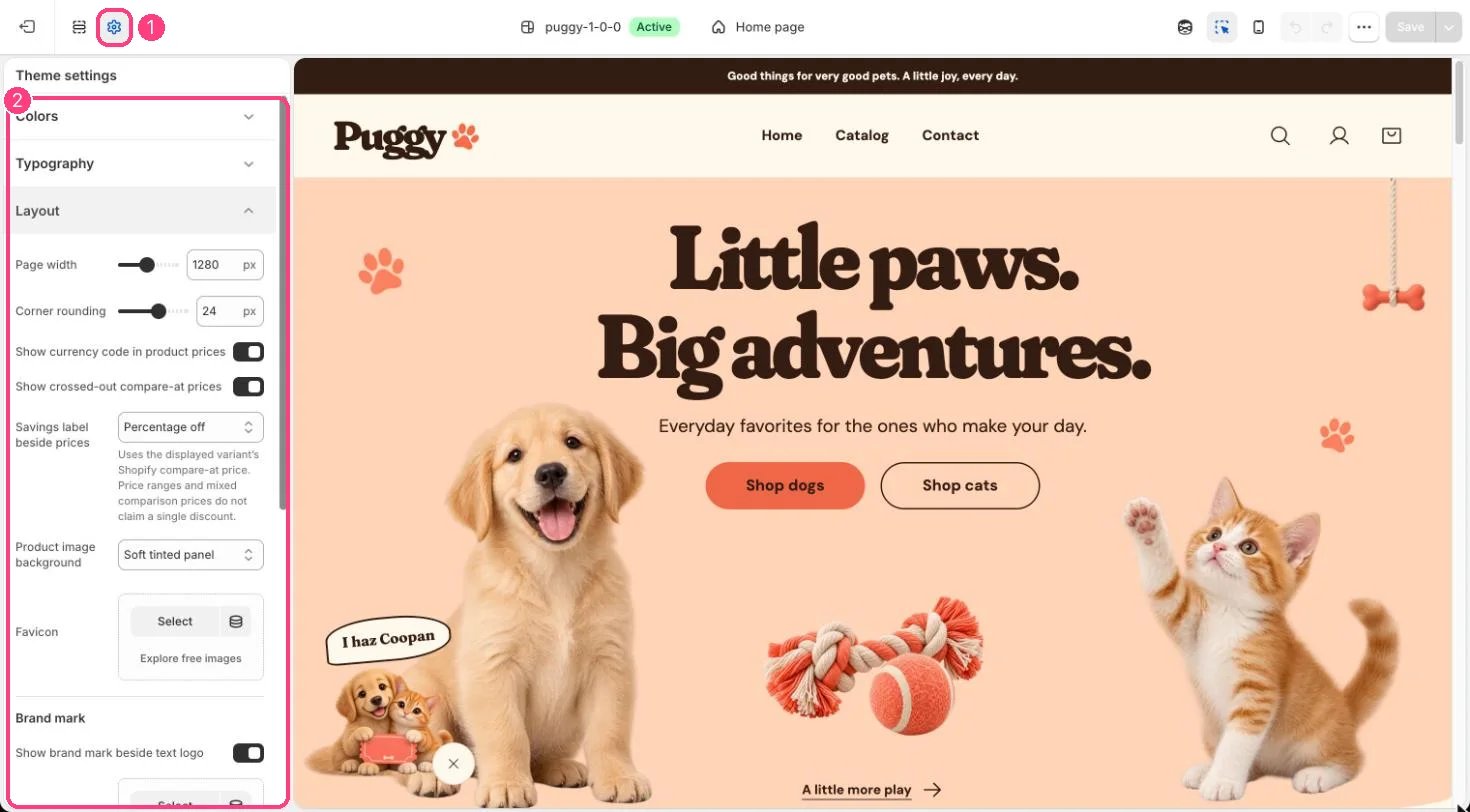
> Page width, corner rounding, how prices and savings show, product card image backgrounds, the favicon and the brand mark beside a text logo.
**Where:** in the theme editor, open **Theme settings** (the gear icon at the top of the left sidebar) and choose **Layout**.
 ## How it works
* Page width (1000 to 1600 px) sets how wide content can grow on large screens.
* Corner rounding (0 to 40 px) rounds cards, images, buttons and panels.
* Show currency code in product prices adds the code, such as USD, after product prices.
* Show crossed-out compare-at prices strikes through the old price when a variant's compare-at price is higher. Turning it off also hides sale badges.
* Savings label beside prices shows Percentage off (rounded down), Amount saved, a simple On sale label, or nothing. Cards for products with a price range don't claim a single discount.
* Product image background puts product card images on a Soft tinted panel, Peach, or Transparent.
* Favicon shows as a small square icon in the browser tab. Without one, a paw print is used.
* Brand mark shows or hides the small mark beside a text logo, and can replace the default paw with your own square image.
## Edit it
* Set compare-at prices on each variant in Shopify admin. The compare-at price must be higher than the price to count as a saving.
* Upload a square Favicon image.
* For Brand mark image, a 72 x 72 px PNG is recommended. Turn off Show brand mark beside text logo to show the store name alone.
## Settings
| Setting | What it does |
| - | - |
| **Page width** | Slider from 1000 to 1600 px, in steps of 40. Default: 1280 px. |
| **Corner rounding** | Slider from 0 to 40 px, in steps of 2. Default: 24 px. |
| **Show currency code in product prices** | On or off. Default: on. |
| **Show crossed-out compare-at prices** | On or off. Default: on. |
| **Savings label beside prices** | Options: Percentage off, Amount saved, Sale, None. Uses the displayed variant’s Shopify compare-at price. Price ranges and mixed comparison prices do not claim a single discount. Default: Percentage off. |
| **Product image background** | Options: Soft tinted panel, Peach, Transparent. Default: Soft tinted panel. |
| **Favicon** | Image: upload one or choose from Content → Files. |
**Brand mark**
| Setting | What it does |
| - | - |
| **Show brand mark beside text logo** | On or off. Default: on. |
| **Brand mark image** | Image: upload one or choose from Content → Files. Square image, 72 x 72px .png recommended. Leave blank to use the paw mark. |
This documentation is built and hosted on [Mintlify](https://mintlify.com), a developer documentation platform.
## How it works
* Page width (1000 to 1600 px) sets how wide content can grow on large screens.
* Corner rounding (0 to 40 px) rounds cards, images, buttons and panels.
* Show currency code in product prices adds the code, such as USD, after product prices.
* Show crossed-out compare-at prices strikes through the old price when a variant's compare-at price is higher. Turning it off also hides sale badges.
* Savings label beside prices shows Percentage off (rounded down), Amount saved, a simple On sale label, or nothing. Cards for products with a price range don't claim a single discount.
* Product image background puts product card images on a Soft tinted panel, Peach, or Transparent.
* Favicon shows as a small square icon in the browser tab. Without one, a paw print is used.
* Brand mark shows or hides the small mark beside a text logo, and can replace the default paw with your own square image.
## Edit it
* Set compare-at prices on each variant in Shopify admin. The compare-at price must be higher than the price to count as a saving.
* Upload a square Favicon image.
* For Brand mark image, a 72 x 72 px PNG is recommended. Turn off Show brand mark beside text logo to show the store name alone.
## Settings
| Setting | What it does |
| - | - |
| **Page width** | Slider from 1000 to 1600 px, in steps of 40. Default: 1280 px. |
| **Corner rounding** | Slider from 0 to 40 px, in steps of 2. Default: 24 px. |
| **Show currency code in product prices** | On or off. Default: on. |
| **Show crossed-out compare-at prices** | On or off. Default: on. |
| **Savings label beside prices** | Options: Percentage off, Amount saved, Sale, None. Uses the displayed variant’s Shopify compare-at price. Price ranges and mixed comparison prices do not claim a single discount. Default: Percentage off. |
| **Product image background** | Options: Soft tinted panel, Peach, Transparent. Default: Soft tinted panel. |
| **Favicon** | Image: upload one or choose from Content → Files. |
**Brand mark**
| Setting | What it does |
| - | - |
| **Show brand mark beside text logo** | On or off. Default: on. |
| **Brand mark image** | Image: upload one or choose from Content → Files. Square image, 72 x 72px .png recommended. Leave blank to use the paw mark. |
This documentation is built and hosted on [Mintlify](https://mintlify.com), a developer documentation platform.