
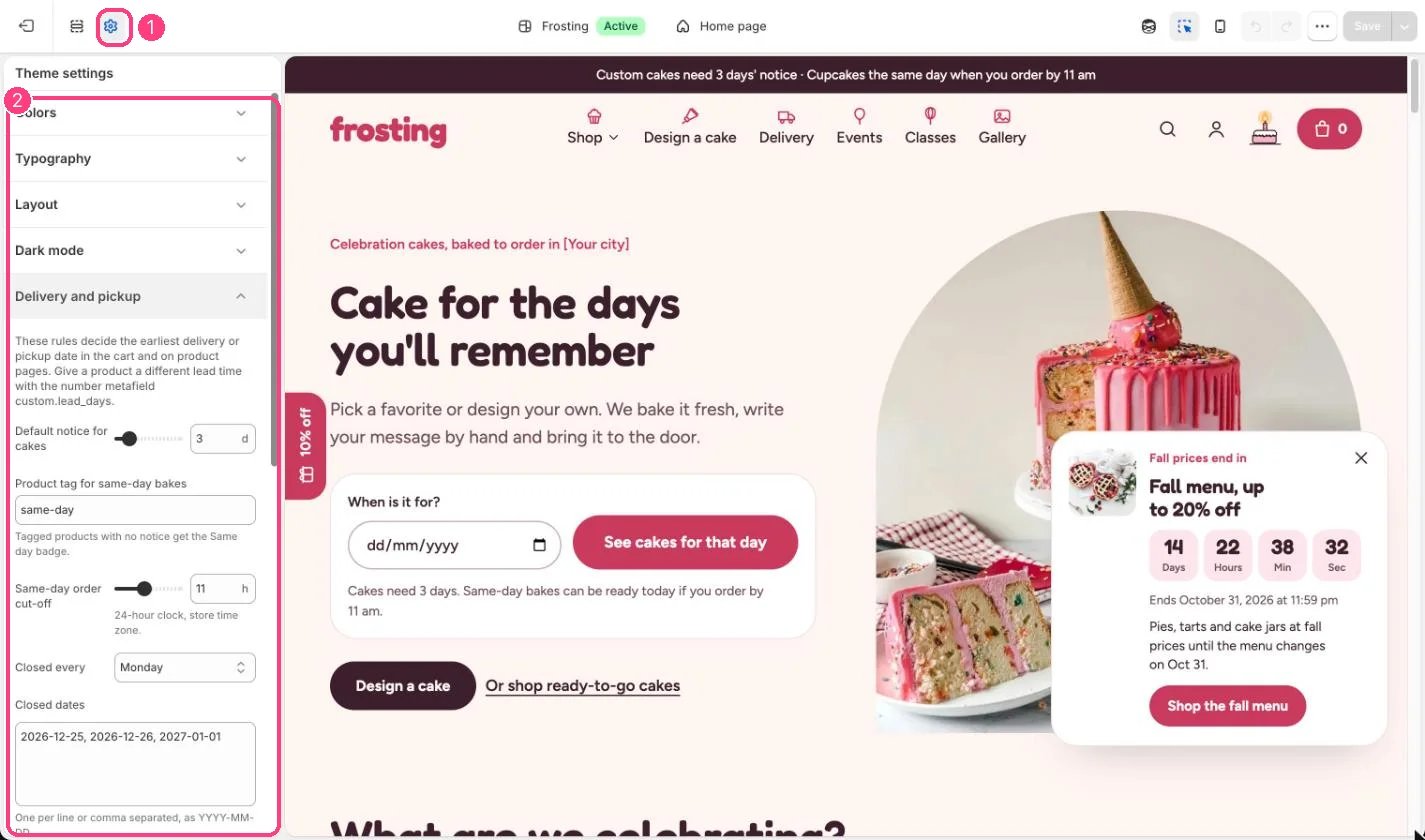
1 Theme settings (the gear icon) · 2 Delivery and pickup, opened in the sidebar
How it works
- Default notice for cakes (0 to 21 days, default 3) applies to every product without its own custom.lead_days metafield.
- Products tagged with the same-day tag (default same-day) and no metafield need no notice, and get the Same day badge on product cards.
- Orders for same-day bakes placed after the Same-day order cut-off (6 to 18 on the 24-hour clock, default 11) move to the next day.
- Closed every blocks one weekday (default Monday), and Closed dates blocks holidays.
- Delivery and pickup time windows fill the time menus in the cart and the cake builder.
- Ask for a date before checkout stops the cart’s checkout button until a valid date is chosen.
- Free delivery from shows a progress bar in the cart. Leave it empty to hide the bar.
- Dates and the cut-off are worked out on the shopper’s device clock, which matches your store’s time for local shoppers.
Edit it
- Type Closed dates as YYYY-MM-DD, one per line or comma separated, for example 2026-12-25.
- Type time windows comma separated, for example 9–11 am, 11 am–1 pm.
- Set the matching free shipping rate in Settings, Shipping and delivery; the theme only shows the progress.
- Give a product its own notice with the number metafield custom.lead_days.