Download the Gloaming demo kit and set up a store like the demo in about 15 minutes.
A fresh install of Gloaming shows drawn placeholders instead of sample jewelry, so your own pieces show from day one. To start from the full demo instead, for practice, a client preview or a faster launch, download the Gloaming demo kit and import it into a new or development store.
Download the Gloaming demo kit
Version 0.1.0, a ZIP of about 84 MB: the pre-configured theme, the demo catalog, the importer, a product CSV, and every photograph and film the demo uses.
The kit is on Google Drive. Click Download at the top right of the Drive page. If Drive says it can’t scan the file for viruses, click Download anyway.
A Shopify theme can’t create products, pages or menus, so it can’t import its own demo content. The kit’s importer does it instead: a small script you run once on your computer, which adds everything to your store through Shopify’s own command line tool.
Gloaming with every section filled in: the hero film, the arched collections, the vertical films, shop the look, the journal, boutiques and events, the spin wheel with four real codes, and the logo text.
setup/
The importer (setup.mjs) and its package.json.
data/catalogue.json
What the importer creates: 24 pieces of jewelry (plus a gift card you create yourself), 10 collections, 8 pages, the Journal and Events blogs with 16 posts, the menus, and the 85 photographs and 10 films the sections use.
media/
Copies of the 85 photographs, 10 film posters and 10 films the demo uses, under the file names the theme looks for. media.json lists each file’s source and author.
products/gloaming-demo-products.csv
The products in Shopify’s import format, for setting up by hand.
CREDITS.md
Where every photograph (Unsplash) and film (Pexels) comes from.
README.md
The full setup guide.
The importer uploads the films from media/films. Shopify fetches the photographs from Unsplash itself; if one of those links ever stops working, upload its copy from media/photos under Content → Files, keeping the file name.
The first command installs Shopify’s command line tool for this folder. The second opens your browser once to approve the access the importer needs. The third creates the metafield definitions, the metal swatches, a boutique location with local pickup, the products with their photographs and stock, the collections, pages, blogs and posts, the menus, the four spin wheel discount codes, and the section photographs and films in Content → Files. It is safe to run again: anything that already exists is reused. A log goes to setup/logs/.
3
Upload the demo theme
In the Shopify admin go to Online Store → Themes, then under Draft themes click Import → Upload zip file and choose theme/gloaming-demo-theme-0.1.0.zip. Click Preview to check it, then Publish when you are ready. Development stores show a password page first; the password is under Online Store → Preferences.
1 Import · 2 Upload zip file
The importer replaces the items in your store’s main menu and footer menu, adds a store location and creates four discount codes. Run it on a new or development store, not on a live shop.
Run the importer before uploading the theme: the theme finds its photographs and films by file name. If the theme went up first and some media are missing, upload the theme ZIP again.
Gift card product: Shopify only creates gift cards once gift cards are activated in your store’s settings. Create a product called Gift card, choose Gift card as the product type, and add the denominations you want.
Quantity price breaks: these need a B2B catalog.
Pre-order deposits: these need a selling plan app.
Complete the set: complementary products are added in the Search & Discovery app.
No command line? Create the product metafield definitions in Settings → Custom data (namespace custom, the keys in the CSV column headers, storefront access on), then import products/gloaming-demo-products.csv in Products → Import, and upload the files in media/ under Content → Files, keeping their names. Collections, pages, blogs and menus are much quicker with the importer; their full list is in data/catalogue.json.
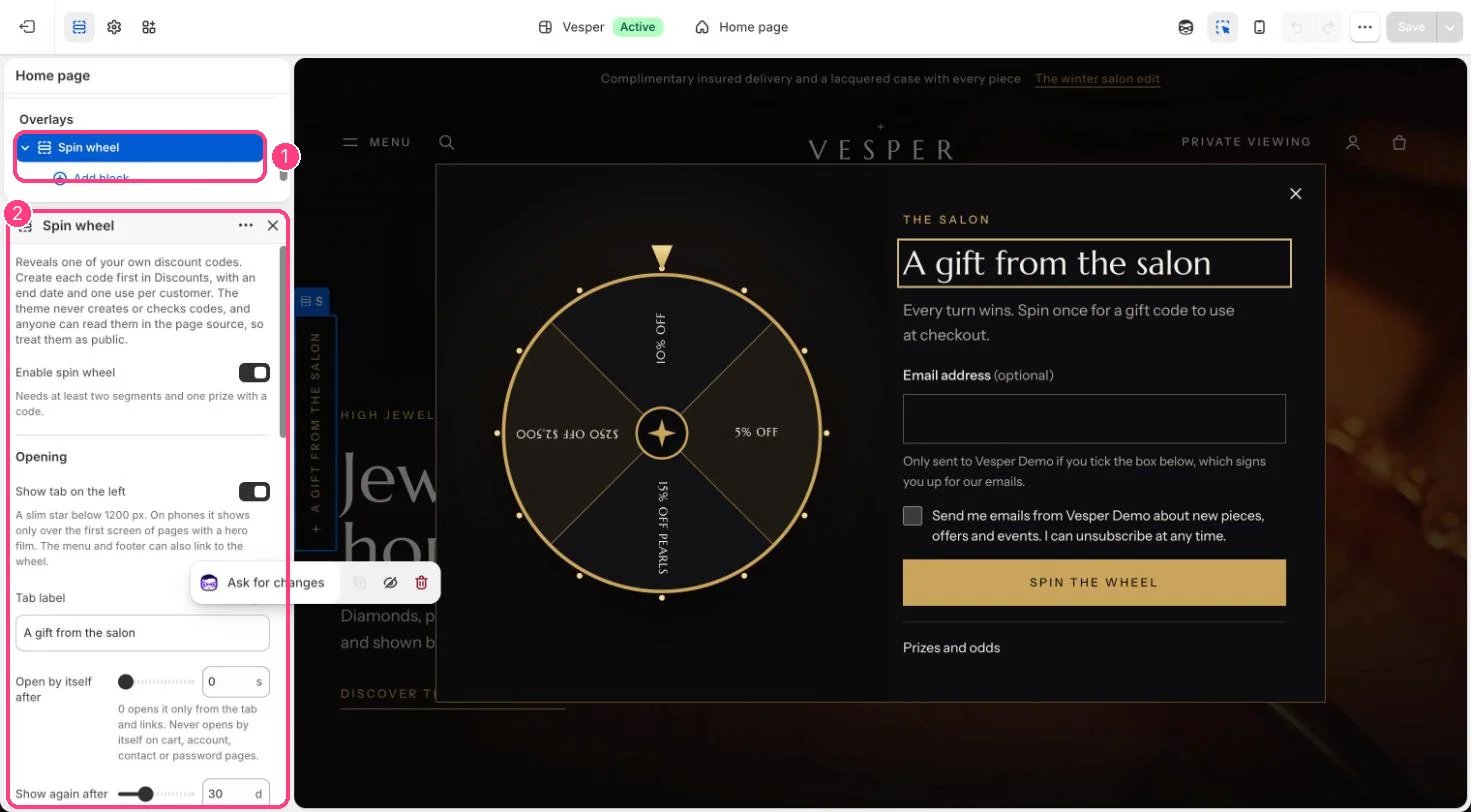
Spin wheel: the demo wheel offers four codes the importer creates: NUIT10 (10% off), SALON5 (5% off), PERLE15 (15% off the Perle collection) and SALON250 ($250 off orders of $2,500 or more). Each is limited to one use per customer. Change the prizes or turn the wheel off under Overlays → Spin wheel.
Countdowns: the demo sale countdown follows a sample end date. Change it or clear it in Home page → Sale countdown; it hides itself when the time runs out.
The demo wheel in the theme editor: 1 Spin wheel, under Overlays · 2 its settings; each prize is a block
The demo photographs come from Unsplash and the films from Pexels (sources in CREDITS.md). They are for demo and preview stores only. Replace them with photographs and films of your own pieces before you sell.
⌘I
{"docsConfig":{"theme":"almond","$schema":"https://mintlify.com/docs.json","name":"Kwebby Documentation","description":"Documentation of Themes, Apps and Plugins offered by Kwebby.","colors":{"primary":"#F97200","light":"#F57700","dark":"#A73E06"},"logo":{"light":"https://mintcdn.com/kwebby/TpZ5Zd9XFi4SxDRE/images/kwebby-yellow-black.png?fit=max\u0026auto=format\u0026n=TpZ5Zd9XFi4SxDRE\u0026q=85\u0026s=8d72008e1f895697c1fbd9b26d1b536d","dark":"https://mintcdn.com/kwebby/TpZ5Zd9XFi4SxDRE/images/kwebby-yellow-black.png?fit=max\u0026auto=format\u0026n=TpZ5Zd9XFi4SxDRE\u0026q=85\u0026s=8d72008e1f895697c1fbd9b26d1b536d","href":"https://docs.kwebby.com"},"favicon":{"light":"https://mintcdn.com/kwebby/TpZ5Zd9XFi4SxDRE/images/favicon(1).png?fit=max\u0026auto=format\u0026n=TpZ5Zd9XFi4SxDRE\u0026q=85\u0026s=c527aedc2f6c7e40822d1c0ee3755200","dark":"https://mintcdn.com/kwebby/TpZ5Zd9XFi4SxDRE/images/favicon(1).png?fit=max\u0026auto=format\u0026n=TpZ5Zd9XFi4SxDRE\u0026q=85\u0026s=c527aedc2f6c7e40822d1c0ee3755200"},"navbar":{"links":[{"href":"mailto:service@kwebby.com","label":"Support"}],"primary":{"type":"button","label":"Back to Kwebby","href":"https://kwebby.com"}},"footer":{"socials":{"github":"https://github.com/kwebby"}},"contextual":{"options":["copy","view","chatgpt","claude","perplexity","mcp","cursor","vscode"],"display":"header"},"styling":{"latex":true},"navigation":{"pages":[]}},"deployment":{"deploymentMetadataValue":{"subdomain":"kwebby","hasAudioNarration":false,"actualSubdomain":"kwebby","customDomains":["docs.kwebby.com"],"gitSource":{"type":"github","owner":"mintlify-community","repo":"docs-kwebby-e0ca5b7f","deployBranch":"main","contentDirectory":"","isPrivate":true,"mountPath":"","label":""},"entitlements":{"AI_CHAT":{"status":"DISABLED"},"WEB_MCP":{"status":"DISABLED"},"NARRATION":{"status":"DISABLED"}},"buildId":"6ad70b109c07678feae63c0b","clientVersion":"0.0.4111","searchFilterCounts":[{"language":"default","tag":"Kelvin","count":108},{"language":"default","tag":"Gloaming","count":91},{"language":"default","tag":"Frosting","count":73},{"language":"default","tag":"Puggy","count":72},{"language":"default","tag":"Feature guides","count":60},{"language":"default","tag":"Home page","count":58},{"language":"default","tag":"Theme settings","count":38},{"language":"default","tag":"Getting started","count":25},{"language":"default","tag":"More sections","count":25},{"language":"default","tag":"Pages and blog","count":16}]},"assistantConfig":{"enableAskAiButton":false,"enableStarterQuestions":false,"enableContextualStarterQuestions":false,"enableAskAiSearchBar":true},"basePath":"","hasChatPermissions":false,"hasWebMcpPermissions":false,"toggles":[{"name":"kill-isr","enabled":true,"variant":{"name":"disabled","enabled":false,"feature_enabled":true},"impressionData":false},{"name":"custom-rbac-roles","enabled":true,"variant":{"name":"disabled","enabled":false,"feature_enabled":true},"impressionData":false},{"name":"agent-mintlify-slack","enabled":true,"variant":{"name":"disabled","enabled":false,"feature_enabled":true},"impressionData":false},{"name":"agent-integrations-settings","enabled":true,"variant":{"name":"disabled","enabled":false,"feature_enabled":true},"impressionData":false},{"name":"rbac-expansion","enabled":true,"variant":{"name":"disabled","enabled":false,"feature_enabled":true},"impressionData":false},{"name":"automations-pr-grouping","enabled":true,"variant":{"name":"disabled","enabled":false,"feature_enabled":true},"impressionData":false},{"name":"custom-prefix","enabled":true,"variant":{"name":"disabled","enabled":false,"feature_enabled":true},"impressionData":false},{"name":"analytics-v7","enabled":true,"variant":{"name":"disabled","enabled":false,"feature_enabled":true},"impressionData":false},{"name":"user-flows-analytics","enabled":true,"variant":{"name":"disabled","enabled":false,"feature_enabled":true},"impressionData":false},{"name":"no-publish-flow","enabled":true,"variant":{"name":"disabled","enabled":false,"feature_enabled":true},"impressionData":false},{"name":"workos-onboarding","enabled":true,"variant":{"name":"disabled","enabled":false,"feature_enabled":true},"impressionData":false},{"name":"llms-txt-v2","enabled":true,"variant":{"name":"disabled","enabled":false,"feature_enabled":true},"impressionData":false},{"name":"snapshot-serving-live","enabled":true,"variant":{"name":"disabled","enabled":false,"feature_enabled":true},"impressionData":false},{"name":"stripTemperatureMiddleware","enabled":true,"variant":{"name":"disabled","enabled":false,"feature_enabled":true},"impressionData":false},{"name":"support-platform-pylon-zendesk","enabled":true,"variant":{"name":"disabled","enabled":false,"feature_enabled":true},"impressionData":false},{"name":"snapshot-serving","enabled":true,"variant":{"name":"disabled","enabled":false,"feature_enabled":true},"impressionData":false},{"name":"instant-rollback","enabled":true,"variant":{"name":"disabled","enabled":false,"feature_enabled":true},"impressionData":false},{"name":"granular-notifications-server","enabled":true,"variant":{"name":"disabled","enabled":false,"feature_enabled":true},"impressionData":false},{"name":"granular-notifications","enabled":true,"variant":{"name":"disabled","enabled":false,"feature_enabled":true},"impressionData":false},{"name":"automations-fable","enabled":true,"variant":{"name":"disabled","enabled":false,"feature_enabled":true},"impressionData":false},{"name":"fixed-ai-action-pricing","enabled":true,"variant":{"name":"disabled","enabled":false,"feature_enabled":true},"impressionData":false},{"name":"automation-resolve-merge-conflict","enabled":true,"variant":{"name":"disabled","enabled":false,"feature_enabled":true},"impressionData":false},{"name":"scoped-publishing","enabled":true,"variant":{"name":"disabled","enabled":false,"feature_enabled":true},"impressionData":false},{"name":"mintql","enabled":true,"variant":{"name":"disabled","enabled":false,"feature_enabled":true},"impressionData":false},{"name":"page-level-analytics","enabled":true,"variant":{"name":"disabled","enabled":false,"feature_enabled":true},"impressionData":false},{"name":"editor-version-history-v2","enabled":true,"variant":{"name":"disabled","enabled":false,"feature_enabled":true},"impressionData":false},{"name":"billing-page-v2","enabled":true,"variant":{"name":"disabled","enabled":false,"feature_enabled":true},"impressionData":false},{"name":"full-page-search","enabled":true,"variant":{"name":"disabled","enabled":false,"feature_enabled":true},"impressionData":false},{"name":"workspace-projects","enabled":true,"variant":{"name":"disabled","enabled":false,"feature_enabled":true},"impressionData":false},{"name":"assistant-v5","enabled":true,"variant":{"name":"disabled","enabled":false,"feature_enabled":true},"impressionData":false},{"name":"fork-pr-previews","enabled":true,"variant":{"name":"disabled","enabled":false,"feature_enabled":true},"impressionData":false},{"name":"revalidation-jwt","enabled":true,"variant":{"name":"disabled","enabled":false,"feature_enabled":true},"impressionData":false},{"name":"workos-sso-scim","enabled":true,"variant":{"name":"disabled","enabled":false,"feature_enabled":true},"impressionData":false},{"name":"hobby-abuse-scan","enabled":true,"variant":{"name":"disabled","enabled":false,"feature_enabled":true},"impressionData":false},{"name":"dashboard-inbox","enabled":true,"variant":{"name":"disabled","enabled":false,"feature_enabled":true},"impressionData":false},{"name":"workos-signup","enabled":true,"variant":{"name":"disabled","enabled":false,"feature_enabled":true},"impressionData":false},{"name":"turbopuffer-dual-write","enabled":true,"variant":{"name":"disabled","enabled":false,"feature_enabled":true},"impressionData":false},{"name":"workos-enabled","enabled":true,"variant":{"name":"disabled","enabled":false,"feature_enabled":true},"impressionData":false},{"name":"approve-review-flow","enabled":true,"variant":{"name":"disabled","enabled":false,"feature_enabled":true},"impressionData":false},{"name":"editor-metadata","enabled":true,"variant":{"name":"disabled","enabled":false,"feature_enabled":true},"impressionData":false},{"name":"sso-setup-deadline-banner","enabled":true,"variant":{"name":"disabled","enabled":false,"feature_enabled":true},"impressionData":false},{"name":"turbopuffer-serve","enabled":true,"variant":{"name":"disabled","enabled":false,"feature_enabled":true},"impressionData":false},{"name":"live-agents","enabled":true,"variant":{"name":"disabled","enabled":false,"feature_enabled":true},"impressionData":false}],"googleFontsInlined":true},"customCss":[],"page":{"pagePath":"gloaming/getting-started/demo-content","slug":"/gloaming/getting-started/demo-content","pageMetadata":{"title":"Import the demo content","description":"Download the Gloaming demo kit and set up a store like the demo in about 15 minutes.","href":"/gloaming/getting-started/demo-content"},"description":{"compiledSource":"\"use strict\";\nconst {jsx: _jsx} = arguments[0];\nconst {useMDXComponents: _provideComponents} = arguments[0];\nfunction _createMdxContent(props) {\n const _components = {\n p: \"p\",\n ..._provideComponents(),\n ...props.components\n };\n return _jsx(_components.p, {\n children: \"Download the Gloaming demo kit and set up a store like the demo in about 15 minutes.\"\n });\n}\nfunction MDXContent(props = {}) {\n const {wrapper: MDXLayout} = {\n ..._provideComponents(),\n ...props.components\n };\n return MDXLayout ? _jsx(MDXLayout, {\n ...props,\n children: _jsx(_createMdxContent, {\n ...props\n })\n }) : _createMdxContent(props);\n}\nreturn {\n default: MDXContent\n};\n","frontmatter":{},"scope":{}},"pageType":"default","mdx":{"mdxSource":{"compiledSource":"\"use strict\";const{Fragment:_Fragment,jsx:_jsx,jsxs:_jsxs}=arguments[0];const{useMDXComponents:_provideComponents}=arguments[0];function _createMdxContent(props){const _components={a:`a`,code:`code`,li:`li`,p:`p`,pre:`pre`,span:`span`,strong:`strong`,tbody:`tbody`,td:`td`,th:`th`,thead:`thead`,tr:`tr`,ul:`ul`,..._provideComponents(),...props.components},{Card,CodeBlock,Frame,Heading,Note,OptimizedImage,Step,Steps,Table,Tip,Warning}=_components;if(!Card)_missingMdxReference(`Card`,true);if(!CodeBlock)_missingMdxReference(`CodeBlock`,true);if(!Frame)_missingMdxReference(`Frame`,true);if(!Heading)_missingMdxReference(`Heading`,true);if(!Note)_missingMdxReference(`Note`,true);if(!OptimizedImage)_missingMdxReference(`OptimizedImage`,true);if(!Step)_missingMdxReference(`Step`,true);if(!Steps)_missingMdxReference(`Steps`,true);if(!Table)_missingMdxReference(`Table`,true);if(!Tip)_missingMdxReference(`Tip`,true);if(!Warning)_missingMdxReference(`Warning`,true);return _jsxs(_Fragment,{children:[_jsxs(_components.p,{children:[`A fresh install of Gloaming shows drawn placeholders instead of sample jewelry, so your own pieces show from day one. To start from the full demo instead, for practice, a client preview or a faster launch, download the `,_jsx(_components.strong,{children:`Gloaming demo kit`}),` and import it into a new or development store.`]}),`\n`,_jsx(Card,{title:`Download the Gloaming demo kit`,icon:`download`,href:`https://drive.google.com/file/d/1vcxCFX-dxksRdO-5WqIoKQy6xXRaYjY1/view?usp=sharing`,children:_jsx(_components.p,{children:`Version 0.1.0, a ZIP of about 84 MB: the pre-configured theme, the demo catalog, the importer, a product CSV, and every photograph and film the demo uses.`})}),`\n`,_jsxs(Tip,{children:[`The kit is on Google Drive. Click `,_jsx(_components.strong,{children:`Download`}),` at the top right of the Drive page. If Drive says it can’t scan the file for viruses, click `,_jsx(_components.strong,{children:`Download anyway`}),`.`]}),`\n`,_jsxs(Note,{children:[`A Shopify theme can’t create products, pages or menus, so it can’t import its own demo content. The kit’s `,_jsx(_components.strong,{children:`importer`}),` does it instead: a small script you run once on your computer, which adds everything to your store through Shopify’s own command line tool.`]}),`\n`,_jsx(Heading,{level:`2`,id:`what-is-in-the-demo-kit`,children:`What is in the demo kit`}),`\n`,_jsxs(Table,{children:[_jsx(_components.thead,{children:_jsxs(_components.tr,{children:[_jsx(_components.th,{children:`Folder`}),_jsx(_components.th,{children:`What it is`})]})}),_jsxs(_components.tbody,{children:[_jsxs(_components.tr,{children:[_jsx(_components.td,{children:_jsx(_components.code,{children:`theme/gloaming-demo-theme-0.1.0.zip`})}),_jsx(_components.td,{children:`Gloaming with every section filled in: the hero film, the arched collections, the vertical films, shop the look, the journal, boutiques and events, the spin wheel with four real codes, and the logo text.`})]}),_jsxs(_components.tr,{children:[_jsx(_components.td,{children:_jsx(_components.code,{children:`setup/`})}),_jsxs(_components.td,{children:[`The importer (`,_jsx(_components.code,{children:`setup.mjs`}),`) and its `,_jsx(_components.code,{children:`package.json`}),`.`]})]}),_jsxs(_components.tr,{children:[_jsx(_components.td,{children:_jsx(_components.code,{children:`data/catalogue.json`})}),_jsx(_components.td,{children:`What the importer creates: 24 pieces of jewelry (plus a gift card you create yourself), 10 collections, 8 pages, the Journal and Events blogs with 16 posts, the menus, and the 85 photographs and 10 films the sections use.`})]}),_jsxs(_components.tr,{children:[_jsx(_components.td,{children:_jsx(_components.code,{children:`media/`})}),_jsxs(_components.td,{children:[`Copies of the 85 photographs, 10 film posters and 10 films the demo uses, under the file names the theme looks for. `,_jsx(_components.code,{children:`media.json`}),` lists each file’s source and author.`]})]}),_jsxs(_components.tr,{children:[_jsx(_components.td,{children:_jsx(_components.code,{children:`products/gloaming-demo-products.csv`})}),_jsx(_components.td,{children:`The products in Shopify’s import format, for setting up by hand.`})]}),_jsxs(_components.tr,{children:[_jsx(_components.td,{children:_jsx(_components.code,{children:`CREDITS.md`})}),_jsx(_components.td,{children:`Where every photograph (Unsplash) and film (Pexels) comes from.`})]}),_jsxs(_components.tr,{children:[_jsx(_components.td,{children:_jsx(_components.code,{children:`README.md`})}),_jsx(_components.td,{children:`The full setup guide.`})]})]})]}),`\n`,_jsxs(_components.p,{children:[`The importer uploads the films from `,_jsx(_components.code,{children:`media/films`}),`. Shopify fetches the photographs from Unsplash itself; if one of those links ever stops working, upload its copy from `,_jsx(_components.code,{children:`media/photos`}),` under `,_jsx(_components.strong,{children:`Content → Files`}),`, keeping the file name.`]}),`\n`,_jsx(Heading,{level:`2`,id:`import-with-the-importer-about-15-minutes`,children:`Import with the importer (about 15 minutes)`}),`\n`,_jsxs(Steps,{children:[_jsx(Step,{title:`Unzip the kit`,children:_jsxs(_components.p,{children:[`Unzip the kit anywhere on your computer. Keep the `,_jsx(_components.code,{children:`media`}),` folder next to `,_jsx(_components.code,{children:`setup`}),`.`]})}),_jsxs(Step,{title:`Run the importer`,children:[_jsxs(_components.p,{children:[`You need `,_jsx(_components.a,{href:`https://nodejs.org`,children:`Node.js`}),` 22 or newer. In a terminal, open the kit’s `,_jsx(_components.code,{children:`setup`}),` folder and run:`]}),_jsx(CodeBlock,{filename:``,numberOfLines:`3`,language:`shellscript`,children:_jsx(_components.pre,{className:`shiki shiki-themes github-light-default dark-plus`,style:{backgroundColor:`#ffffff`,\"--shiki-dark-bg\":`#0B0C0E`,color:`#1f2328`,\"--shiki-dark\":`#D4D4D4`},language:`shellscript`,children:_jsxs(_components.code,{language:`shellscript`,numberOfLines:`3`,children:[_jsxs(_components.span,{className:`line`,children:[_jsx(_components.span,{style:{color:`#953800`,\"--shiki-dark\":`#DCDCAA`},children:`npm`}),_jsx(_components.span,{style:{color:`#0A3069`,\"--shiki-dark\":`#CE9178`},children:` install`})]}),`\n`,_jsxs(_components.span,{className:`line`,children:[_jsx(_components.span,{style:{color:`#953800`,\"--shiki-dark\":`#DCDCAA`},children:`node`}),_jsx(_components.span,{style:{color:`#0A3069`,\"--shiki-dark\":`#CE9178`},children:` setup.mjs`}),_jsx(_components.span,{style:{color:`#0A3069`,\"--shiki-dark\":`#CE9178`},children:` your-store.myshopify.com`}),_jsx(_components.span,{style:{color:`#0A3069`,\"--shiki-dark\":`#CE9178`},children:` auth`})]}),`\n`,_jsxs(_components.span,{className:`line`,children:[_jsx(_components.span,{style:{color:`#953800`,\"--shiki-dark\":`#DCDCAA`},children:`node`}),_jsx(_components.span,{style:{color:`#0A3069`,\"--shiki-dark\":`#CE9178`},children:` setup.mjs`}),_jsx(_components.span,{style:{color:`#0A3069`,\"--shiki-dark\":`#CE9178`},children:` your-store.myshopify.com`})]}),`\n`]})})}),_jsxs(_components.p,{children:[`The first command installs Shopify’s command line tool for this folder. The second opens your browser once to approve the access the importer needs. The third creates the metafield definitions, the metal swatches, a boutique location with local pickup, the products with their photographs and stock, the collections, pages, blogs and posts, the menus, the four spin wheel discount codes, and the section photographs and films in `,_jsx(_components.strong,{children:`Content → Files`}),`. It is safe to run again: anything that already exists is reused. A log goes to `,_jsx(_components.code,{children:`setup/logs/`}),`.`]})]}),_jsxs(Step,{title:`Upload the demo theme`,children:[_jsxs(_components.p,{children:[`In the Shopify admin go to `,_jsx(_components.strong,{children:`Online Store → Themes`}),`, then under Draft themes click `,_jsx(_components.strong,{children:`Import → Upload zip file`}),` and choose `,_jsx(_components.code,{children:`theme/gloaming-demo-theme-0.1.0.zip`}),`. Click `,_jsx(_components.strong,{children:`Preview`}),` to check it, then `,_jsx(_components.strong,{children:`Publish`}),` when you are ready. Development stores show a password page first; the password is under `,_jsx(_components.strong,{children:`Online Store → Preferences`}),`.`]}),_jsx(Frame,{caption:`1 Import · 2 Upload zip file`,children:_jsx(OptimizedImage,{src:`https://mintcdn.com/kwebby/ipMVAv6ECVUC3DoM/images/vesper/admin-upload.webp?fit=max\u0026auto=format\u0026n=ipMVAv6ECVUC3DoM\u0026q=85\u0026s=e78ee392990488474a89de52c64266d6`,alt:`The Upload zip file option`,\"data-og-width\":`1471`,width:`1471`,\"data-og-height\":`812`,height:`812`,\"data-path\":`images/vesper/admin-upload.webp`,\"data-optimize\":`true`,\"data-opv\":`3`,srcset:`https://mintcdn.com/kwebby/ipMVAv6ECVUC3DoM/images/vesper/admin-upload.webp?w=280\u0026fit=max\u0026auto=format\u0026n=ipMVAv6ECVUC3DoM\u0026q=85\u0026s=f07b1fa2d7b86706f7dc0a75cebff486 280w, https://mintcdn.com/kwebby/ipMVAv6ECVUC3DoM/images/vesper/admin-upload.webp?w=560\u0026fit=max\u0026auto=format\u0026n=ipMVAv6ECVUC3DoM\u0026q=85\u0026s=9cd8b8ace42a08e3c49be430a041e0a5 560w, https://mintcdn.com/kwebby/ipMVAv6ECVUC3DoM/images/vesper/admin-upload.webp?w=840\u0026fit=max\u0026auto=format\u0026n=ipMVAv6ECVUC3DoM\u0026q=85\u0026s=6ac26c01e3d0f5bafa2143e7001ef2f9 840w, https://mintcdn.com/kwebby/ipMVAv6ECVUC3DoM/images/vesper/admin-upload.webp?w=1100\u0026fit=max\u0026auto=format\u0026n=ipMVAv6ECVUC3DoM\u0026q=85\u0026s=6fd59d22031521bf1dc9bb6f7e9f96d4 1100w, https://mintcdn.com/kwebby/ipMVAv6ECVUC3DoM/images/vesper/admin-upload.webp?w=1650\u0026fit=max\u0026auto=format\u0026n=ipMVAv6ECVUC3DoM\u0026q=85\u0026s=ae01688bd7a2a977257cc84e91f0c495 1650w, https://mintcdn.com/kwebby/ipMVAv6ECVUC3DoM/images/vesper/admin-upload.webp?w=2500\u0026fit=max\u0026auto=format\u0026n=ipMVAv6ECVUC3DoM\u0026q=85\u0026s=b9ca639737858ff951160e9339263791 2500w`})})]})]}),`\n`,_jsxs(Warning,{children:[`The importer replaces the items in your store’s `,_jsx(_components.strong,{children:`main menu`}),` and `,_jsx(_components.strong,{children:`footer menu`}),`, adds a store location and creates four discount codes. Run it on a new or development store, not on a live shop.`]}),`\n`,_jsx(_components.p,{children:`Run the importer before uploading the theme: the theme finds its photographs and films by file name. If the theme went up first and some media are missing, upload the theme ZIP again.`}),`\n`,_jsx(Heading,{level:`2`,id:`what-the-kit-does-not-do`,children:`What the kit does not do`}),`\n`,_jsxs(_components.ul,{children:[`\n`,_jsxs(_components.li,{children:[_jsx(_components.strong,{children:`Gift card product:`}),` Shopify only creates gift cards once gift cards are activated in your store’s settings. Create a product called Gift card, choose Gift card as the product type, and add the denominations you want.`]}),`\n`,_jsxs(_components.li,{children:[_jsx(_components.strong,{children:`Quantity price breaks:`}),` these need a B2B catalog.`]}),`\n`,_jsxs(_components.li,{children:[_jsx(_components.strong,{children:`Pre-order deposits:`}),` these need a selling plan app.`]}),`\n`,_jsxs(_components.li,{children:[_jsx(_components.strong,{children:`Complete the set:`}),` complementary products are added in the Search \u0026 Discovery app.`]}),`\n`,_jsxs(_components.li,{children:[_jsx(_components.strong,{children:`Filters:`}),` add them in Search \u0026 Discovery; see `,_jsx(_components.a,{href:`/gloaming/guides/search-and-discovery-filters`,children:`Filters with Search \u0026 Discovery`}),`.`]}),`\n`]}),`\n`,_jsx(Heading,{level:`2`,id:`import-by-hand`,children:`Import by hand`}),`\n`,_jsxs(_components.p,{children:[`No command line? Create the product metafield definitions in `,_jsx(_components.strong,{children:`Settings → Custom data`}),` (namespace `,_jsx(_components.code,{children:`custom`}),`, the keys in the CSV column headers, storefront access on), then import `,_jsx(_components.code,{children:`products/gloaming-demo-products.csv`}),` in `,_jsx(_components.strong,{children:`Products → Import`}),`, and upload the files in `,_jsx(_components.code,{children:`media/`}),` under `,_jsx(_components.strong,{children:`Content → Files`}),`, keeping their names. Collections, pages, blogs and menus are much quicker with the importer; their full list is in `,_jsx(_components.code,{children:`data/catalogue.json`}),`.`]}),`\n`,_jsx(Heading,{level:`2`,id:`good-to-know`,children:`Good to know`}),`\n`,_jsxs(_components.ul,{children:[`\n`,_jsxs(_components.li,{children:[_jsx(_components.strong,{children:`Spin wheel:`}),` the demo wheel offers four codes the importer creates: NUIT10 (10% off), SALON5 (5% off), PERLE15 (15% off the Perle collection) and SALON250 ($250 off orders of $2,500 or more). Each is limited to one use per customer. Change the prizes or turn the wheel off under `,_jsx(_components.strong,{children:`Overlays → Spin wheel`}),`.`]}),`\n`,_jsxs(_components.li,{children:[_jsx(_components.strong,{children:`Countdowns:`}),` the demo sale countdown follows a sample end date. Change it or clear it in `,_jsx(_components.strong,{children:`Home page → Sale countdown`}),`; it hides itself when the time runs out.`]}),`\n`]}),`\n`,_jsx(Frame,{caption:`The demo wheel in the theme editor: 1 Spin wheel, under Overlays · 2 its settings; each prize is a block`,children:_jsx(OptimizedImage,{src:`https://mintcdn.com/kwebby/ipMVAv6ECVUC3DoM/images/vesper/editor-spin-wheel.webp?fit=max\u0026auto=format\u0026n=ipMVAv6ECVUC3DoM\u0026q=85\u0026s=4e49a75bddcdffd33712cf567e03f094`,alt:`The demo spin wheel in the theme editor`,\"data-og-width\":`1471`,width:`1471`,\"data-og-height\":`812`,height:`812`,\"data-path\":`images/vesper/editor-spin-wheel.webp`,\"data-optimize\":`true`,\"data-opv\":`3`,srcset:`https://mintcdn.com/kwebby/ipMVAv6ECVUC3DoM/images/vesper/editor-spin-wheel.webp?w=280\u0026fit=max\u0026auto=format\u0026n=ipMVAv6ECVUC3DoM\u0026q=85\u0026s=9a44e256c18b20bfe9d60a5e857937c6 280w, https://mintcdn.com/kwebby/ipMVAv6ECVUC3DoM/images/vesper/editor-spin-wheel.webp?w=560\u0026fit=max\u0026auto=format\u0026n=ipMVAv6ECVUC3DoM\u0026q=85\u0026s=c977099f517ff6135a88975913d48aa8 560w, https://mintcdn.com/kwebby/ipMVAv6ECVUC3DoM/images/vesper/editor-spin-wheel.webp?w=840\u0026fit=max\u0026auto=format\u0026n=ipMVAv6ECVUC3DoM\u0026q=85\u0026s=e7eebcd74638b19fdfca49035e8bd3d1 840w, https://mintcdn.com/kwebby/ipMVAv6ECVUC3DoM/images/vesper/editor-spin-wheel.webp?w=1100\u0026fit=max\u0026auto=format\u0026n=ipMVAv6ECVUC3DoM\u0026q=85\u0026s=4f4b0c427d1b23d1a8de31d438d64d9f 1100w, https://mintcdn.com/kwebby/ipMVAv6ECVUC3DoM/images/vesper/editor-spin-wheel.webp?w=1650\u0026fit=max\u0026auto=format\u0026n=ipMVAv6ECVUC3DoM\u0026q=85\u0026s=d779b7d21db989392409e62762a71b77 1650w, https://mintcdn.com/kwebby/ipMVAv6ECVUC3DoM/images/vesper/editor-spin-wheel.webp?w=2500\u0026fit=max\u0026auto=format\u0026n=ipMVAv6ECVUC3DoM\u0026q=85\u0026s=f955ded413baa6636ed0a8da8be30812 2500w`})}),`\n`,_jsxs(Warning,{children:[`The demo photographs come from Unsplash and the films from Pexels (sources in `,_jsx(_components.code,{children:`CREDITS.md`}),`). They are for demo and preview stores only. Replace them with photographs and films of your own pieces before you sell.`]})]})}function MDXContent(props={}){const{wrapper:MDXLayout}={..._provideComponents(),...props.components};return MDXLayout?_jsx(MDXLayout,{...props,children:_jsx(_createMdxContent,{...props})}):_createMdxContent(props)}return{default:MDXContent};function _missingMdxReference(id,component){throw new Error(`Expected `+(component?`component`:`object`)+\" `\"+id+\"` to be defined: you likely forgot to import, pass, or provide it.\")}","frontmatter":{},"scope":{"config":{},"pageMetadata":{"title":"Import the demo content","description":"Download the Gloaming demo kit and set up a store like the demo in about 15 minutes.","href":"/gloaming/getting-started/demo-content"}}},"mdxSourceWithNoJs":null},"mdxExtracts":{"tableOfContents":[{"title":"What is in the demo kit","slug":"what-is-in-the-demo-kit","depth":2,"children":[]},{"title":"Import with the importer (about 15 minutes)","slug":"import-with-the-importer-about-15-minutes","depth":2,"children":[]},{"title":"What the kit does not do","slug":"what-the-kit-does-not-do","depth":2,"children":[]},{"title":"Import by hand","slug":"import-by-hand","depth":2,"children":[]},{"title":"Good to know","slug":"good-to-know","depth":2,"children":[]}],"codeExamples":{}},"jsLinks":[],"subdomain":"kwebby","siteName":"Kwebby Documentation","title":"Import the demo content - Kwebby Documentation","navMaps":{"firstHrefInVersion":{},"firstHrefInLanguage":{}},"lastModified":"2026-10-20T06:33:00.867Z","originalFileLocation":"gloaming/getting-started/demo-content.mdx"},"headHtml":"\u003cscript data-mint-head>(function(){var d=document.documentElement,p=null;if(!p){try{p=localStorage.getItem(\"isDarkMode\")}catch(e){}if(p==='true')p='dark';else if(p==='false')p='light';if(p!=='light'\u0026\u0026p!=='dark'\u0026\u0026p!=='system')p=\"system\"}var r=p==='system'?(matchMedia(\"(prefers-color-scheme: dark)\").matches?'dark':'light'):p;d.classList.remove(r==='dark'?'light':'dark');d.classList.add(r);d.setAttribute(\"data-theme-preference\",p)})();\u003c/script>\u003cmeta data-mint-head name=\"description\" content=\"Download the Gloaming demo kit and set up a store like the demo in about 15 minutes.\">\u003cmeta data-mint-head name=\"application-name\" content=\"Kwebby Documentation\">\u003cmeta data-mint-head name=\"generator\" content=\"Mintlify\">\u003clink data-mint-head rel=\"icon\" type=\"image/png\" sizes=\"192x192\" href=\"/mintlify-assets/_mintlify/favicons/kwebby/qtPMsnKhF6QU_9XG/_generated/favicon/android-chrome-192x192.png\" media=\"(prefers-color-scheme: light)\">\u003clink data-mint-head rel=\"apple-touch-icon\" type=\"image/png\" sizes=\"180x180\" href=\"/mintlify-assets/_mintlify/favicons/kwebby/qtPMsnKhF6QU_9XG/_generated/favicon/apple-touch-icon.png\">\u003clink data-mint-head rel=\"icon\" type=\"image/png\" sizes=\"16x16\" href=\"/mintlify-assets/_mintlify/favicons/kwebby/qtPMsnKhF6QU_9XG/_generated/favicon/favicon-16x16.png\" media=\"(prefers-color-scheme: light)\">\u003clink data-mint-head rel=\"icon\" type=\"image/png\" sizes=\"32x32\" href=\"/mintlify-assets/_mintlify/favicons/kwebby/qtPMsnKhF6QU_9XG/_generated/favicon/favicon-32x32.png\" media=\"(prefers-color-scheme: light)\">\u003clink data-mint-head rel=\"shortcut icon\" type=\"image/x-icon\" href=\"/mintlify-assets/_mintlify/favicons/kwebby/qtPMsnKhF6QU_9XG/_generated/favicon/favicon.ico\" media=\"(prefers-color-scheme: light)\">\u003clink data-mint-head rel=\"icon\" type=\"image/png\" sizes=\"192x192\" href=\"/mintlify-assets/_mintlify/favicons/kwebby/qtPMsnKhF6QU_9XG/_generated/favicon-dark/android-chrome-192x192.png\" media=\"(prefers-color-scheme: dark)\">\u003clink data-mint-head rel=\"icon\" type=\"image/png\" sizes=\"16x16\" href=\"/mintlify-assets/_mintlify/favicons/kwebby/qtPMsnKhF6QU_9XG/_generated/favicon-dark/favicon-16x16.png\" media=\"(prefers-color-scheme: dark)\">\u003clink data-mint-head rel=\"icon\" type=\"image/png\" sizes=\"32x32\" href=\"/mintlify-assets/_mintlify/favicons/kwebby/qtPMsnKhF6QU_9XG/_generated/favicon-dark/favicon-32x32.png\" media=\"(prefers-color-scheme: dark)\">\u003clink data-mint-head rel=\"shortcut icon\" type=\"image/x-icon\" href=\"/mintlify-assets/_mintlify/favicons/kwebby/qtPMsnKhF6QU_9XG/_generated/favicon-dark/favicon.ico\" media=\"(prefers-color-scheme: dark)\">\u003cmeta data-mint-head property=\"og:title\" content=\"Import the demo content - Kwebby Documentation\">\u003cmeta data-mint-head property=\"og:description\" content=\"Download the Gloaming demo kit and set up a store like the demo in about 15 minutes.\">\u003cmeta data-mint-head property=\"og:site_name\" content=\"Kwebby Documentation\">\u003cmeta data-mint-head property=\"og:url\" content=\"https://docs.kwebby.com/gloaming/getting-started/demo-content\">\u003cmeta data-mint-head property=\"og:type\" content=\"website\">\u003cmeta data-mint-head property=\"og:image\" content=\"https://kwebby.mintlify.site/_mintlify/api/og/v2?division=Getting+started\u0026amp;title=Import+the+demo+content\u0026amp;description=Download+the+Gloaming+demo+kit+and+set+up+a+store+like+the+demo+in+about+15+minutes.\u0026amp;theme=c66c1e6a00f2049f134dbc30\u0026amp;signature=d050c557cdfcbee8ec16794fe0aeeef248c8322117a6629772ef34de804ef6b7\">\u003cmeta data-mint-head property=\"og:image:width\" content=\"1200\">\u003cmeta data-mint-head property=\"og:image:height\" content=\"630\">\u003cmeta data-mint-head name=\"twitter:card\" content=\"summary_large_image\">\u003cmeta data-mint-head name=\"twitter:title\" content=\"Import the demo content - Kwebby Documentation\">\u003cmeta data-mint-head name=\"twitter:description\" content=\"Download the Gloaming demo kit and set up a store like the demo in about 15 minutes.\">\u003cmeta data-mint-head name=\"twitter:image\" content=\"https://kwebby.mintlify.site/_mintlify/api/og/v2?division=Getting+started\u0026amp;title=Import+the+demo+content\u0026amp;description=Download+the+Gloaming+demo+kit+and+set+up+a+store+like+the+demo+in+about+15+minutes.\u0026amp;theme=c66c1e6a00f2049f134dbc30\u0026amp;signature=d050c557cdfcbee8ec16794fe0aeeef248c8322117a6629772ef34de804ef6b7\">\u003cmeta data-mint-head name=\"twitter:image:width\" content=\"1200\">\u003cmeta data-mint-head name=\"twitter:image:height\" content=\"630\">\u003cmeta data-mint-head name=\"msapplication-config\" content=\"/mintlify-assets/_mintlify/favicons/kwebby/qtPMsnKhF6QU_9XG/_generated/favicon/browserconfig.xml\">\u003cmeta data-mint-head name=\"apple-mobile-web-app-title\" content=\"Kwebby Documentation\">\u003cmeta data-mint-head name=\"msapplication-TileColor\" content=\"#F97200\">\u003clink data-mint-head rel=\"canonical\" href=\"https://docs.kwebby.com/gloaming/getting-started/demo-content\">\u003clink data-mint-head rel=\"alternate\" type=\"application/xml\" href=\"/sitemap.xml\">\u003clink data-mint-head rel=\"alternate\" type=\"text/markdown\" href=\"/gloaming/getting-started/demo-content.md\">\u003cscript data-mint-head type=\"application/ld+json\">{\"@context\":\"https://schema.org\",\"@graph\":[{\"@type\":\"Organization\",\"@id\":\"https://docs.kwebby.com/#organization\",\"name\":\"Kwebby Documentation\",\"url\":\"https://docs.kwebby.com\",\"logo\":{\"@type\":\"ImageObject\",\"url\":\"https://mintcdn.com/kwebby/TpZ5Zd9XFi4SxDRE/images/kwebby-yellow-black.png?fit=max\u0026auto=format\u0026n=TpZ5Zd9XFi4SxDRE\u0026q=85\u0026s=8d72008e1f895697c1fbd9b26d1b536d\"}},{\"@type\":\"WebSite\",\"@id\":\"https://docs.kwebby.com#website\",\"name\":\"Kwebby Documentation\",\"url\":\"https://docs.kwebby.com\",\"publisher\":{\"@id\":\"https://docs.kwebby.com/#organization\"}},{\"@type\":\"WebPage\",\"@id\":\"https://docs.kwebby.com/gloaming/getting-started/demo-content#webpage\",\"url\":\"https://docs.kwebby.com/gloaming/getting-started/demo-content\",\"name\":\"Import the demo content\",\"description\":\"Download the Gloaming demo kit and set up a store like the demo in about 15 minutes.\",\"dateModified\":\"2026-10-20T06:33:00.867Z\",\"isPartOf\":{\"@id\":\"https://docs.kwebby.com#website\"},\"breadcrumb\":{\"@id\":\"https://docs.kwebby.com/gloaming/getting-started/demo-content#breadcrumb\"}},{\"@type\":\"BreadcrumbList\",\"@id\":\"https://docs.kwebby.com/gloaming/getting-started/demo-content#breadcrumb\",\"itemListElement\":[{\"@type\":\"ListItem\",\"position\":1,\"name\":\"Getting started\",\"item\":\"https://docs.kwebby.com/gloaming/getting-started/introduction\"},{\"@type\":\"ListItem\",\"position\":2,\"name\":\"Import the demo content\",\"item\":\"https://docs.kwebby.com/gloaming/getting-started/demo-content\"}]},{\"@type\":[\"Article\",\"TechArticle\"],\"@id\":\"https://docs.kwebby.com/gloaming/getting-started/demo-content#article\",\"headline\":\"Import the demo content\",\"name\":\"Import the demo content\",\"description\":\"Download the Gloaming demo kit and set up a store like the demo in about 15 minutes.\",\"url\":\"https://docs.kwebby.com/gloaming/getting-started/demo-content\",\"mainEntityOfPage\":{\"@id\":\"https://docs.kwebby.com/gloaming/getting-started/demo-content#webpage\"},\"dateModified\":\"2026-10-20T06:33:00.867Z\",\"publisher\":{\"@id\":\"https://docs.kwebby.com/#organization\"},\"isPartOf\":{\"@id\":\"https://docs.kwebby.com#website\"}}]}\u003c/script>\u003cscript data-mint-head type=\"application/ld+json\">{\"@context\":\"https://schema.org\",\"@type\":\"WebSite\",\"name\":\"Kwebby Documentation\",\"publisher\":{\"@type\":\"Organization\",\"name\":\"Kwebby Documentation\"},\"provider\":{\"@type\":\"Organization\",\"name\":\"Mintlify\",\"url\":\"https://mintlify.com\"}}\u003c/script>","agentPointerHref":"/gloaming/getting-started/demo-content.md","siteName":"Kwebby Documentation","nav":{"global":null,"tabs":[{"tab":"Home","pages":[{"title":"Home","href":""}]},{"tab":"Puggy","pages":[{"title":"Puggy","href":"/puggy/getting-started/introduction"}]},{"tab":"Frosting","pages":[{"title":"Frosting","href":"/frosting/getting-started/introduction"}]},{"tab":"Gloaming","groups":[{"group":"Getting started","icon":"rocket","pages":[{"title":"Welcome to Gloaming","href":"/gloaming/getting-started/introduction"},{"title":"Install the theme","href":"/gloaming/getting-started/install"},{"title":"Theme editor basics","description":"How to edit pages, sections, blocks, section groups and theme settings.","href":"/gloaming/getting-started/theme-editor"},{"title":"Import the demo content","href":"/gloaming/getting-started/demo-content"},{"title":"Set up your products","description":"Metal and size options, metafields, badges, stock and photographs.","href":"/gloaming/getting-started/set-up-products"},{"title":"Update the theme","href":"/gloaming/getting-started/updating"}]},{"group":"Theme settings","icon":"sliders","pages":[{"title":"Logo and favicon","href":"/gloaming/theme-settings/logo-and-favicon"},{"title":"Colors","href":"/gloaming/theme-settings/colors"},{"title":"Typography","href":"/gloaming/theme-settings/typography"},{"title":"Layout","href":"/gloaming/theme-settings/layout"},{"title":"Product cards","href":"/gloaming/theme-settings/product-cards"},{"title":"Cart","href":"/gloaming/theme-settings/cart"},{"title":"Search","href":"/gloaming/theme-settings/search"},{"title":"Social media","href":"/gloaming/theme-settings/social-media"}]},{"group":"Header and footer","icon":"bars","pages":[{"title":"Announcement bar","href":"/gloaming/sections/announcement-bar"},{"title":"Footer","href":"/gloaming/sections/footer"},{"title":"Header","href":"/gloaming/sections/header"}]},{"group":"Home page","icon":"house","pages":[{"title":"Before and after","href":"/gloaming/sections/before-and-after"},{"title":"Boutique and event","href":"/gloaming/sections/boutique-and-event"},{"title":"Collection list (arched)","href":"/gloaming/sections/collection-list-arched"},{"title":"Featured collection","href":"/gloaming/sections/featured-collection"},{"title":"Gallery mosaic","href":"/gloaming/sections/gallery-mosaic"},{"title":"Hero film","href":"/gloaming/sections/hero-film"},{"title":"Journal (home page)","href":"/gloaming/sections/journal-home-page"},{"title":"Newsletter","href":"/gloaming/sections/newsletter"},{"title":"Pledges","href":"/gloaming/sections/pledges"},{"title":"Press","href":"/gloaming/sections/press"},{"title":"Recently viewed","href":"/gloaming/sections/recently-viewed"},{"title":"Sale countdown","href":"/gloaming/sections/sale-countdown"},{"title":"Shop the look","href":"/gloaming/sections/shop-the-look"},{"title":"Slideshow","href":"/gloaming/sections/slideshow"},{"title":"Statement","href":"/gloaming/sections/statement"},{"title":"Story","href":"/gloaming/sections/story"},{"title":"Vertical films","href":"/gloaming/sections/vertical-films"}]},{"group":"Product page","icon":"gem","pages":[{"title":"Featured product","href":"/gloaming/sections/featured-product"},{"title":"Product information","href":"/gloaming/sections/product-information"},{"title":"Product recommendations","href":"/gloaming/sections/product-recommendations"},{"title":"Quick view","href":"/gloaming/sections/quick-view"}]},{"group":"Collections and search","icon":"magnifying-glass","pages":[{"title":"Collection","href":"/gloaming/sections/collection"},{"title":"Collections list page","href":"/gloaming/sections/collections-list-page"},{"title":"Search results","href":"/gloaming/sections/search-results"},{"title":"Search suggestions","href":"/gloaming/sections/search-suggestions"}]},{"group":"Cart","icon":"bag-shopping","pages":[{"title":"Bag drawer","href":"/gloaming/sections/bag-drawer"},{"title":"Cart","href":"/gloaming/sections/cart"},{"title":"Goes well with","href":"/gloaming/sections/goes-well-with"}]},{"group":"About and content pages","icon":"file-lines","pages":[{"title":"Call-to-action band","href":"/gloaming/sections/call-to-action-band"},{"title":"Chapter","href":"/gloaming/sections/chapter"},{"title":"Contact form","href":"/gloaming/sections/contact-form"},{"title":"Figures","href":"/gloaming/sections/figures"},{"title":"Gallery","href":"/gloaming/sections/gallery"},{"title":"Makers","href":"/gloaming/sections/makers"},{"title":"Numbered steps","href":"/gloaming/sections/numbered-steps"},{"title":"Page","href":"/gloaming/sections/page"},{"title":"Page hero","href":"/gloaming/sections/page-hero"},{"title":"Press quotes","href":"/gloaming/sections/press-quotes"},{"title":"Questions and answers","href":"/gloaming/sections/questions-and-answers"},{"title":"Timeline","href":"/gloaming/sections/timeline"}]},{"group":"Journal, boutiques and events","icon":"calendar","pages":[{"title":"Boutiques","href":"/gloaming/sections/boutiques"},{"title":"Events","href":"/gloaming/sections/events"},{"title":"Events blog","href":"/gloaming/sections/events-blog"},{"title":"Journal","href":"/gloaming/sections/journal"},{"title":"Journal story","href":"/gloaming/sections/journal-story"}]},{"group":"Account, trade and utility pages","icon":"user","pages":[{"title":"Account","href":"/gloaming/sections/account"},{"title":"Page not found","href":"/gloaming/sections/page-not-found"},{"title":"Password page","href":"/gloaming/sections/password-page"},{"title":"Quick order list","href":"/gloaming/sections/quick-order-list"}]},{"group":"Overlays","icon":"window-restore","pages":[{"title":"Age check","href":"/gloaming/sections/age-check"},{"title":"Spin wheel","href":"/gloaming/sections/spin-wheel"}]},{"group":"More sections","icon":"puzzle-piece","pages":[{"title":"Custom Liquid","href":"/gloaming/sections/custom-liquid"},{"title":"Image with text","href":"/gloaming/sections/image-with-text"},{"title":"Rich text","href":"/gloaming/sections/rich-text"}]},{"group":"Feature guides","icon":"book-open","pages":[{"title":"Metal swatches","href":"/gloaming/guides/metal-swatches"},{"title":"Ring sizes and the size guide","href":"/gloaming/guides/ring-sizes-and-size-guide"},{"title":"Engraving and gift options","href":"/gloaming/guides/engraving-and-gift-options"},{"title":"Gift wrapping, notes and suggestions","href":"/gloaming/guides/gift-wrapping-and-the-bag"},{"title":"Pre-order","href":"/gloaming/guides/pre-order"},{"title":"Price on request and enquiries","href":"/gloaming/guides/price-on-request"},{"title":"Quantity breaks and trade orders","href":"/gloaming/guides/quantity-breaks-and-trade-orders"},{"title":"Pickup in boutiques","href":"/gloaming/guides/pickup-in-boutiques"},{"title":"Filters with Search \u0026 Discovery","href":"/gloaming/guides/search-and-discovery-filters"},{"title":"Spin wheel","href":"/gloaming/guides/spin-wheel"},{"title":"Honest countdowns","href":"/gloaming/guides/honest-countdowns"},{"title":"Vertical films","href":"/gloaming/guides/vertical-films"},{"title":"Shop the look","href":"/gloaming/guides/shop-the-look"},{"title":"Boutiques and events","href":"/gloaming/guides/boutiques-and-events"},{"title":"Menus and the drawer mega menu","href":"/gloaming/guides/menus-and-mega-menu"},{"title":"Pages and templates to create","href":"/gloaming/guides/pages-and-templates"},{"title":"Languages and right-to-left","href":"/gloaming/guides/languages-and-right-to-left"},{"title":"Metafields reference","href":"/gloaming/guides/metafields-reference"}]},{"group":"Help","icon":"life-ring","pages":[{"title":"Support","href":"/gloaming/help/support"},{"title":"Troubleshooting","href":"/gloaming/help/troubleshooting"}]}]},{"tab":"Kelvin","pages":[{"title":"Kelvin","href":"/kelvin/getting-started/introduction"}]}]},"basePath":"","title":"Import the demo content - Kwebby Documentation","buildId":"dpl_DqYu5MPb49gWBBbUGgpHQUmCHY3P","deploymentId":"dpl_DqYu5MPb49gWBBbUGgpHQUmCHY3P","dynamics":["07c022d89b","a74be98ba7"],"chunks":["Frame-u3J1-UOn.js","DynamicMarkdown-B-f2cqXQ.js","zoom-image-lightbox-DTFzvaXJ.js","lightbox-handle-r17bVUz3.js"]}